Code
names(babynames)[1] "year" "sex" "name" "n" "prop"
Create a new Quarto titled “join_review_yourname.qmd” to record your work on the activity. You do not need to submit this on Brightspace, but you are welcome to share your Quarto with me over email for feedback.
Load the required packages: tidyverse and babynames
In Part 1 and Part 2, the solution code is not automatically displayed, but you can see it by clicking the Code buttons. This gives you the opportunity to think first about how something should be done and then check to see what code was actually used. I strongly recommend you take the time to attempt an answer the question before revealing the solution.
Part 3 gives you a chance to apply what you’ve learned about joins in exercises without example solutions.
Baby Names
The babynames data frame contains full baby name information provided by the U.S. Social Security Administration. The data frame has 5 variables:
names(babynames)[1] "year" "sex" "name" "n" "prop"where n is the number of occurrences of that name for that sex in that year, and prop is n divided by the total number of applicants in that year – so it is the proportion of people born in that year with that sex and name. In other words, consider the first row of the data frame:
babynames %>% head(1)# A tibble: 1 × 5
year sex name n prop
<dbl> <chr> <chr> <int> <dbl>
1 1880 F Mary 7065 0.0724which tells us that in 1880 there were 7065 girl babies named Mary and that was 7.24% of babies born that year!
Update the babynames data frame by adding a new variable called popular that will be TRUE if the name was assigned to more than 1% of all babies in that year.
babynames <- babynames %>% mutate(popular = (prop > .01))

# OR
babynames <- babynames %>% mutate(popular = if_else(prop>.01, TRUE, FALSE))Write code that will show the 10 baby names that were the most popular in any single year (we’re not trying to aggregate across years). Note: the same name may appear multiple times in this output.
babynames %>%
  arrange(desc(prop)) %>%
head(10)We are interested in knowing which year had the greatest number of births. Write code that will show the data in descending order by number of births in each year.
babynames %>%
  group_by(year) %>%
  summarize(n = sum(n)) %>%
arrange(desc(n)) In the babynames package there is a table called births. It has just two columns:
head(births)# A tibble: 6 × 2
year births
<int> <int>
1 1909 2718000
2 1910 2777000
3 1911 2809000
4 1912 2840000
5 1913 2869000
6 1914 2966000These data come from the U.S. Census Bureau (see help(births) for more information). For clarity, let’s put this table into a new object with a better name.
census_births <- birthsThe information about individual names is stored in the babynames table. These data come from the Social Security Administration (see help(babynames) for more details). We expect that the total number of births recorded by the Census Bureau should match the total number of births as recorded by the Social Security Administration, but let’s investigate this.
First we should condense the SSA data into the same yearly form as the Census Bureau data. We can do this with group_by and summarize. Think about how to do this, and try it out in your Quarto, before you look at the code.
n() function counts the number of observations in a group. It can only be used in the summarize, mutate, and filter functions.ssa_births <- babynames %>%
group_by(year) %>%
summarize(N = n(), births = sum(n))Actually, I’m going to make one small change. In order to make the subsequent exercises more interesting, I’m going to repeat the above but filter to exclude data from 2012 on so that the tables don’t end in the same year.
ssa_births <- babynames %>%
  filter(year < 2012) %>%
  group_by(year) %>%
  summarize(N = n(), births = sum(n))
Now I have two separate tables with what should be the same information: census_births and ssa_births, but they don’t cover the same set of years. We can see this by doing some summarizing of both tables.
census_births %>%
  summarize(
    N = n(),
    earliest = min(year),
    latest = max(year)
  )
# A tibble: 1 × 3
N earliest latest
<int> <int> <int>
1 109 1909 2017ssa_births %>%
summarize(
N = n(),
earliest = min(year),
latest = max(year)
)# A tibble: 1 × 3
N earliest latest
<int> <dbl> <dbl>
1 132 1880 2011As you know, we can combine two data frames with a join operation. Generally we want to in some way match rows in one data frame rows that correspond in a different data frame.
If we use an inner_join the result will have only rows that have a corresponding match in both of the data frames.
census_births %>%
  inner_join(ssa_births, by = "year") %>%
  summarize(
    N = n(),
    earliest = min(year),
    latest = max(year)
  )
# A tibble: 1 × 3
N earliest latest
<int> <dbl> <dbl>
1 103 1909 2011You can see that the set of years that results is the intersection of the two sets of years in the original data frames.
If we use a left_join then we will get all the rows from census_births, even if there is no corresponding entry in the ssa_births table. This means that rows that have no corresponding entry will get NAs in place of the missing data.
total_births <- census_births %>%
  left_join(ssa_births, by = "year")

total_births %>%
  filter(is.na(births.y))
# A tibble: 6 × 4
year births.x N births.y
<dbl> <int> <int> <int>
1 2012 3952841 NA NA
2 2013 3932181 NA NA
3 2014 3988076 NA NA
4 2015 3978497 NA NA
5 2016 3945875 NA NA
6 2017 3855500 NA NABy using a filter for the NA data, I can see that the data from 2012 onward exists in the census_births data frame, but not in the ssa_births data frame. Obviously, this is no longer the intersection of the two data frames.
total_births %>%
  summarize(
    N = n(),
    earliest = min(year),
    latest = max(year)
  )
# A tibble: 1 × 3
N earliest latest
<int> <dbl> <dbl>
1 109 1909 2017We can easily see that a right_join will have the opposite effect. There are many years of SSA data that have no match in the Census data and we can see that by looking for the data that has NAs.
total_births <- census_births %>%
  right_join(ssa_births, by = "year")

total_births %>%
  filter(is.na(births.x))
# A tibble: 29 × 4
year births.x N births.y
<dbl> <int> <int> <int>
1 1880 NA 2000 201484
2 1881 NA 1935 192696
3 1882 NA 2127 221533
4 1883 NA 2084 216946
5 1884 NA 2297 243462
6 1885 NA 2294 240854
7 1886 NA 2392 255317
8 1887 NA 2373 247394
9 1888 NA 2651 299473
10 1889 NA 2590 288946
# ℹ 19 more rowsThe number of years represented is neither the intersection, nor the union of the original data frames.
total_births %>%
  summarize(
    N = n(),
    earliest = min(year),
    latest = max(year)
  )
# A tibble: 1 × 3
N earliest latest
<int> <dbl> <dbl>
1 132 1880 2011Keep in mind that if you switch the order of the data frames and switch back to left_join you get exactly the same results. In other words, left_join(a, b) is the same as right_join(b, a).
ssa_births %>%
  left_join(census_births, by = "year") %>%
  summarize(
    N = n(),
    earliest = min(year),
    latest = max(year)
  )
# A tibble: 1 × 3
N earliest latest
<int> <dbl> <dbl>
1 132 1880 2011This brings us to full_join which results in all rows, regardless of whether or not thaty are matched.
total_births <- census_births %>%
  full_join(ssa_births, by = "year")

total_births %>%
  filter(is.na(births.x) | is.na(births.y))
# A tibble: 35 × 4
year births.x N births.y
<dbl> <int> <int> <int>
1 2012 3952841 NA NA
2 2013 3932181 NA NA
3 2014 3988076 NA NA
4 2015 3978497 NA NA
5 2016 3945875 NA NA
6 2017 3855500 NA NA
7 1880 NA 2000 201484
8 1881 NA 1935 192696
9 1882 NA 2127 221533
10 1883 NA 2084 216946
# ℹ 25 more rowsNow the set of years that results really is the union of the years in the two data frames.
total_births %>%
  summarize(
    N = n(),
    earliest = min(year),
    latest = max(year)
  )
# A tibble: 1 × 3
N earliest latest
<int> <dbl> <dbl>
1 138 1880 2017Let’s take a look ahead at the stats package to help us understand the relationship between these two datasets.
Once we have the data frames joined, we can compare the birth numbers directly. I’ll use the cor function which calculates the correlation between two vectors (it’s in the stats package). While the birth numbers are strongly correlated…
total_births %>%
  summarize(
    N = n(),
    correlation = cor(births.x, births.y,
      use = "complete.obs"
    )
  )
# A tibble: 1 × 2
N correlation
<int> <dbl>
1 138 0.892the numbers are not the same.
library(ggplot2)
ggplot(data = total_births, aes(x = year, y = births.x)) +
  geom_line() +
  geom_line(aes(y = births.y))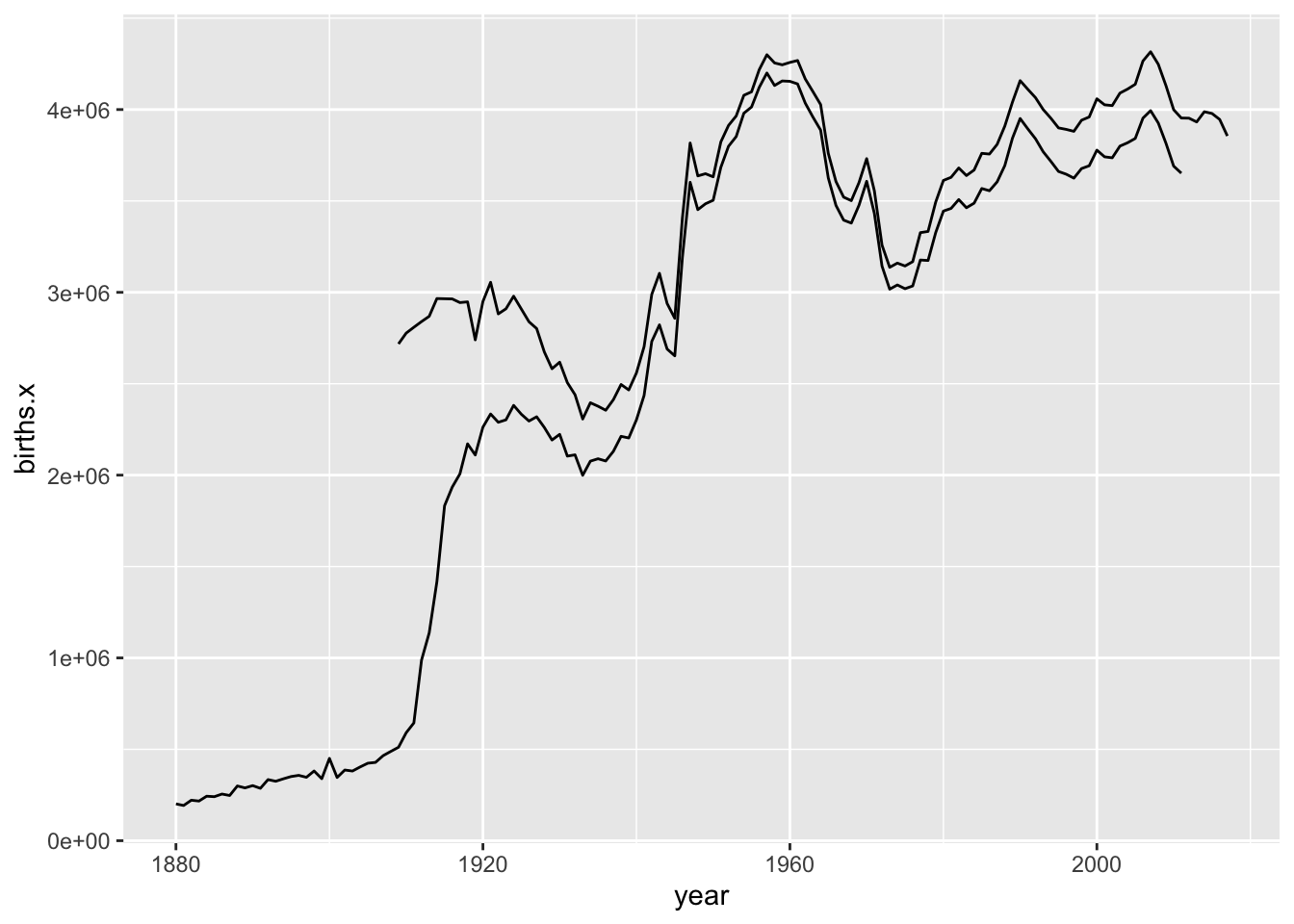
A deeper dive into the documentation for babynames might help you figure out why.