Tidyverse
Intro to Data Analytics
Tidy data
Tidy data
Characteristics of tidy data:
- Each variable forms a column.
- Each observation forms a row.
- Each type of observational unit forms a table.
Tidying data
- We have a data set from real life.
- It’s a mess, or at least not well organized.
- We need to reorganize it.
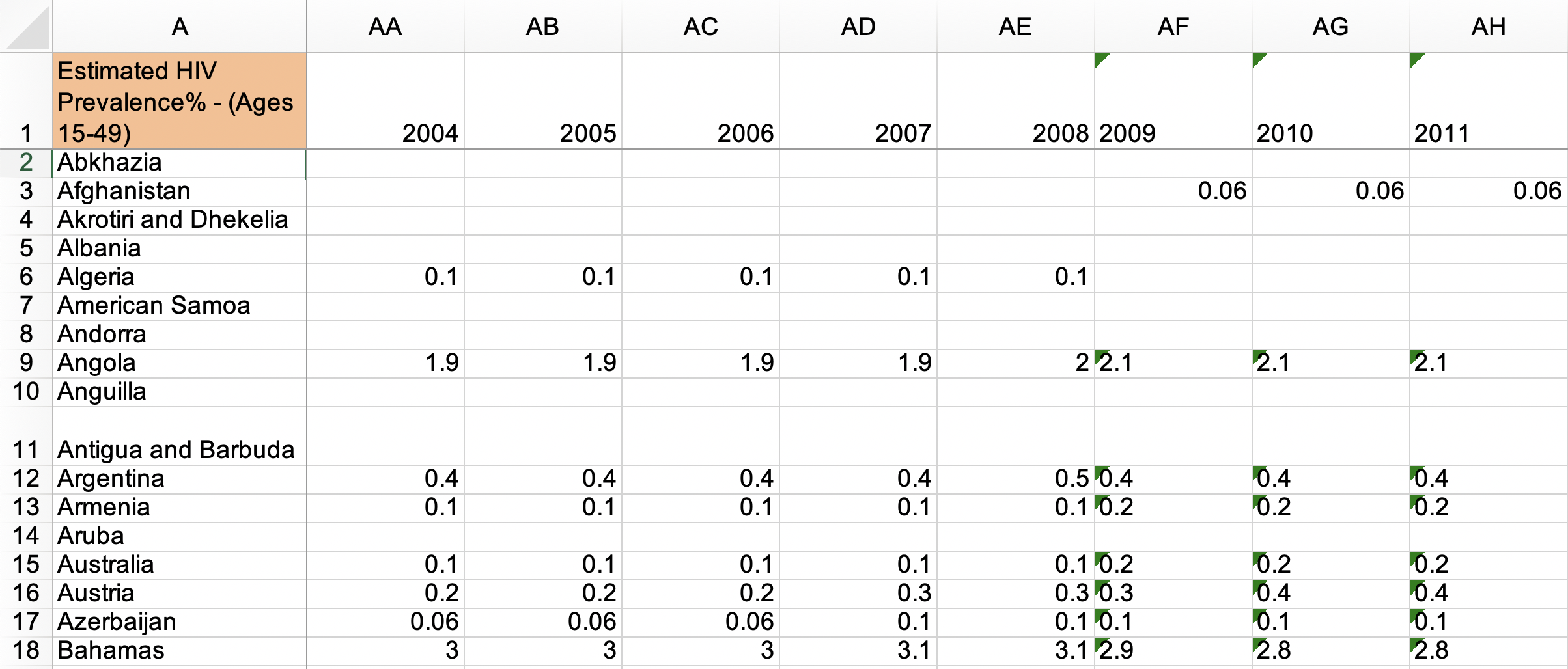
What makes this data not tidy?1
What makes this data not tidy?2
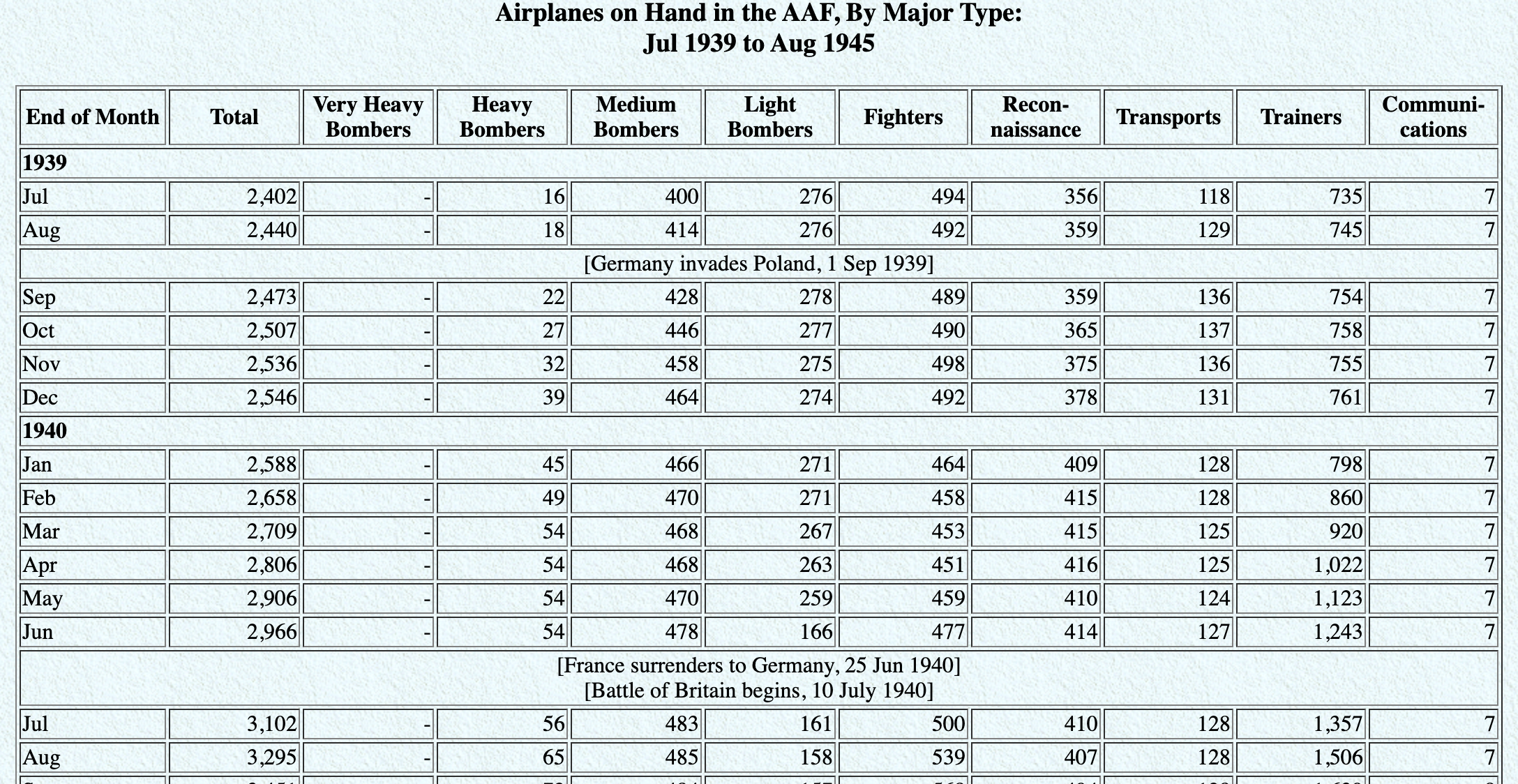
What makes this data not tidy?3
Tidying data
- Numerous actions we can take to tidy data
- At the same time we can also make the data more useful for analysis
- Some actions might be
- Pivoting
pivot( ) function is very versatile
adding more columns / adding more rows
…we’ll get to this later
- Wrangling
- use dplyr library from tidyverse
- Pivoting
Grammar of Data Wrangling
A grammar of data wrangling…
… based on the concepts of functions as verbs that manipulate data frames
Functions that manipulate existing data:
select: pick columns by namearrange: reorder rowsslice: pick rows using index(es)filter: pick rows matching criteriadistinct: filter for unique rows
A grammar of data wrangling…
… based on the concepts of functions as verbs that manipulate data frames
Functions that generate new data:
mutate: add new variablessummarize: reduce variables to valuesgroup_by: for grouped operationscount: to create frequency tables
Rules of dplyr functions
- First argument: always a data frame
- Second argument: what to do with the data
- Always return a data frame
- Don’t modify in place, without creating a separate copy of the data structure
dplyr functions expect a data frame as input, produce a data frame as output
Data: Hotel bookings4
- Data from two hotels: one resort and one city hotel
- Observations: Each row represents a hotel booking
- Goal for original data collection: Development of prediction models to classify likelihood that a hotel’s booking’s would be cancelled (Antonia et al., 2019)
First look: Variables
names(hotels) [1] "hotel" "is_canceled"
[3] "lead_time" "arrival_date_year"
[5] "arrival_date_month" "arrival_date_week_number"
[7] "arrival_date_day_of_month" "stays_in_weekend_nights"
[9] "stays_in_week_nights" "adults"
[11] "children" "babies"
[13] "meal" "country"
[15] "market_segment" "distribution_channel"
[17] "is_repeated_guest" "previous_cancellations"
[19] "previous_bookings_not_canceled" "reserved_room_type"
[21] "assigned_room_type" "booking_changes"
[23] "deposit_type" "agent"
[25] "company" "days_in_waiting_list"
[27] "customer_type" "adr"
[29] "required_car_parking_spaces" "total_of_special_requests"
[31] "reservation_status" "reservation_status_date" Second look: Overview
glimpse(hotels)Rows: 119,390
Columns: 32
$ hotel <chr> "Resort Hotel", "Resort Hotel", "Resort…
$ is_canceled <dbl> 0, 0, 0, 0, 0, 0, 0, 0, 1, 1, 1, 0, 0, …
$ lead_time <dbl> 342, 737, 7, 13, 14, 14, 0, 9, 85, 75, …
$ arrival_date_year <dbl> 2015, 2015, 2015, 2015, 2015, 2015, 201…
$ arrival_date_month <chr> "July", "July", "July", "July", "July",…
$ arrival_date_week_number <dbl> 27, 27, 27, 27, 27, 27, 27, 27, 27, 27,…
$ arrival_date_day_of_month <dbl> 1, 1, 1, 1, 1, 1, 1, 1, 1, 1, 1, 1, 1, …
$ stays_in_weekend_nights <dbl> 0, 0, 0, 0, 0, 0, 0, 0, 0, 0, 0, 0, 0, …
$ stays_in_week_nights <dbl> 0, 0, 1, 1, 2, 2, 2, 2, 3, 3, 4, 4, 4, …
$ adults <dbl> 2, 2, 1, 1, 2, 2, 2, 2, 2, 2, 2, 2, 2, …
$ children <dbl> 0, 0, 0, 0, 0, 0, 0, 0, 0, 0, 0, 0, 0, …
$ babies <dbl> 0, 0, 0, 0, 0, 0, 0, 0, 0, 0, 0, 0, 0, …
$ meal <chr> "BB", "BB", "BB", "BB", "BB", "BB", "BB…
$ country <chr> "PRT", "PRT", "GBR", "GBR", "GBR", "GBR…
$ market_segment <chr> "Direct", "Direct", "Direct", "Corporat…
$ distribution_channel <chr> "Direct", "Direct", "Direct", "Corporat…
$ is_repeated_guest <dbl> 0, 0, 0, 0, 0, 0, 0, 0, 0, 0, 0, 0, 0, …
$ previous_cancellations <dbl> 0, 0, 0, 0, 0, 0, 0, 0, 0, 0, 0, 0, 0, …
$ previous_bookings_not_canceled <dbl> 0, 0, 0, 0, 0, 0, 0, 0, 0, 0, 0, 0, 0, …
$ reserved_room_type <chr> "C", "C", "A", "A", "A", "A", "C", "C",…
$ assigned_room_type <chr> "C", "C", "C", "A", "A", "A", "C", "C",…
$ booking_changes <dbl> 3, 4, 0, 0, 0, 0, 0, 0, 0, 0, 0, 0, 0, …
$ deposit_type <chr> "No Deposit", "No Deposit", "No Deposit…
$ agent <chr> "NULL", "NULL", "NULL", "304", "240", "…
$ company <chr> "NULL", "NULL", "NULL", "NULL", "NULL",…
$ days_in_waiting_list <dbl> 0, 0, 0, 0, 0, 0, 0, 0, 0, 0, 0, 0, 0, …
$ customer_type <chr> "Transient", "Transient", "Transient", …
$ adr <dbl> 0.00, 0.00, 75.00, 75.00, 98.00, 98.00,…
$ required_car_parking_spaces <dbl> 0, 0, 0, 0, 0, 0, 0, 0, 0, 0, 0, 0, 0, …
$ total_of_special_requests <dbl> 0, 0, 0, 0, 1, 1, 0, 1, 1, 0, 0, 0, 3, …
$ reservation_status <chr> "Check-Out", "Check-Out", "Check-Out", …
$ reservation_status_date <date> 2015-07-01, 2015-07-01, 2015-07-02, 20…Changing data frames
Adding a new variable (column)
names(hotels) [1] "hotel" "is_canceled"
[3] "lead_time" "arrival_date_year"
[5] "arrival_date_month" "arrival_date_week_number"
[7] "arrival_date_day_of_month" "stays_in_weekend_nights"
[9] "stays_in_week_nights" "adults"
[11] "children" "babies"
[13] "meal" "country"
[15] "market_segment" "distribution_channel"
[17] "is_repeated_guest" "previous_cancellations"
[19] "previous_bookings_not_canceled" "reserved_room_type"
[21] "assigned_room_type" "booking_changes"
[23] "deposit_type" "agent"
[25] "company" "days_in_waiting_list"
[27] "customer_type" "adr"
[29] "required_car_parking_spaces" "total_of_special_requests"
[31] "reservation_status" "reservation_status_date" Adding a new variable (column) - 2nd attempt
 [1] "hotel"                          "is_canceled"
 [3] "lead_time"                      "arrival_date_year"
 [5] "arrival_date_month"             "arrival_date_week_number"
 [7] "arrival_date_day_of_month"      "stays_in_weekend_nights"
 [9] "stays_in_week_nights"           "adults"
[11] "children"                       "babies"
[13] "meal"                           "country"
[15] "market_segment"                 "distribution_channel"
[17] "is_repeated_guest"              "previous_cancellations"
[19] "previous_bookings_not_canceled" "reserved_room_type"
[21] "assigned_room_type"             "booking_changes"
[23] "deposit_type"                   "agent"
[25] "company"                        "days_in_waiting_list"
[27] "customer_type"                  "adr"
[29] "required_car_parking_spaces"    "total_of_special_requests"
[31] "reservation_status"             "reservation_status_date"
[33] "little_ones" Pipes
What is a pipe?
In programming, a pipe is a technique for passing information from one process to another.
. . .
- Start with the data frame
hotels, and pass it to theselect()function,
# A tibble: 119,390 × 2
hotel lead_time
<chr> <dbl>
1 Resort Hotel 737
2 Resort Hotel 709
3 City Hotel 629
4 City Hotel 629
5 City Hotel 629
6 City Hotel 629
7 City Hotel 629
8 City Hotel 629
9 City Hotel 629
10 City Hotel 629
# ℹ 119,380 more rowsWhat is a pipe?
In programming, a pipe is a technique for passing information from one process to another.
- Start with the data frame
hotels, and pass it to theselect()function, - then we select the variables
hotelandlead_time,
# A tibble: 119,390 × 2
hotel lead_time
<chr> <dbl>
1 Resort Hotel 737
2 Resort Hotel 709
3 City Hotel 629
4 City Hotel 629
5 City Hotel 629
6 City Hotel 629
7 City Hotel 629
8 City Hotel 629
9 City Hotel 629
10 City Hotel 629
# ℹ 119,380 more rowsWhat is a pipe?
In programming, a pipe is a technique for passing information from one process to another.
- Start with the data frame
hotels, and pass it to theselect()function, - then we select the variables
hotelandlead_time, - and then we arrange the data frame by
lead_timein descending order.
# A tibble: 119,390 × 2
hotel lead_time
<chr> <dbl>
1 Resort Hotel 737
2 Resort Hotel 709
3 City Hotel 629
4 City Hotel 629
5 City Hotel 629
6 City Hotel 629
7 City Hotel 629
8 City Hotel 629
9 City Hotel 629
10 City Hotel 629
# ℹ 119,380 more rowsAdding a new variable (column) - 3rd attempt
This becomes useful when we want to chain together several operations.
filter
filter to select a subset of rows
# A tibble: 79,330 × 33
hotel is_canceled lead_time arrival_date_year arrival_date_month
<chr> <dbl> <dbl> <dbl> <chr>
1 City Hotel 0 6 2015 July
2 City Hotel 1 88 2015 July
3 City Hotel 1 65 2015 July
4 City Hotel 1 92 2015 July
5 City Hotel 1 100 2015 July
6 City Hotel 1 79 2015 July
7 City Hotel 0 3 2015 July
8 City Hotel 1 63 2015 July
9 City Hotel 1 62 2015 July
10 City Hotel 1 62 2015 July
# ℹ 79,320 more rows
# ℹ 28 more variables: arrival_date_week_number <dbl>,
# arrival_date_day_of_month <dbl>, stays_in_weekend_nights <dbl>,
# stays_in_week_nights <dbl>, adults <dbl>, children <dbl>, babies <dbl>,
# meal <chr>, country <chr>, market_segment <chr>,
# distribution_channel <chr>, is_repeated_guest <dbl>,
# previous_cancellations <dbl>, previous_bookings_not_canceled <dbl>, …Logical operators in R
| operator | definition | operator | definition |
|---|---|---|---|
< |
less than | x | y |
x OR y |
<= |
less than or equal to | is.na(x) |
test if x is NA |
> |
greater than | !is.na(x) |
test if x is not NA |
>= |
greater than or equal to | x %in% y |
test if x is in y |
== |
exactly equal to | !(x %in% y) |
test if x is not in y |
!= |
not equal to | !x |
not x |
x & y |
x AND y |
filter for many conditions at once
select to select variables (columns)
Select a single column
View only lead_time (number of days between booking and arrival date):
select(hotels, lead_time)# A tibble: 119,390 × 1
lead_time
<dbl>
1 342
2 737
3 7
4 13
5 14
6 14
7 0
8 9
9 85
10 75
# ℹ 119,380 more rowsSelect a single column
Select a single column
- Start with the function (a verb):
select() - First argument: data frame we’re working with ,
hotels
Select a single column
- Start with the function (a verb):
select() - First argument: data frame we’re working with ,
hotels - Second argument: variable we want to select,
lead_time
Select a single column
# A tibble: 119,390 × 1
lead_time
<dbl>
1 342
2 737
3 7
4 13
5 14
6 14
7 0
8 9
9 85
10 75
# ℹ 119,380 more rows- Start with the function (a verb):
select() - First argument: data frame we’re working with ,
hotels - Second argument: variable we want to select,
lead_time - Result: data frame with 119390 rows and 1 column
Tip
dplyr functions always expect a data frame and always yield a data frame.
select(hotels, lead_time)# A tibble: 119,390 × 1
lead_time
<dbl>
1 342
2 737
3 7
4 13
5 14
6 14
7 0
8 9
9 85
10 75
# ℹ 119,380 more rowsselect to keep variables (columns)
# A tibble: 119,390 × 2
hotel lead_time
<chr> <dbl>
1 Resort Hotel 342
2 Resort Hotel 737
3 Resort Hotel 7
4 Resort Hotel 13
5 Resort Hotel 14
6 Resort Hotel 14
7 Resort Hotel 0
8 Resort Hotel 9
9 Resort Hotel 85
10 Resort Hotel 75
# ℹ 119,380 more rowsselect to exclude variables
# A tibble: 119,390 × 32
hotel is_canceled lead_time arrival_date_year arrival_date_month
<chr> <dbl> <dbl> <dbl> <chr>
1 Resort Hotel 0 342 2015 July
2 Resort Hotel 0 737 2015 July
3 Resort Hotel 0 7 2015 July
4 Resort Hotel 0 13 2015 July
5 Resort Hotel 0 14 2015 July
6 Resort Hotel 0 14 2015 July
7 Resort Hotel 0 0 2015 July
8 Resort Hotel 0 9 2015 July
9 Resort Hotel 1 85 2015 July
10 Resort Hotel 1 75 2015 July
# ℹ 119,380 more rows
# ℹ 27 more variables: arrival_date_week_number <dbl>,
# arrival_date_day_of_month <dbl>, stays_in_weekend_nights <dbl>,
# stays_in_week_nights <dbl>, adults <dbl>, children <dbl>, babies <dbl>,
# meal <chr>, country <chr>, market_segment <chr>,
# distribution_channel <chr>, is_repeated_guest <dbl>,
# previous_cancellations <dbl>, previous_bookings_not_canceled <dbl>, …select a range of variables
# A tibble: 119,390 × 5
hotel is_canceled lead_time arrival_date_year arrival_date_month
<chr> <dbl> <dbl> <dbl> <chr>
1 Resort Hotel 0 342 2015 July
2 Resort Hotel 0 737 2015 July
3 Resort Hotel 0 7 2015 July
4 Resort Hotel 0 13 2015 July
5 Resort Hotel 0 14 2015 July
6 Resort Hotel 0 14 2015 July
7 Resort Hotel 0 0 2015 July
8 Resort Hotel 0 9 2015 July
9 Resort Hotel 1 85 2015 July
10 Resort Hotel 1 75 2015 July
# ℹ 119,380 more rowsselect variables with certain characteristics
# A tibble: 119,390 × 4
arrival_date_year arrival_date_month arrival_date_week_number
<dbl> <chr> <dbl>
1 2015 July 27
2 2015 July 27
3 2015 July 27
4 2015 July 27
5 2015 July 27
6 2015 July 27
7 2015 July 27
8 2015 July 27
9 2015 July 27
10 2015 July 27
# ℹ 119,380 more rows
# ℹ 1 more variable: arrival_date_day_of_month <dbl>select variables with certain characteristics
# A tibble: 119,390 × 4
reserved_room_type assigned_room_type deposit_type customer_type
<chr> <chr> <chr> <chr>
1 C C No Deposit Transient
2 C C No Deposit Transient
3 A C No Deposit Transient
4 A A No Deposit Transient
5 A A No Deposit Transient
6 A A No Deposit Transient
7 C C No Deposit Transient
8 C C No Deposit Transient
9 A A No Deposit Transient
10 D D No Deposit Transient
# ℹ 119,380 more rowsSelect helpers
starts_with(): Starts with a prefixends_with(): Ends with a suffixcontains(): Contains a literal stringnum_range(): Matches a numerical range like x01, x02, x03one_of(): Matches variable names in a character vectoreverything(): Matches all variableslast_col(): Select last variable, possibly with an offsetmatches(): Matches a regular expression (a sequence of symbols/characters expressing a string/pattern to be searched for within text)
See help for any of these functions for more info, e.g. ?everything.
Select multiple columns
View only the hotel type and lead_time:
. . .
select(hotels, hotel, lead_time)# A tibble: 119,390 × 2
hotel lead_time
<chr> <dbl>
1 Resort Hotel 342
2 Resort Hotel 737
3 Resort Hotel 7
4 Resort Hotel 13
5 Resort Hotel 14
6 Resort Hotel 14
7 Resort Hotel 0
8 Resort Hotel 9
9 Resort Hotel 85
10 Resort Hotel 75
# ℹ 119,380 more rowsWhat if we wanted to select these columns, and then arrange the data in descending order of lead time?
Data wrangling, step-by-step
Select:
hotels |>
select(hotel, lead_time)# A tibble: 119,390 × 2
hotel lead_time
<chr> <dbl>
1 Resort Hotel 342
2 Resort Hotel 737
3 Resort Hotel 7
4 Resort Hotel 13
5 Resort Hotel 14
6 Resort Hotel 14
7 Resort Hotel 0
8 Resort Hotel 9
9 Resort Hotel 85
10 Resort Hotel 75
# ℹ 119,380 more rowsSelect, then arrange:
hotels |>
  select(hotel, lead_time) |>
  arrange(desc(lead_time))
# A tibble: 119,390 × 2
hotel lead_time
<chr> <dbl>
1 Resort Hotel 737
2 Resort Hotel 709
3 City Hotel 629
4 City Hotel 629
5 City Hotel 629
6 City Hotel 629
7 City Hotel 629
8 City Hotel 629
9 City Hotel 629
10 City Hotel 629
# ℹ 119,380 more rowsarrange in ascending / descending order
slice for certain row numbers
# A tibble: 5 × 33
  hotel        is_canceled lead_time arrival_date_year arrival_date_month
  <chr>              <dbl>     <dbl>             <dbl> <chr>
1 Resort Hotel           0       342              2015 July
2 Resort Hotel           0       737              2015 July
3 Resort Hotel           0         7              2015 July
4 Resort Hotel           0        13              2015 July
5 Resort Hotel           0        14              2015 July
# ℹ 28 more variables: arrival_date_week_number <dbl>,
#   arrival_date_day_of_month <dbl>, stays_in_weekend_nights <dbl>,
#   stays_in_week_nights <dbl>, adults <dbl>, children <dbl>, babies <dbl>,
#   meal <chr>, country <chr>, market_segment <chr>,
#   distribution_channel <chr>, is_repeated_guest <dbl>,
#   previous_cancellations <dbl>, previous_bookings_not_canceled <dbl>,
#   reserved_room_type <chr>, assigned_room_type <chr>, …
Tip
In R, you can use the # for adding comments to your code. Any text following # will be printed as is, and won’t be run as R code. This is useful for leaving comments in your code and for temporarily disabling certain lines of code while debugging.
hotels |>
  # slice the first five rows  # this line is a comment
  #select(hotel) |>           # this one doesn't run
  slice(1:5)                   # this line runs
# A tibble: 5 × 33
hotel is_canceled lead_time arrival_date_year arrival_date_month
<chr> <dbl> <dbl> <dbl> <chr>
1 Resort Hotel 0 342 2015 July
2 Resort Hotel 0 737 2015 July
3 Resort Hotel 0 7 2015 July
4 Resort Hotel 0 13 2015 July
5 Resort Hotel 0 14 2015 July
# ℹ 28 more variables: arrival_date_week_number <dbl>,
# arrival_date_day_of_month <dbl>, stays_in_weekend_nights <dbl>,
# stays_in_week_nights <dbl>, adults <dbl>, children <dbl>, babies <dbl>,
# meal <chr>, country <chr>, market_segment <chr>,
# distribution_channel <chr>, is_repeated_guest <dbl>,
# previous_cancellations <dbl>, previous_bookings_not_canceled <dbl>,
# reserved_room_type <chr>, assigned_room_type <chr>, …distinct and count
distinct to filter for unique rows
And arrange to order alphabetically
# A tibble: 14 × 2
   hotel        market_segment
   <chr>        <chr>
 1 City Hotel   Aviation
 2 City Hotel   Complementary
 3 City Hotel   Corporate
 4 City Hotel   Direct
 5 City Hotel   Groups
 6 City Hotel   Offline TA/TO
 7 City Hotel   Online TA
 8 City Hotel   Undefined
 9 Resort Hotel Complementary
10 Resort Hotel Corporate
11 Resort Hotel Direct
12 Resort Hotel Groups
13 Resort Hotel Offline TA/TO
14 Resort Hotel Online TA
count to create frequency tables
count and arrange
count for multiple variables
# A tibble: 14 × 3
   hotel        market_segment     n
   <chr>        <chr>          <int>
 1 City Hotel   Aviation         237
 2 City Hotel   Complementary    542
 3 City Hotel   Corporate       2986
 4 City Hotel   Direct          6093
 5 City Hotel   Groups         13975
 6 City Hotel   Offline TA/TO  16747
 7 City Hotel   Online TA      38748
 8 City Hotel   Undefined          2
 9 Resort Hotel Complementary    201
10 Resort Hotel Corporate       2309
11 Resort Hotel Direct          6513
12 Resort Hotel Groups          5836
13 Resort Hotel Offline TA/TO   7472
14 Resort Hotel Online TA      17729
order matters when you count
# A tibble: 14 × 3
   hotel        market_segment     n
   <chr>        <chr>          <int>
 1 City Hotel   Aviation         237
 2 City Hotel   Complementary    542
 3 City Hotel   Corporate       2986
 4 City Hotel   Direct          6093
 5 City Hotel   Groups         13975
 6 City Hotel   Offline TA/TO  16747
 7 City Hotel   Online TA      38748
 8 City Hotel   Undefined          2
 9 Resort Hotel Complementary    201
10 Resort Hotel Corporate       2309
11 Resort Hotel Direct          6513
12 Resort Hotel Groups          5836
13 Resort Hotel Offline TA/TO   7472
14 Resort Hotel Online TA      17729
# A tibble: 14 × 3
market_segment hotel n
<chr> <chr> <int>
1 Aviation City Hotel 237
2 Complementary City Hotel 542
3 Complementary Resort Hotel 201
4 Corporate City Hotel 2986
5 Corporate Resort Hotel 2309
6 Direct City Hotel 6093
7 Direct Resort Hotel 6513
8 Groups City Hotel 13975
9 Groups Resort Hotel 5836
10 Offline TA/TO City Hotel 16747
11 Offline TA/TO Resort Hotel 7472
12 Online TA City Hotel 38748
13 Online TA Resort Hotel 17729
14 Undefined City Hotel 2What is happening in the following chunk?
hotels |>
  mutate(little_ones = children + babies) |>
  count(hotel, little_ones) |>
  mutate(prop = n / sum(n))
# A tibble: 12 × 4
hotel little_ones n prop
<chr> <dbl> <int> <dbl>
1 City Hotel 0 73923 0.619
2 City Hotel 1 3263 0.0273
3 City Hotel 2 2056 0.0172
4 City Hotel 3 82 0.000687
5 City Hotel 9 1 0.00000838
6 City Hotel 10 1 0.00000838
7 City Hotel NA 4 0.0000335
8 Resort Hotel 0 36131 0.303
9 Resort Hotel 1 2183 0.0183
10 Resort Hotel 2 1716 0.0144
11 Resort Hotel 3 29 0.000243
12 Resort Hotel 10 1 0.00000838summarize and group_by
summarize for summary stats
# A tibble: 1 × 1
  mean_adr
     <dbl>
1     102.
. . .
Tip
summarize() changes entirely the kind of info we get from the data frame. It collapses rows down to a single summary statistic, and removes all columns that are irrelevant to the calculation.
Tip
summarize() also lets you get away with being sloppy and not naming your new column, but that’s not recommended!
hotels |>
  summarize(mean(adr))
# A tibble: 1 × 1
`mean(adr)`
<dbl>
1 102.hotels |>
summarize(mean_adr = mean(adr))# A tibble: 1 × 1
mean_adr
<dbl>
1 102.group_by for grouped operations
# mean average daily rate for all booking at city and resort hotels
hotels |>
  group_by(hotel) |>
  summarize(mean_adr = mean(adr))
# A tibble: 2 × 2
hotel mean_adr
<chr> <dbl>
1 City Hotel 105.
2 Resort Hotel 95.0Calculating frequencies
The following two give the same result, so count is simply short for group_by, then determine frequencies
hotels |>
  group_by(hotel) |>
  summarize(n = n())
# A tibble: 2 × 2
hotel n
<chr> <int>
1 City Hotel 79330
2 Resort Hotel 40060hotels |>
count(hotel)# A tibble: 2 × 2
hotel n
<chr> <int>
1 City Hotel 79330
2 Resort Hotel 40060Multiple summary statistics
summarize can be used for multiple summary statistics
hotels |>
  summarize(
    min_adr = min(adr),
    mean_adr = mean(adr),
    median_adr = median(adr),
    max_adr = max(adr)
    )
# A tibble: 1 × 4
min_adr mean_adr median_adr max_adr
<dbl> <dbl> <dbl> <dbl>
1 -6.38 102. 94.6 5400