Exploring Relationships and Bivariate Analysis

Bard College | Introduction to Data Analytics

Bivariate analysis

  • Comparing distributions

  • Scatter plots

  • Calculate correlation coefficients

  • Correlation plots

  • Cross tabulations (count(), group_by and summarize)

  • Bivariate mapping (later)

  • Covariance (later)

  • Simple linear regression (later)

Getting started

Before we get started, load the palmerpenguins package.

  • This package contains the dataset penguins

  • Use ?penguins to learn more about the data.

Data: Palmer Penguins

From an earlier session…

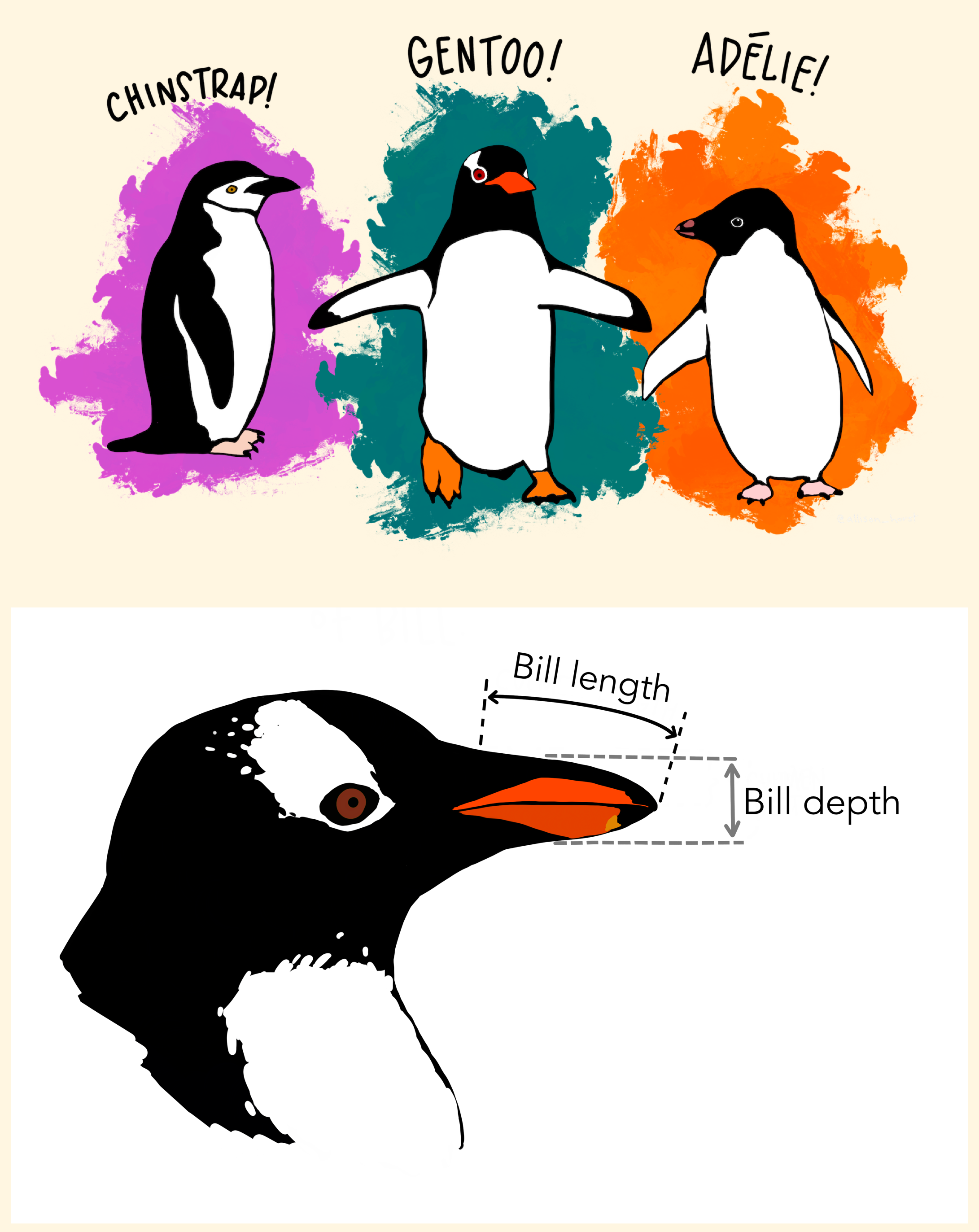
Measurements for penguin species, island in Palmer Archipelago, size (flipper length, body mass, bill dimensions), and sex.

Rows: 344
Columns: 8
$ species           <fct> Adelie, Adelie, Adelie, Adelie, Adelie, Adelie, Adel…
$ island            <fct> Torgersen, Torgersen, Torgersen, Torgersen, Torgerse…
$ bill_length_mm    <dbl> 39.1, 39.5, 40.3, NA, 36.7, 39.3, 38.9, 39.2, 34.1, …
$ bill_depth_mm     <dbl> 18.7, 17.4, 18.0, NA, 19.3, 20.6, 17.8, 19.6, 18.1, …
$ flipper_length_mm <int> 181, 186, 195, NA, 193, 190, 181, 195, 193, 190, 186…
$ body_mass_g       <int> 3750, 3800, 3250, NA, 3450, 3650, 3625, 4675, 3475, …
$ sex               <fct> male, female, female, NA, female, male, female, male…
$ year              <int> 2007, 2007, 2007, 2007, 2007, 2007, 2007, 2007, 2007…

Compare distributions

Measure and compare central tendency and spread

Histograms, density plots, and box plots
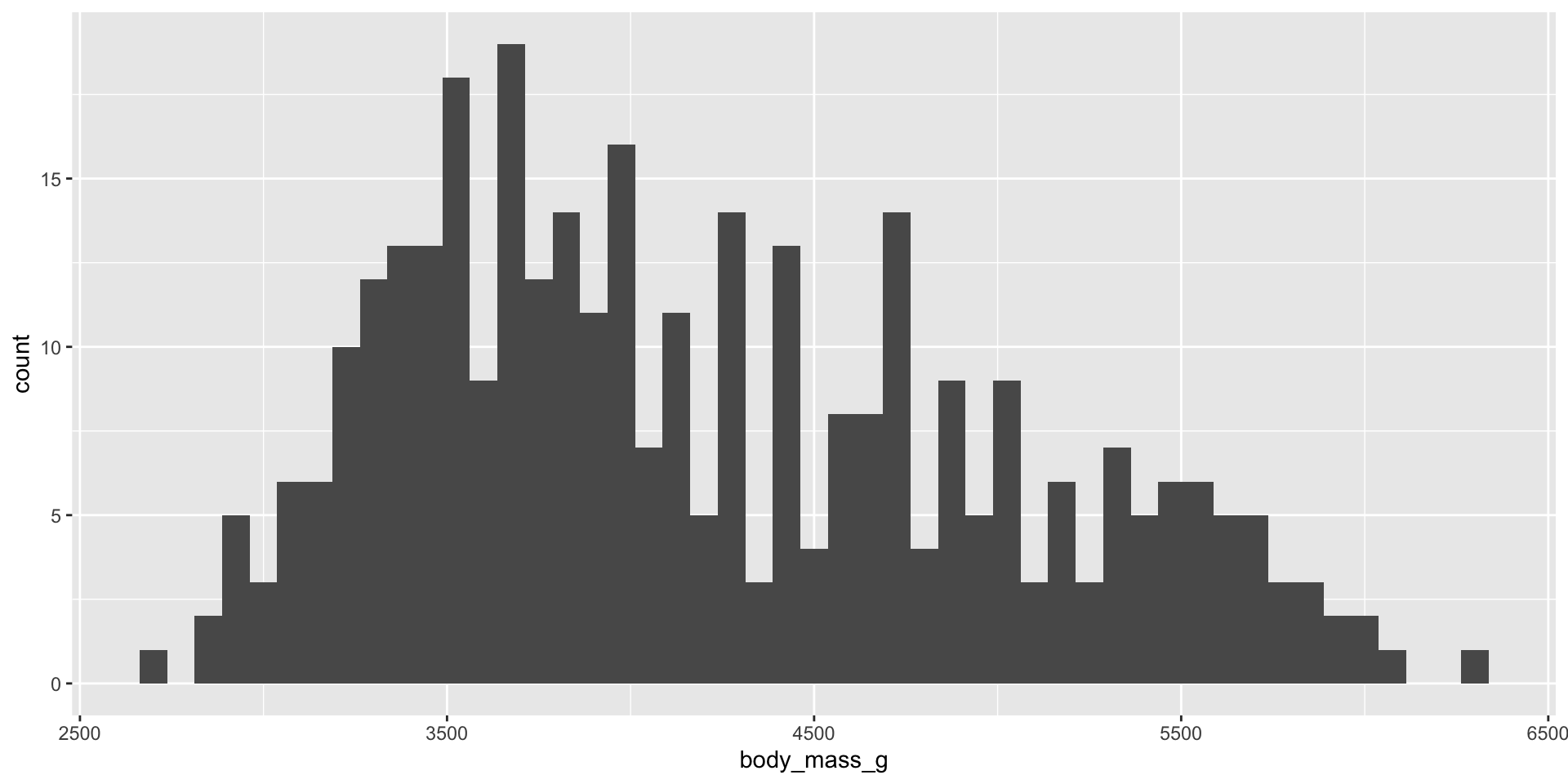
ggplot(penguins, aes(x = body_mass_g)) +
  geom_histogram(binwidth = 75)

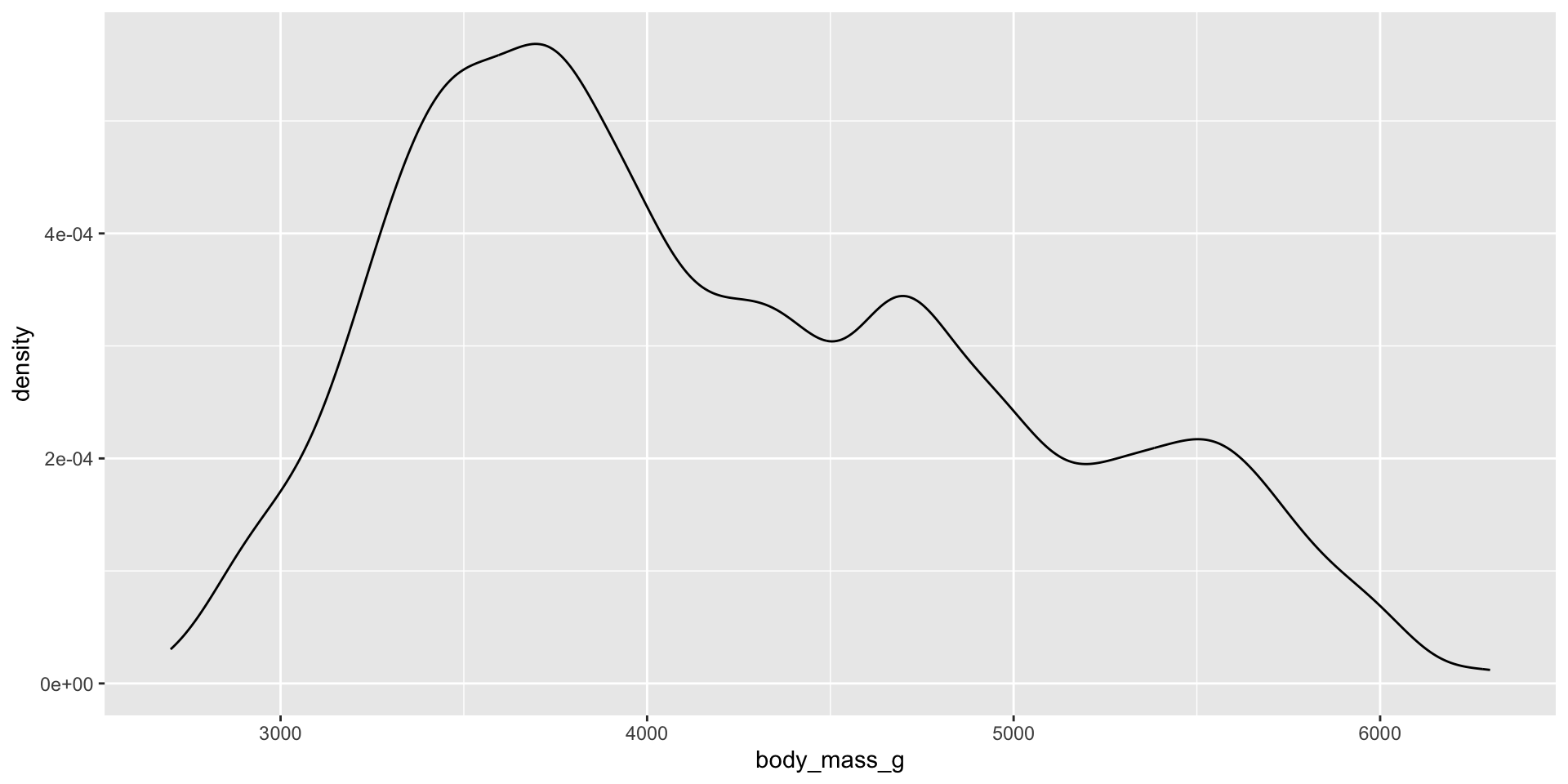
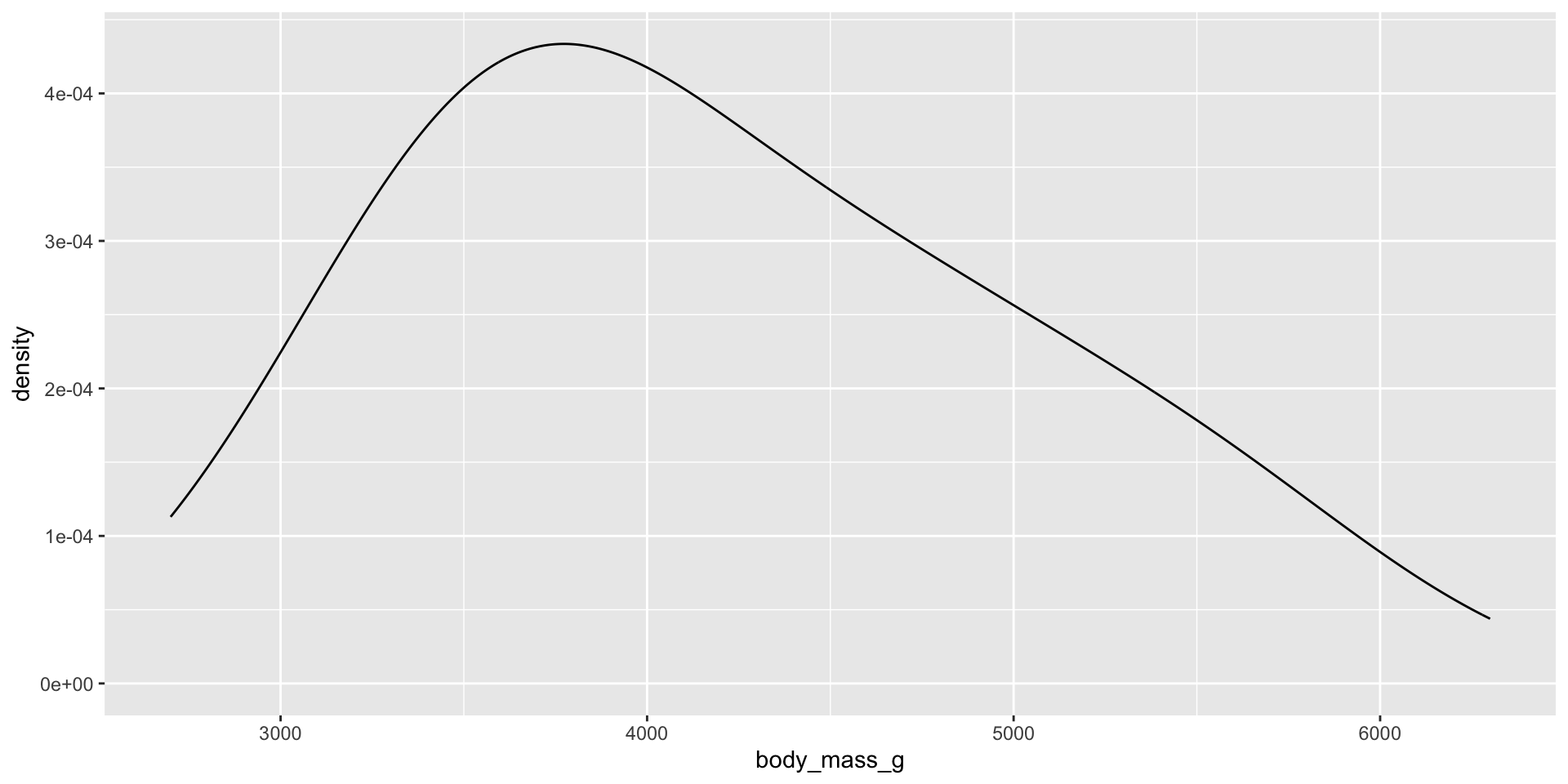
ggplot(penguins, aes(x = body_mass_g)) +
  geom_density(adjust = 0.5)

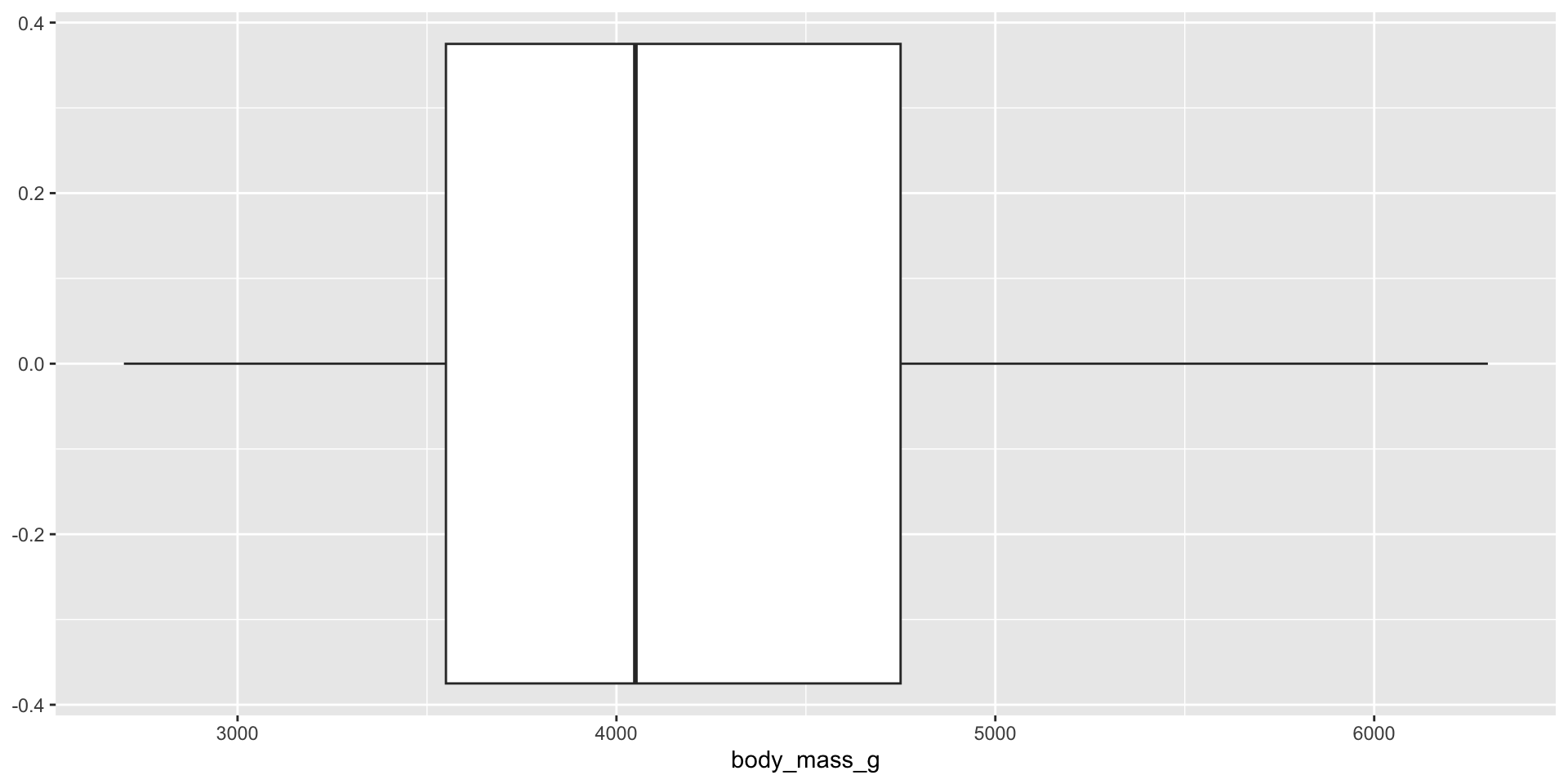
ggplot(penguins, aes(x = body_mass_g)) +
  geom_boxplot()

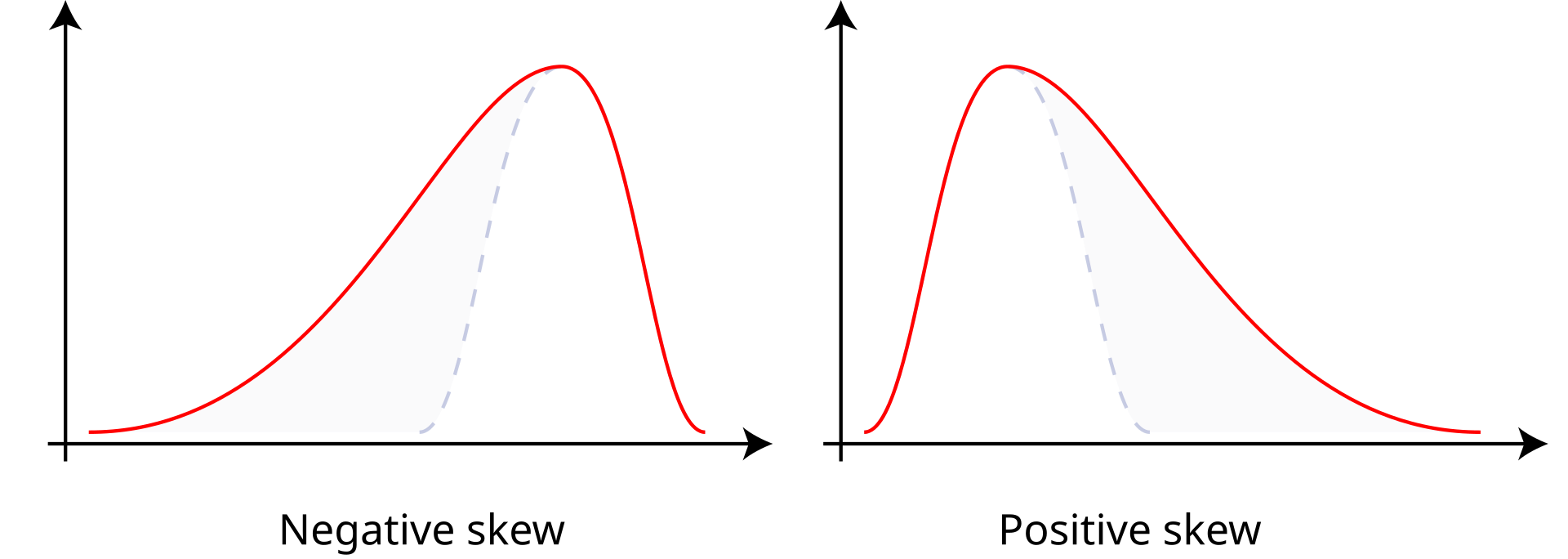
Reminders: Skew

  • Positive skew: The right tail is longer; the mass of the distribution is concentrated on the left of the figure. Right or positive skew refers to the right tail being drawn out and, often, the mean being skewed to the right of a typical center (median) of the data.
  • Negative skew: The left tail is longer; the mass of the distribution is concentrated on the right of the figure. Left or negative skew refers to the left tail being drawn out and, often, the mean being skewed to the left of a typical center of the data.

Central tendency

For data from skewed distributions, the median is better than the mean because it isn’t influenced by extremely large values.

Learn more (link)

Which central tendency measure is most appropriate?
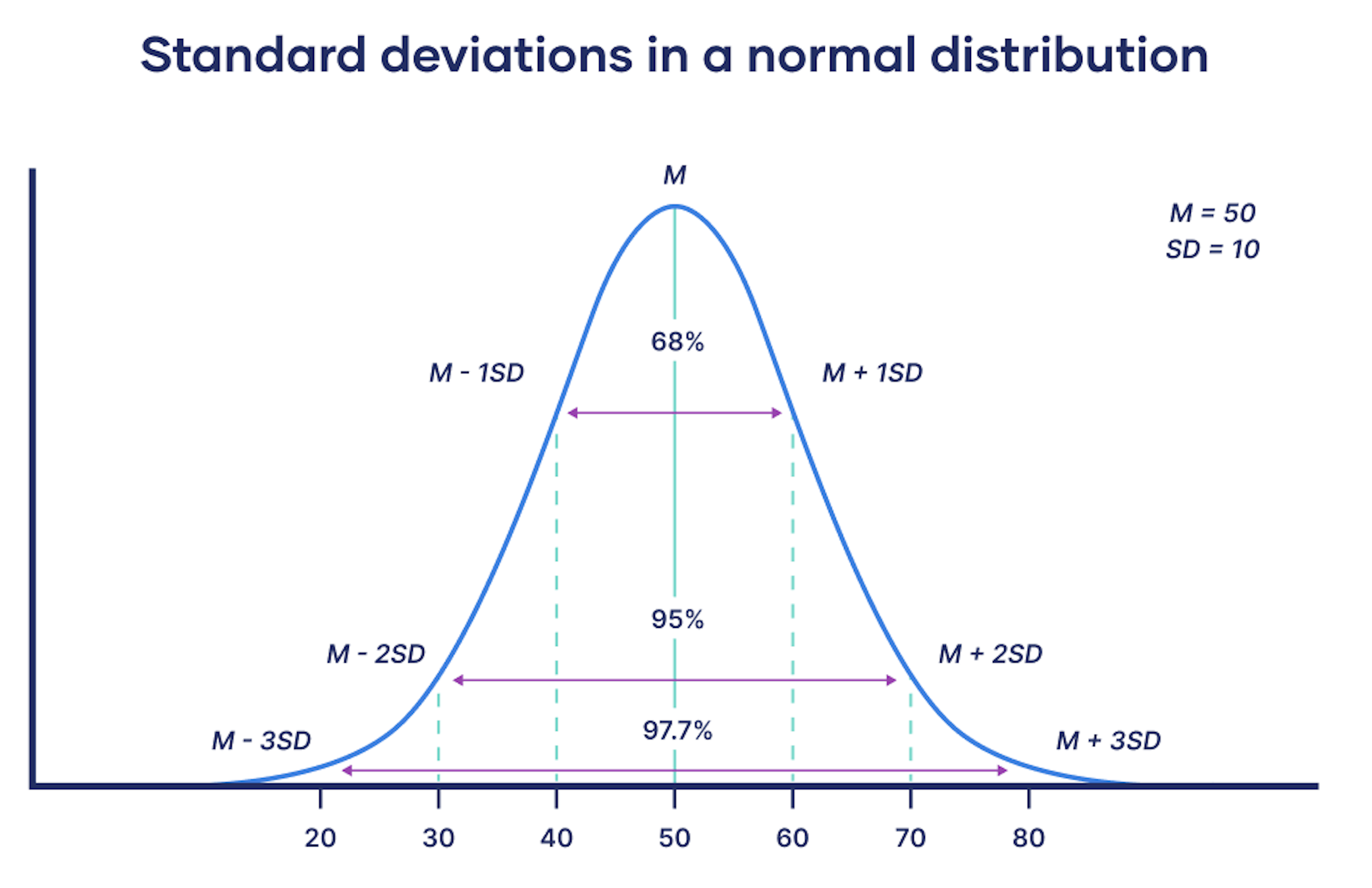
Measure spread or variability with standard deviation

Standard deviation

Standard deviation

For each value in the data set, we compute its deviation from the mean

\[ x_i - \bar{x} \]This will generate some negative and some positive values, so to get them to be positive we square them.

Then, add these up to compute the average deviation, or sample variance:

\[s^{2}= ∑(x_i−\bar{x})^2 / n-1\]

Take the square root to get the standard deviation: \[s\]

Calculating standard deviation

Let’s try this out in R

df1 <- data.frame(nums = seq(1, 50, 3))
df1
   nums
1     1
2     4
3     7
4    10
5    13
6    16
7    19
8    22
9    25
10   28
11   31
12   34
13   37
14   40
15   43
16   46
17   49
df2 <- data.frame(nums = c(24,24,24,24,24,24,24,24,25,26,26,26,26,26,26,26,26)) 
df2 
   nums
1    24
2    24
3    24
4    24
5    24
6    24
7    24
8    24
9    25
10   26
11   26
12   26
13   26
14   26
15   26
16   26
17   26

Calculating standard deviation

df1 <- data.frame(nums = seq(1, 50, 3))

df1 |> 
  summarize(avg = mean(nums),
            std_dev = sd(nums))

df2 <- data.frame(nums = c(24,24,24,24,24,24,24,24,25,26,26,26,26,26,26,26,26))

df2 |> 
  summarize(avg = mean(nums),
            std_dev = sd(nums))

Standard deviation

df1 <- data.frame(nums = seq(1, 50, 3))

df1 |> 
  summarize(avg = mean(nums),
            std_dev = sd(nums))
  avg  std_dev
1  25 15.14926
df2 <- data.frame(nums = c(24,24,24,24,24,24,24,24,25,26,26,26,26,26,26,26,26))

df2 |> 
  summarize(avg = mean(nums),
            std_dev = sd(nums))
  avg std_dev
1  25       1

Calculate standard deviation with dplyr functions

Calculate step-by-step

calc_standard_deviation <- df1 |> 
  mutate(deviation_from_mean = nums - mean(nums),
         deviation_squared = deviation_from_mean^2) |>
  summarize(sum_deviation_squared = sum(deviation_squared),
            s2 = sum_deviation_squared/(17-1), # See formula for s-squared on previous slide
            sd = sqrt(s2))
calc_standard_deviation
  sum_deviation_squared    s2       sd
1                  3672 229.5 15.14926

Standard deviation of penguin body mass by species

Which species has the most variation in body mass (grams)?

penguins |> 
  group_by(species) |> 
  summarize(std_dev = sd(body_mass_g, na.rm = TRUE))
# A tibble: 3 × 2
  species   std_dev
  <fct>       <dbl>
1 Adelie       459.
2 Chinstrap    384.
3 Gentoo       504.

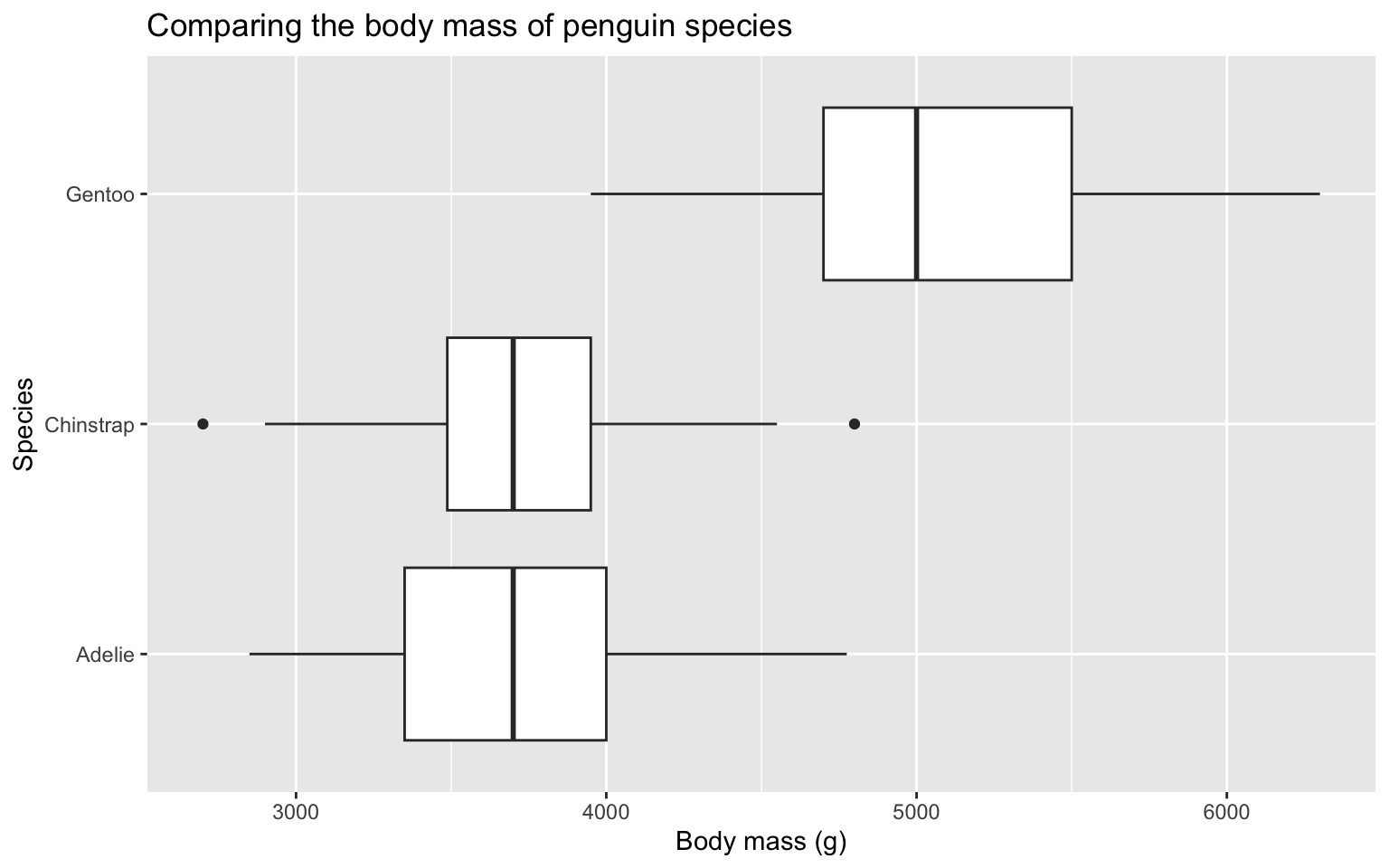
Compare distributions with side-by-side box plots

Side-by-side box plots
penguins |> 
  ggplot(aes(x = body_mass_g, y = species)) +
  geom_boxplot() +
  labs(
    x = "Body mass (g)",
    y = "Species",
    title = "Comparing the body mass of penguin species"
  ) 

Side-by-side box plots

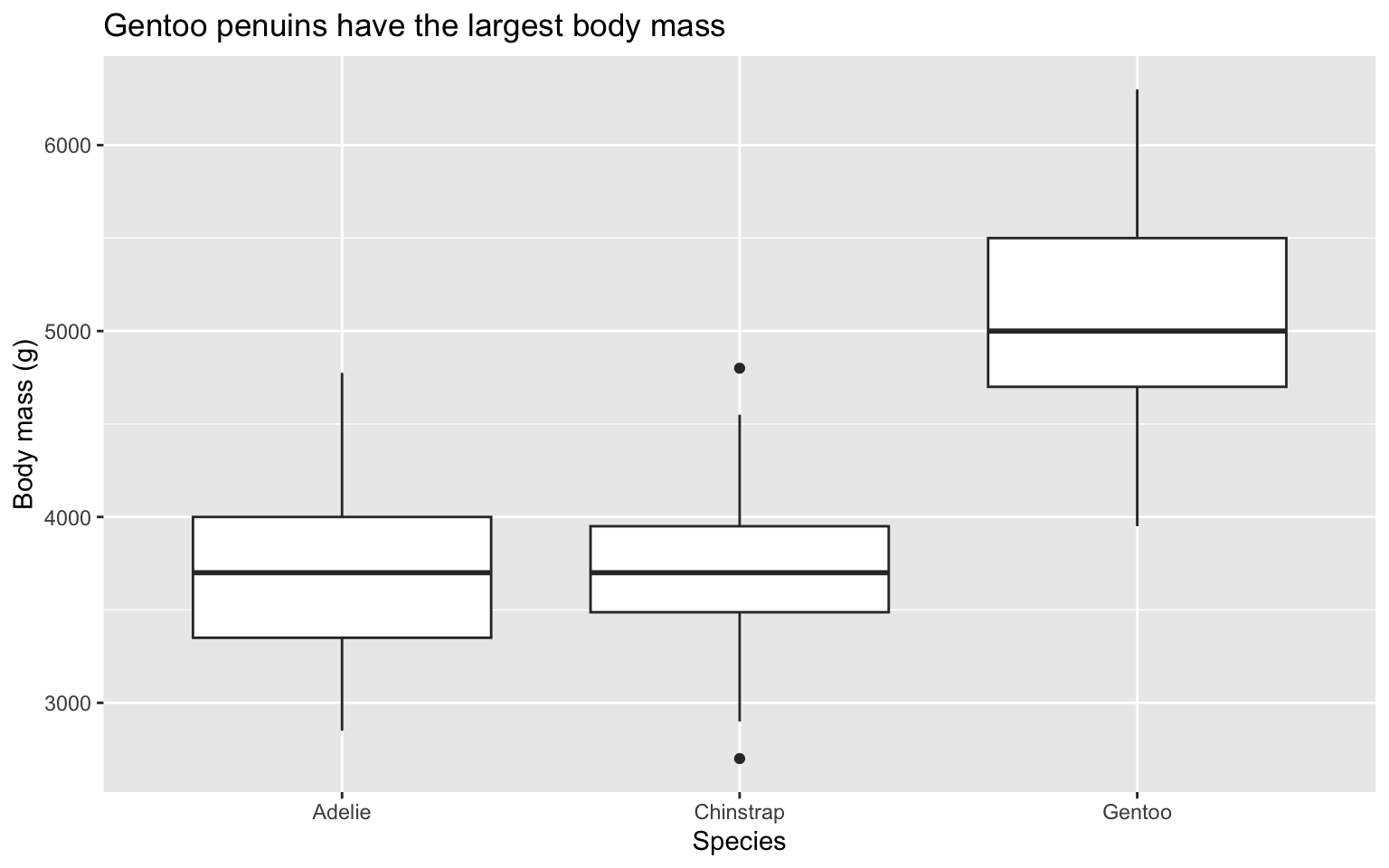
penguins |> 
  ggplot(aes(x = species, y = body_mass_g)) +
  geom_boxplot() +
  labs(
    x = "Species",
    y = "Body mass (g)",
    title = "Gentoo penuins have the largest body mass"
  )  

Create a quick summary with summary

summary(penguins)
      species          island    bill_length_mm  bill_depth_mm  
 Adelie   :152   Biscoe   :168   Min.   :32.10   Min.   :13.10  
 Chinstrap: 68   Dream    :124   1st Qu.:39.23   1st Qu.:15.60  
 Gentoo   :124   Torgersen: 52   Median :44.45   Median :17.30  
                                 Mean   :43.92   Mean   :17.15  
                                 3rd Qu.:48.50   3rd Qu.:18.70  
                                 Max.   :59.60   Max.   :21.50  
                                 NA's   :2       NA's   :2      
 flipper_length_mm  body_mass_g       sex           year     
 Min.   :172.0     Min.   :2700   female:165   Min.   :2007  
 1st Qu.:190.0     1st Qu.:3550   male  :168   1st Qu.:2007  
 Median :197.0     Median :4050   NA's  : 11   Median :2008  
 Mean   :200.9     Mean   :4202                Mean   :2008  
 3rd Qu.:213.0     3rd Qu.:4750                3rd Qu.:2009  
 Max.   :231.0     Max.   :6300                Max.   :2009  
 NA's   :2         NA's   :2                                 

Show relationships between variables with scatter plots
Scatter plots
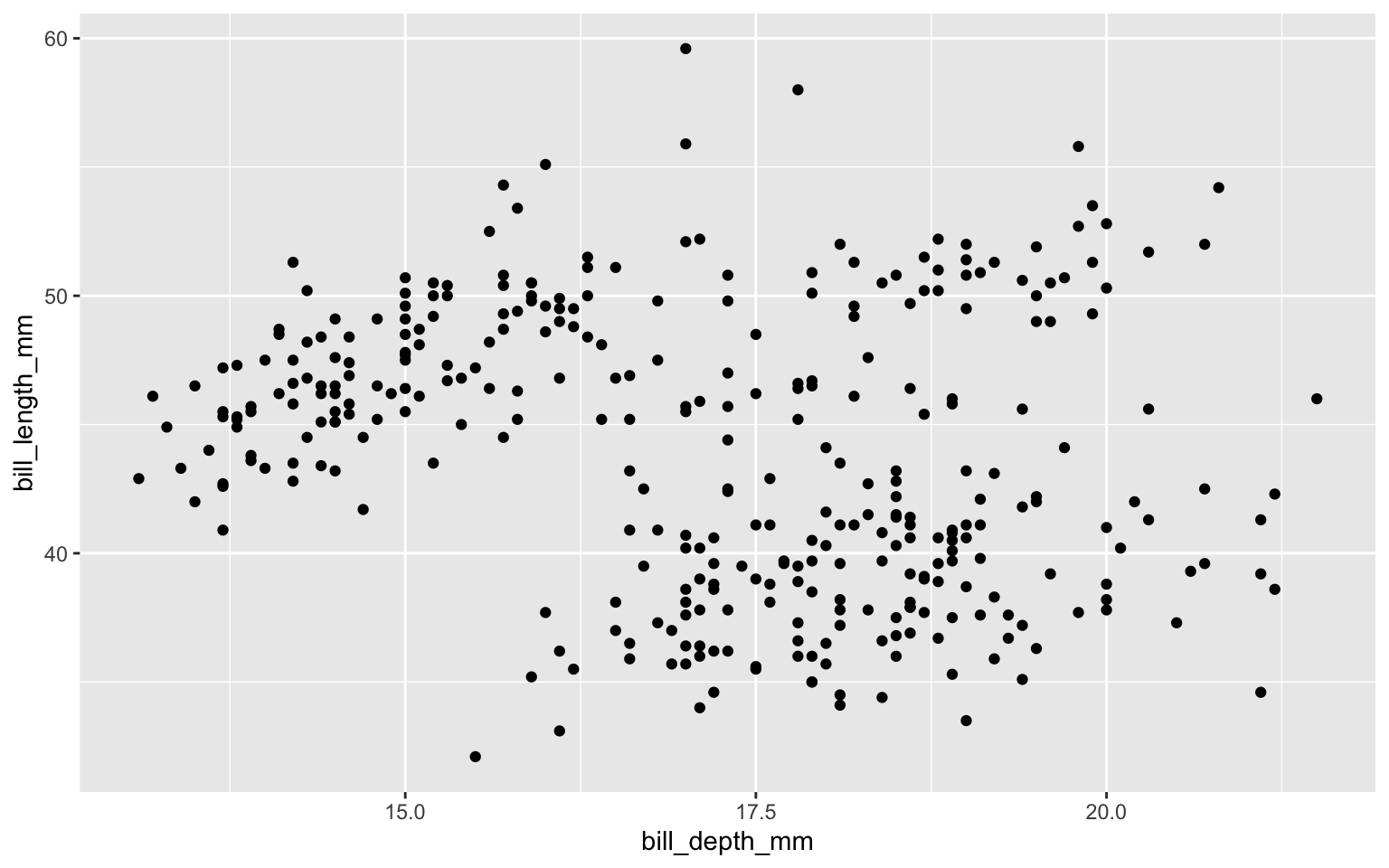
ggplot(data = penguins,
       mapping = aes(x = bill_depth_mm,
                     y = bill_length_mm)) +
  geom_point()

Scatter plots: add linear regression line
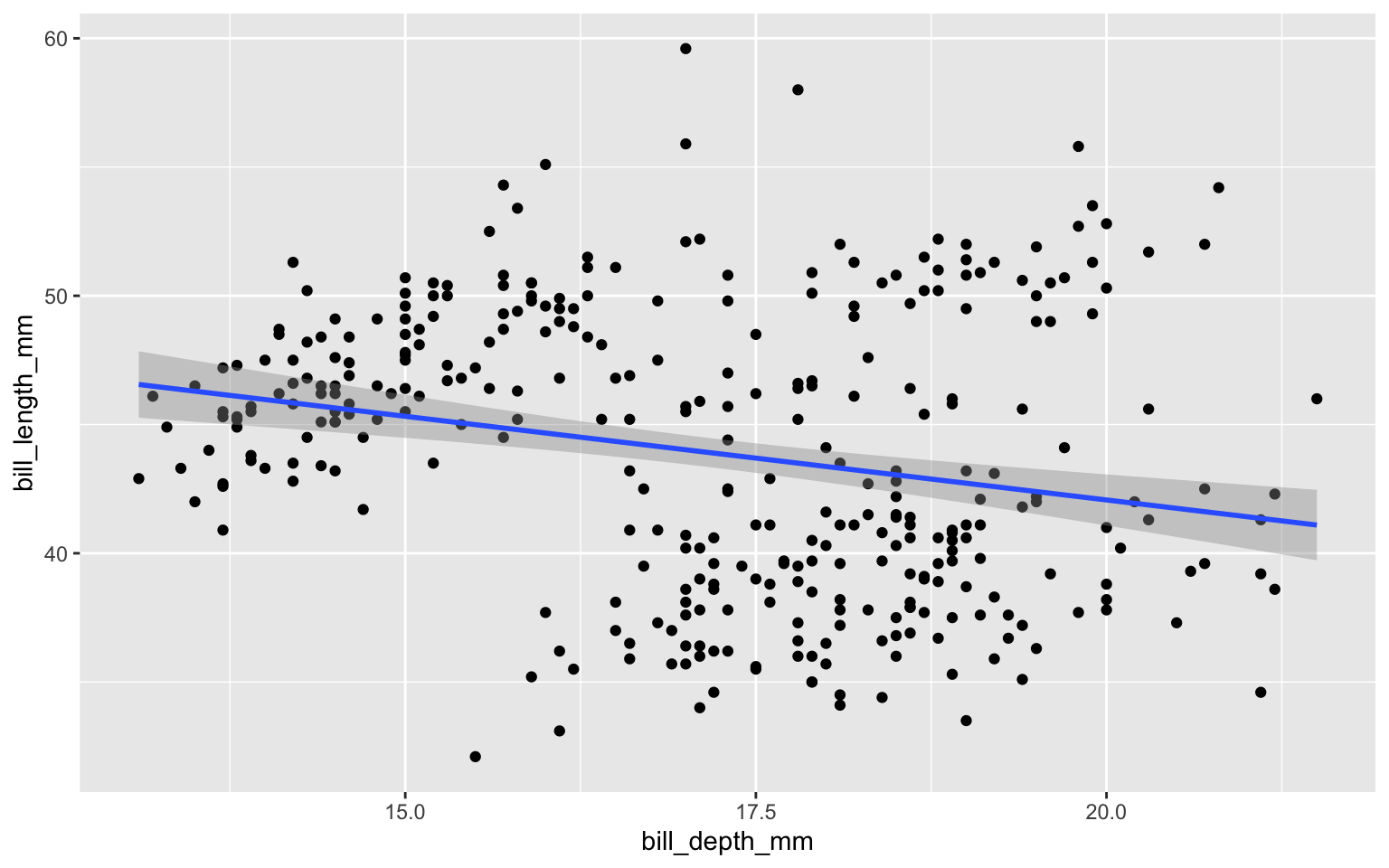
ggplot(penguins,
       aes(x = bill_depth_mm,
           y = bill_length_mm)) +
  geom_point() +
  geom_smooth(method = "lm")

Calculating correlation coefficients with cor()

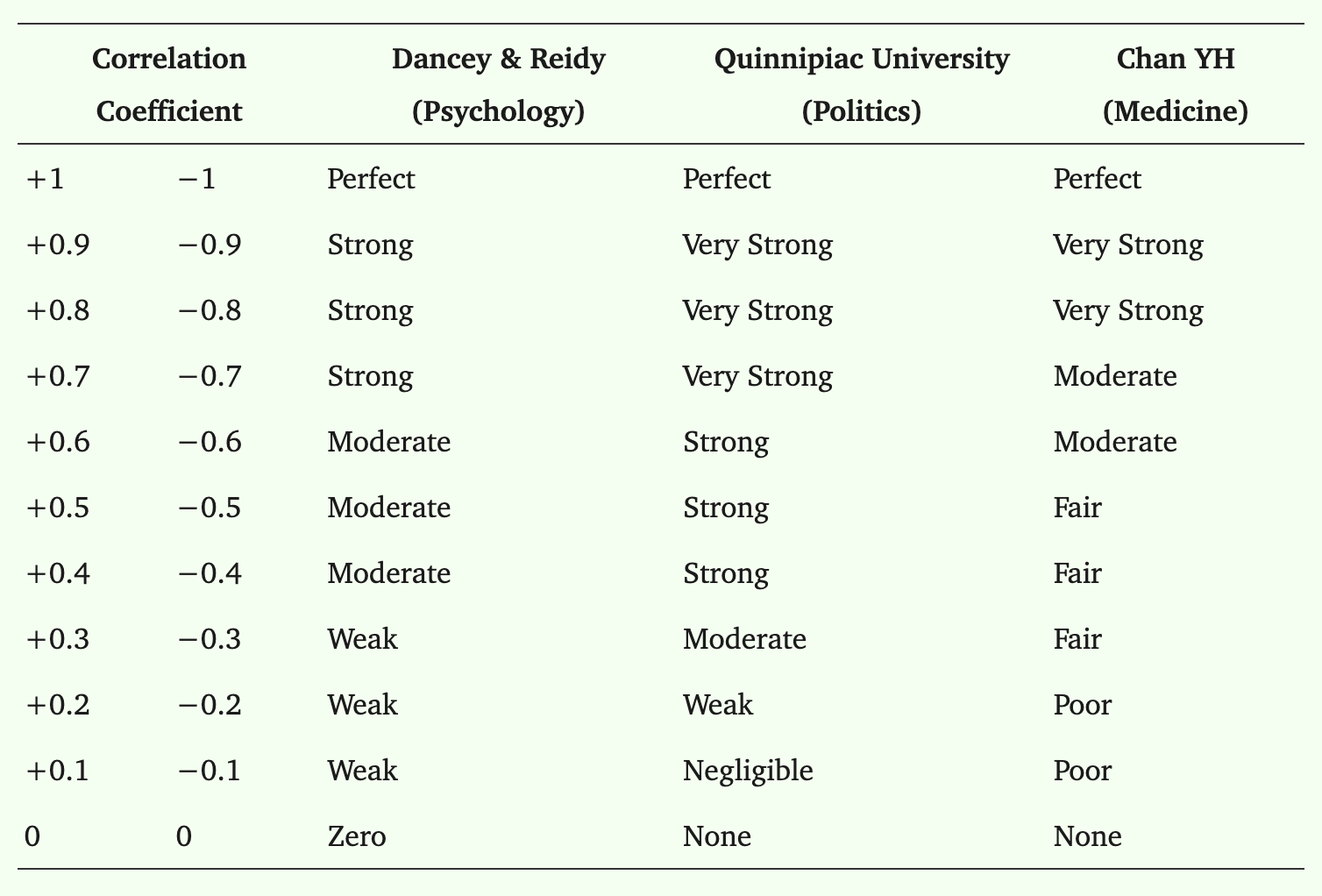
Correlation coefficients

  • Use the cor() function to calculate a Pearson’s R correlation coefficient (the default correlation coefficient type).

  • Pearson R is used for linear relationships between two continuous, normally distributed variables.

  • The cor() function comes from the stats package, which contains functions for statistical calculations and random number generation.

Correlation coefficients

  • Pearson’s R is one of the most popular correlation coefficients, and there are others that are useful based on the data types of the variables you are analyzing: numerical, ordinal, binary.

  • Guide to correlation coefficients: https://pmc.ncbi.nlm.nih.gov/articles/PMC6107969/

  • use = "complete.obs" tells cor() to only use rows where both variables are not missing (i.e., no NA values).

corr <- penguins |>
  summarize(pearson_r = cor(bill_depth_mm, bill_length_mm, use = "complete.obs")) |>
  pull(pearson_r) # pull() is similar to $ from base R. It works in tidyverse pipes.

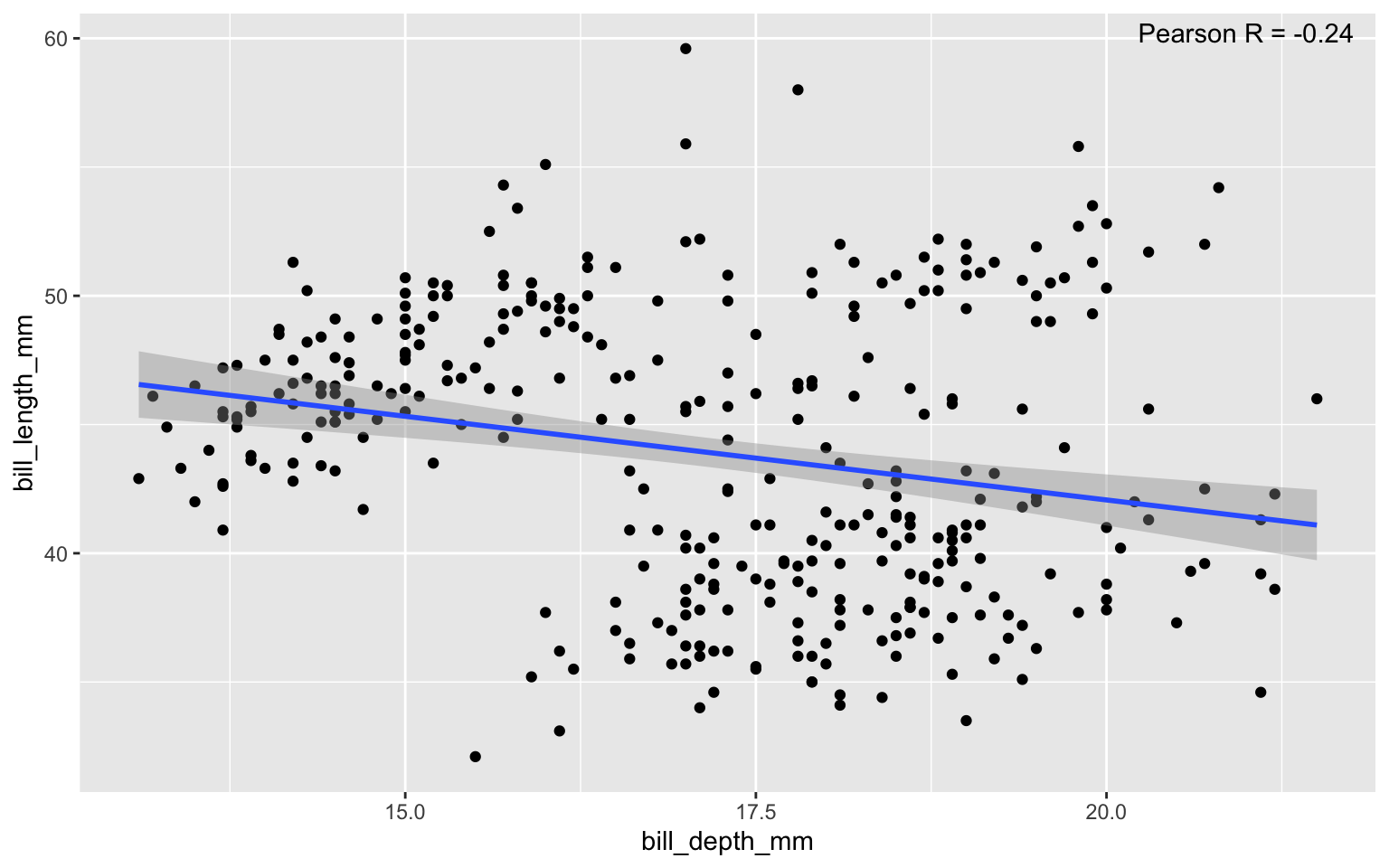
corr
[1] -0.2350529

Scatter plots: add linear regression line and correlation coefficient

corr <- penguins |>
  summarize(pearson_r = cor(bill_depth_mm, bill_length_mm, use = "complete.obs")) |>
  pull(pearson_r) # pull() is similar to $ from base R. It's mostly useful because it works better in tidyverse pipes.

ggplot(penguins,
       aes(x = bill_depth_mm,
           y = bill_length_mm)) +
  geom_point() +
  geom_smooth(method = "lm") +
  annotate("text",
           x = Inf, y = Inf, # This puts the text in the top-right corner of the plot.
           label = paste0("Pearson R = ",  # paste0() Combines (aka concatenates) pieces into one string (a string is one line of text or numeric values)
                          round(corr, 2)), # Add the correlation coefficient. Use round() to specify how many decimal places you want to show.
           hjust = 1.1, vjust = 1.5)
Side note: formatting plot elements

In the previous slide, we included annotations on the plot by adding the annotate() plot layer:

  • hjust: horizontal justification

    • 0 = left

    • 0.5 = center

    • 1 = right

  • vjust: vertical justification

    • 0 = bottom

    • 0.5 = middle

    • 1 = top

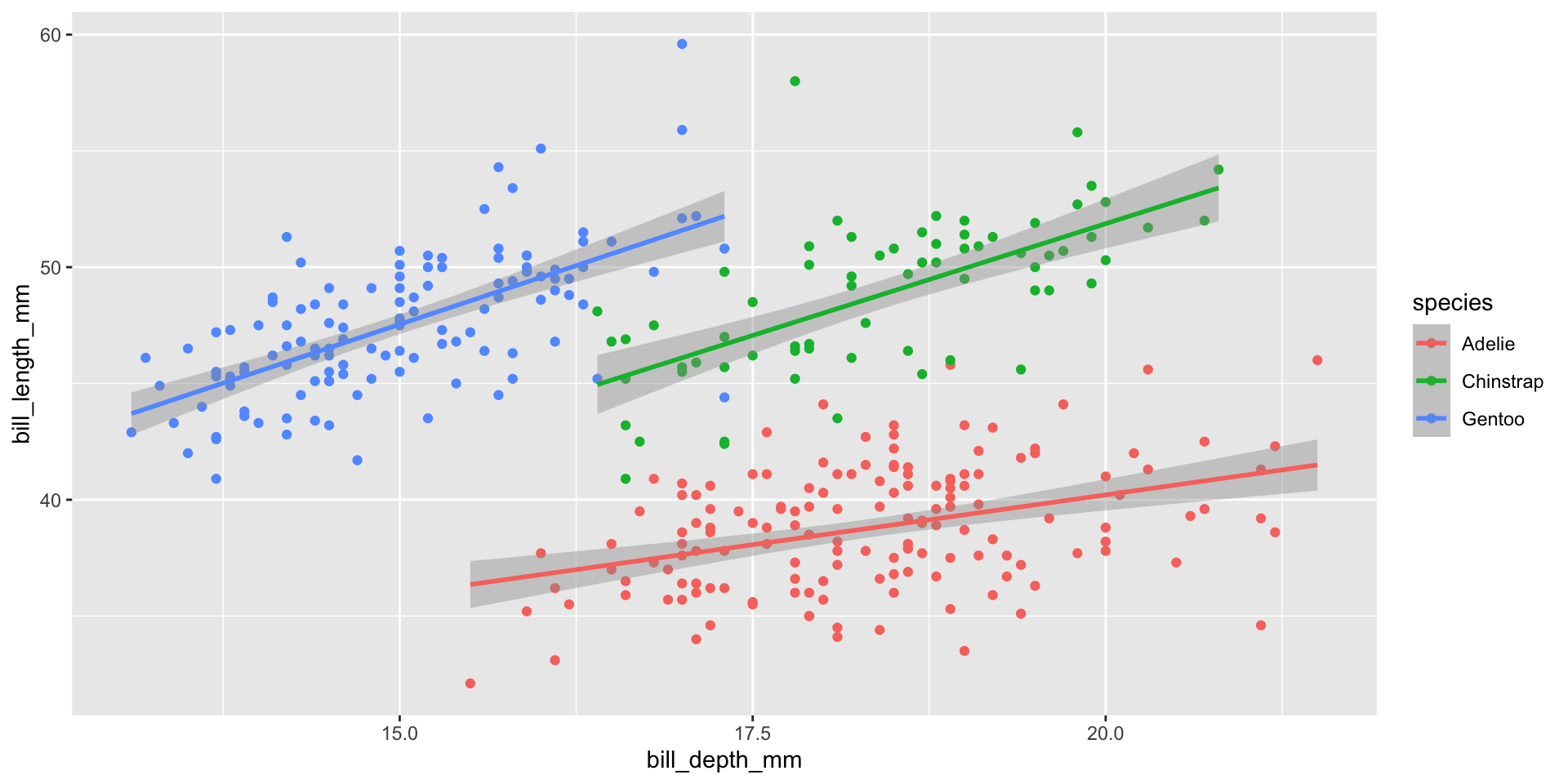
Relationships change based on groups within the data

Correlation coefficient for groups within data

  • Relationships between variables might differ when we look at groups within the data.
  • Use group_by() before summarize() to calculate a separate Pearson’s R correlation coefficient for each group.
corr_by_species <- penguins |>
  group_by(species) |>
  summarize(pearson_r = cor(bill_depth_mm, bill_length_mm, use = "complete.obs"))

corr_by_species
# A tibble: 3 × 2
  species   pearson_r
  <fct>         <dbl>
1 Adelie        0.391
2 Chinstrap     0.654
3 Gentoo        0.643

Scatter plots: add linear regression line and correlation coefficient

corr_by_species <- penguins |>
  group_by(species) |>
  summarize(
    pearson_r = cor(bill_depth_mm, bill_length_mm, use = "complete.obs"),
    x = max(bill_depth_mm, na.rm = TRUE),
    y = max(bill_length_mm, na.rm = TRUE)
  )

ggplot(penguins,
       aes(x = bill_depth_mm,
           y = bill_length_mm,
           color = species)) +
  geom_point() +
  geom_smooth(method = "lm") +
  geom_text(data = corr_by_species,
            aes(x = x,
                y = y,
                label = paste0("r = ", round(pearson_r, 2))),
            hjust = 1.1, vjust = 1.5)
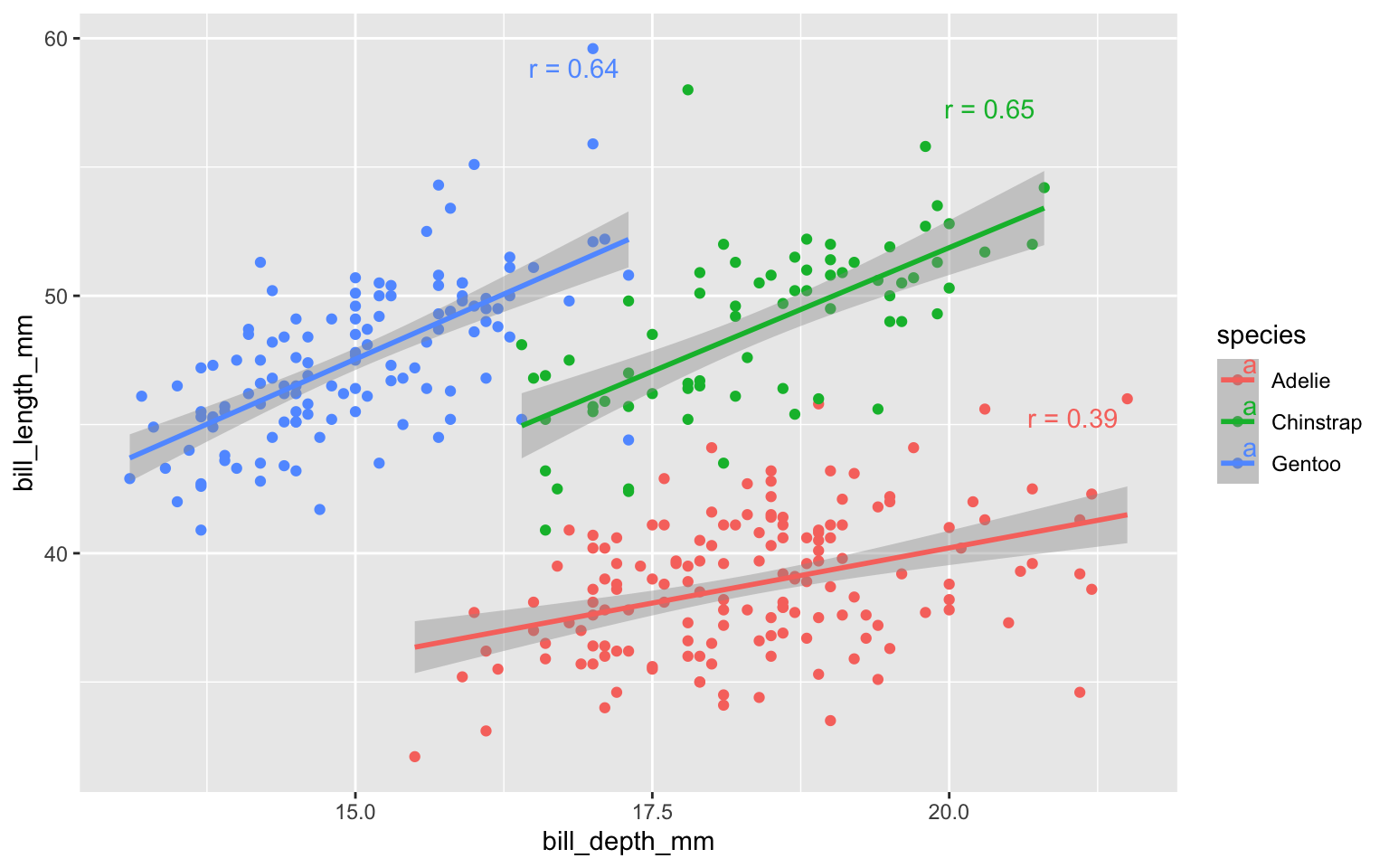
What did you notice about the linear regression lines?

Why did the linear relationship change?

Cross tabulations

Create cross tabulations using: count(), or group_by and summarize

Cross tabulations

  • Compare how two variables relate by counting combinations of values.

Use count()

OR

group_by and summarize() with n()

  • These produce a table showing how often each combination occurs

Examples

# Count shows how many penguins are in each species–island combination.
penguins |> 
  count(species, island)
# A tibble: 5 × 3
  species   island        n
  <fct>     <fct>     <int>
1 Adelie    Biscoe       44
2 Adelie    Dream        56
3 Adelie    Torgersen    52
4 Chinstrap Dream        68
5 Gentoo    Biscoe      124
# Within each species, what share are on each island?
penguins |> 
  count(species, island) |> 
  group_by(species) |> 
  mutate(prop = n / sum(n))
# A tibble: 5 × 4
# Groups:   species [3]
  species   island        n  prop
  <fct>     <fct>     <int> <dbl>
1 Adelie    Biscoe       44 0.289
2 Adelie    Dream        56 0.368
3 Adelie    Torgersen    52 0.342
4 Chinstrap Dream        68 1    
5 Gentoo    Biscoe      124 1    
# Within each island, what share is made up by each species?
penguins |> 
  count(species, island) |> 
  group_by(island) |> 
  mutate(prop = n / sum(n))
# A tibble: 5 × 4
# Groups:   island [3]
  species   island        n  prop
  <fct>     <fct>     <int> <dbl>
1 Adelie    Biscoe       44 0.262
2 Adelie    Dream        56 0.452
3 Adelie    Torgersen    52 1    
4 Chinstrap Dream        68 0.548
5 Gentoo    Biscoe      124 0.738