Visualizing numerical data

Intro to Data Analytics

Some review: data visualization types

  1. Bar chart - distribution across categories (for categorical data, x-axis is categories)

  2. Visualizing numerical distributions

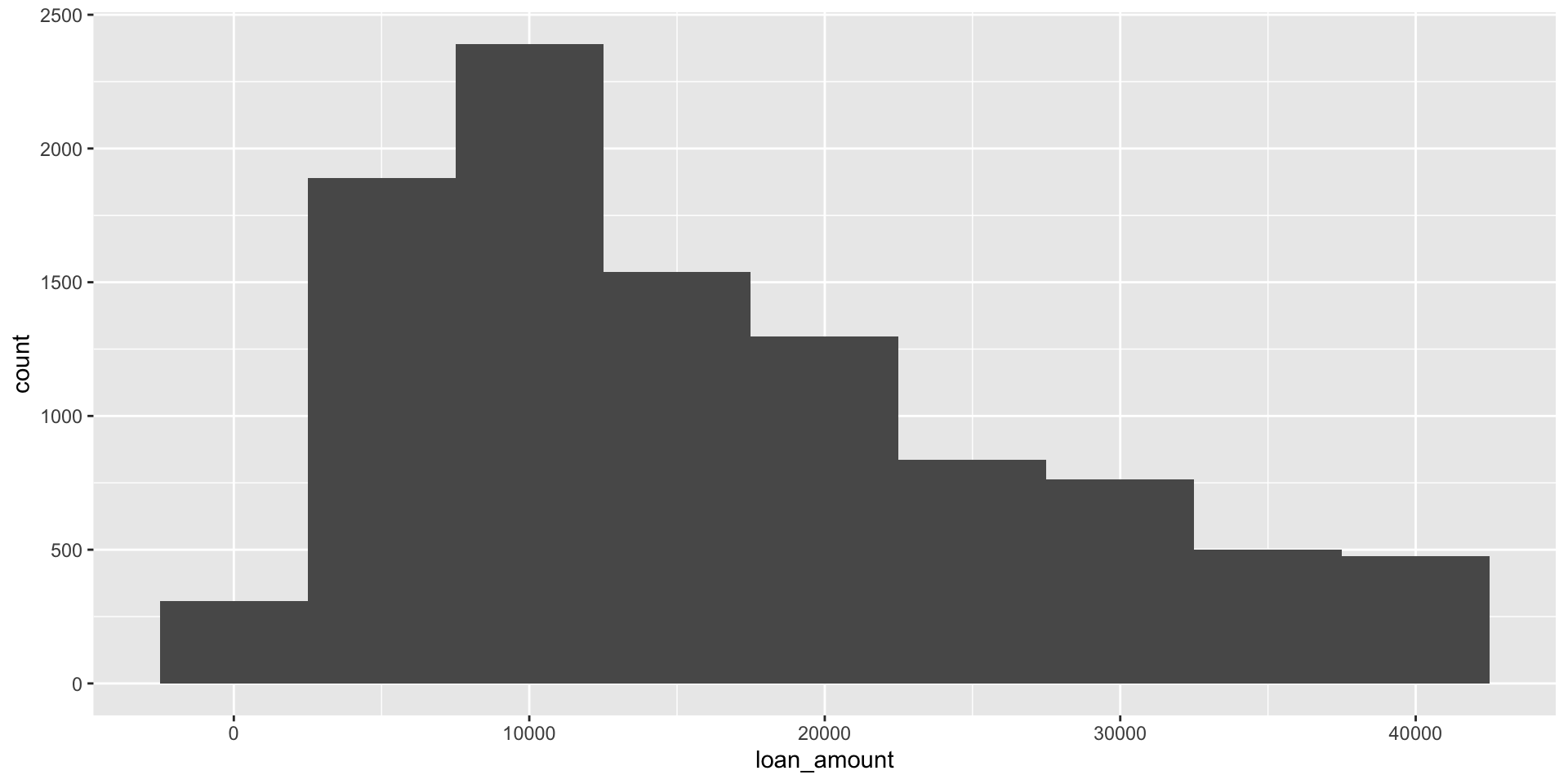
    • Histogram - distribution across bins or buckets. For numeric data, x-axis is numbers, y-axis is the count of observations per bin.

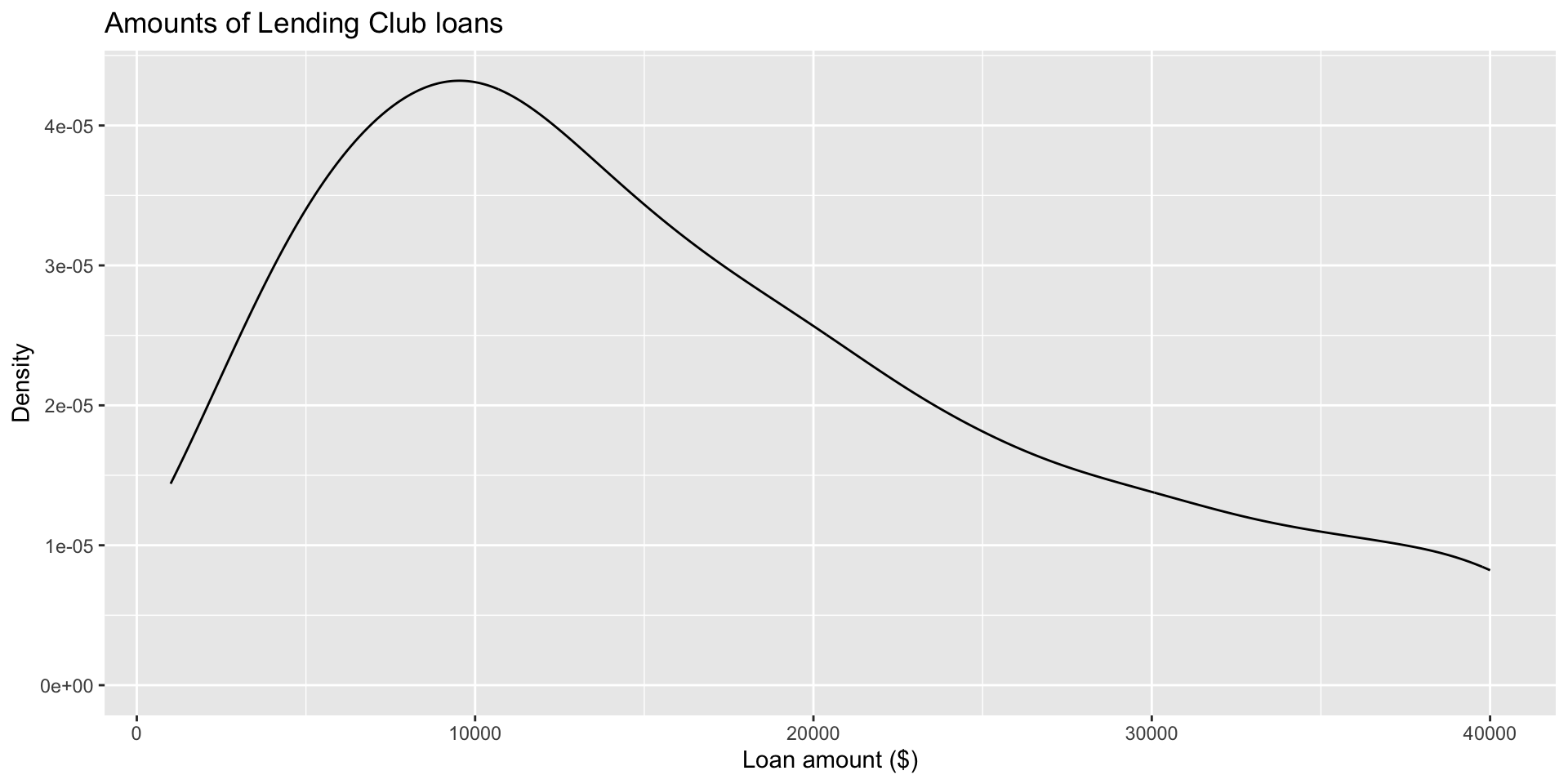
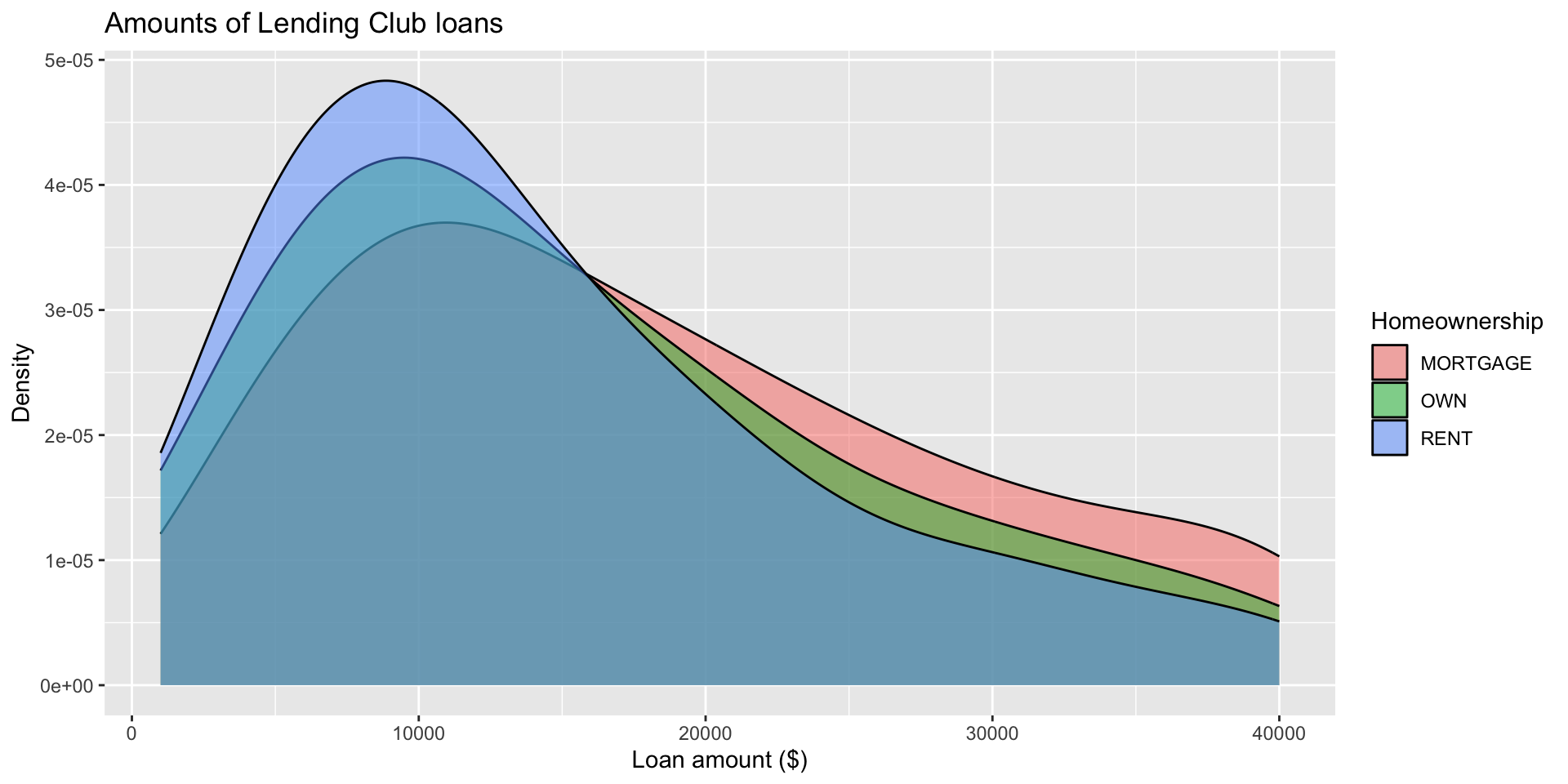
    • Density plot - think of it as a pretty histogram. For numeric data, x-axis is numbers, but now the y-axis is proportion of the whole. Makes it easier to compare two distributions on a single plot. For example, if you have used group_by to break your data into two distinct groups.

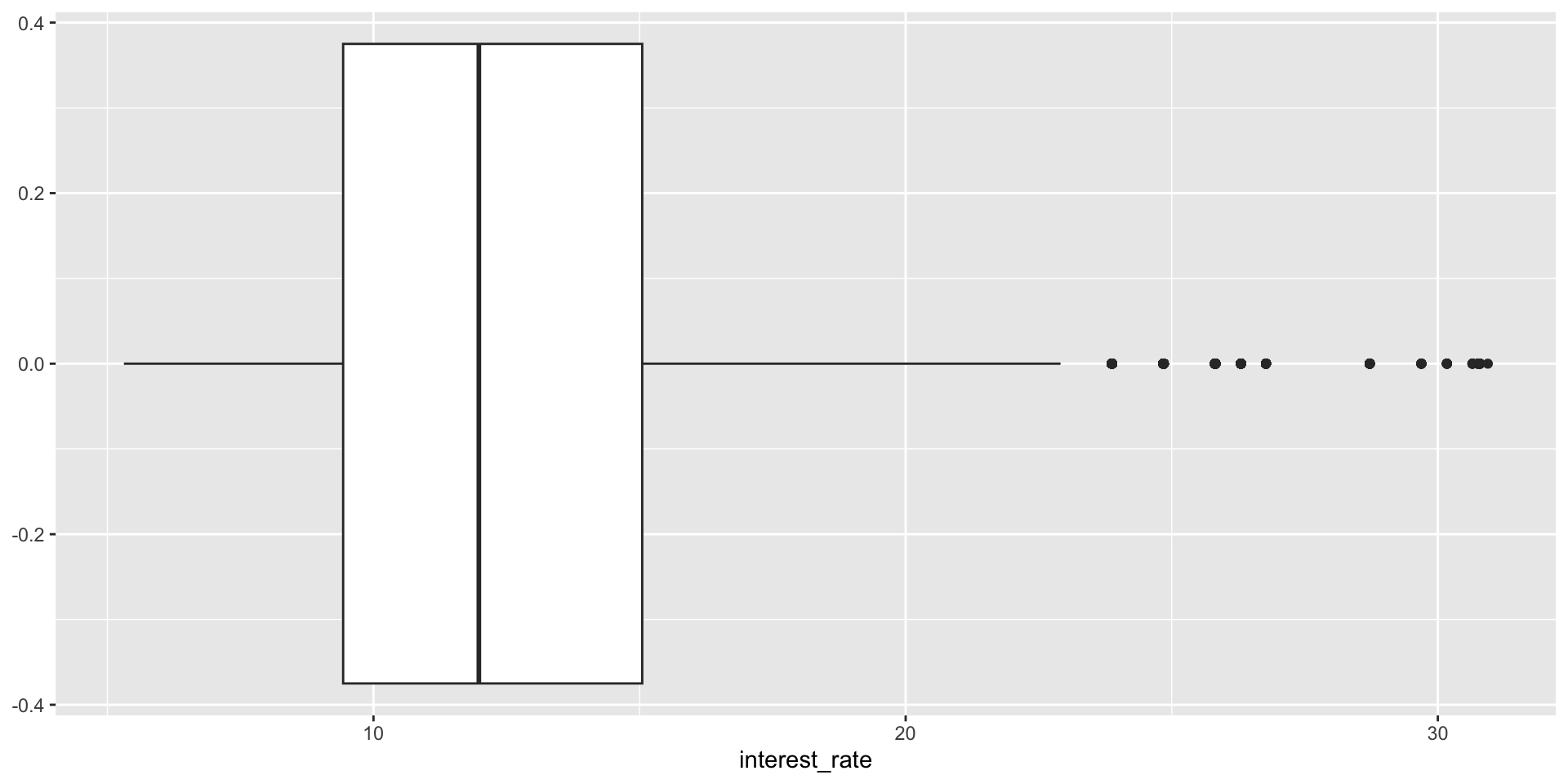
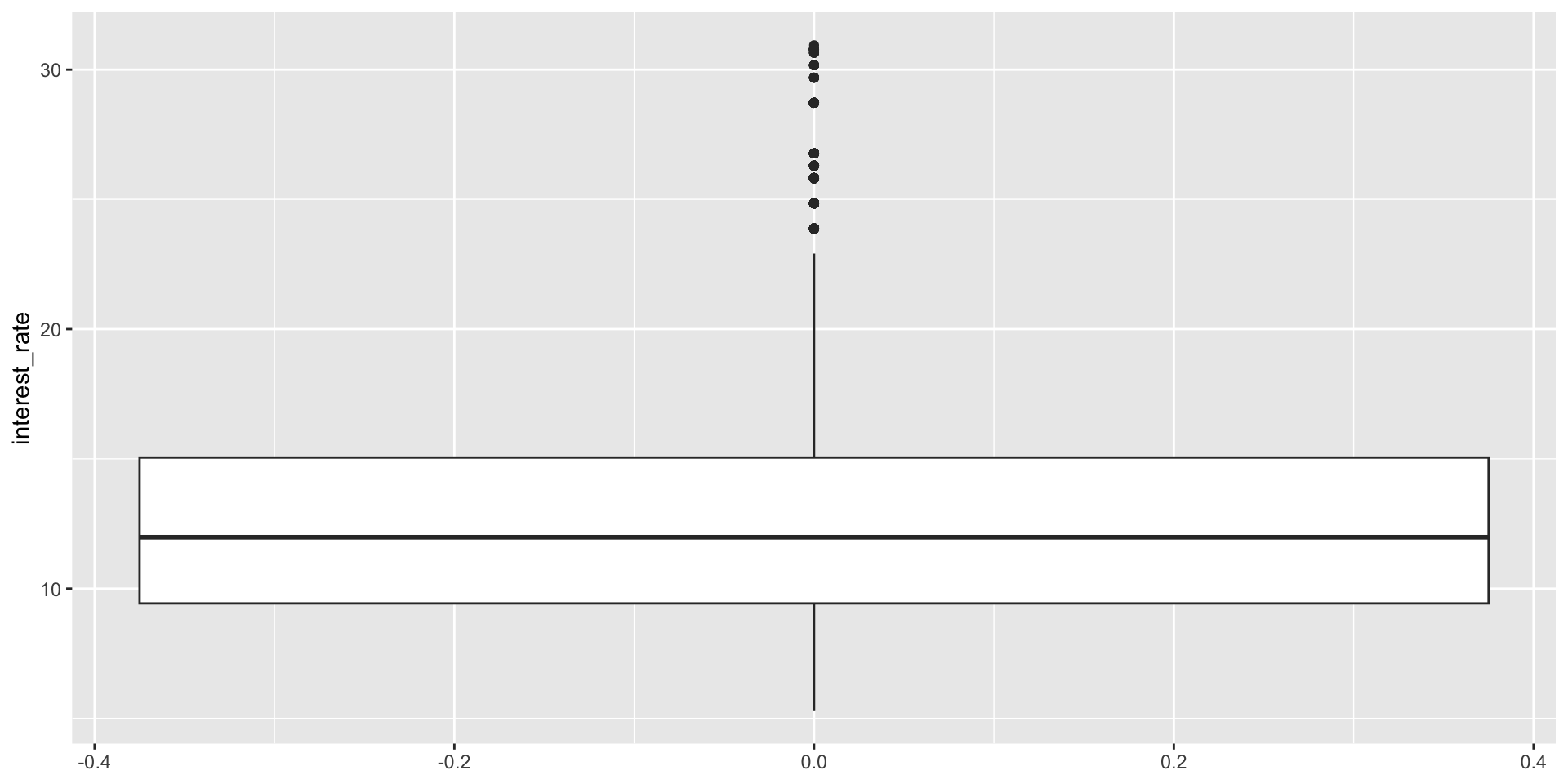
    • Box plot - particularly useful with skewed distributions. Median is central tendency measure show.

Some review: ggplot annotations

  1. Scale functions – change default scale of axes: e.g., xlim()

  2. We’ve seen labs() – used for title, subtitle, caption, x-axis, y-axis, etc.

Features of ggplot

  • You can have more than one geom in a single visualization
  • Add a geom_line to add a line at a measure of central tendency (mean, median)
  • Add geom_smooth() to generate pattern line with confidence interval
  • Local aesthetics are done in specific layers. In the mapping function or geom_*.

Data: Lending Club

  • Thousands of loans made through the Lending Club, a platform that allows individuals to lend to other individuals

  • Not all loans are created equal – ease of getting a loan depends on (apparent) ability to pay back the loan

  • Data includes loans made, these are not loan applications

A peek at data

library(openintro)
glimpse(loans_full_schema)
Rows: 10,000
Columns: 55
$ emp_title                        <chr> "global config engineer ", "warehouse…
$ emp_length                       <dbl> 3, 10, 3, 1, 10, NA, 10, 10, 10, 3, 1…
$ state                            <fct> NJ, HI, WI, PA, CA, KY, MI, AZ, NV, I…
$ homeownership                    <fct> MORTGAGE, RENT, RENT, RENT, RENT, OWN…
$ annual_income                    <dbl> 90000, 40000, 40000, 30000, 35000, 34…
$ verified_income                  <fct> Verified, Not Verified, Source Verifi…
$ debt_to_income                   <dbl> 18.01, 5.04, 21.15, 10.16, 57.96, 6.4…
$ annual_income_joint              <dbl> NA, NA, NA, NA, 57000, NA, 155000, NA…
$ verification_income_joint        <fct> , , , , Verified, , Not Verified, , ,…
$ debt_to_income_joint             <dbl> NA, NA, NA, NA, 37.66, NA, 13.12, NA,…
$ delinq_2y                        <int> 0, 0, 0, 0, 0, 1, 0, 1, 1, 0, 0, 0, 0…
$ months_since_last_delinq         <int> 38, NA, 28, NA, NA, 3, NA, 19, 18, NA…
$ earliest_credit_line             <dbl> 2001, 1996, 2006, 2007, 2008, 1990, 2…
$ inquiries_last_12m               <int> 6, 1, 4, 0, 7, 6, 1, 1, 3, 0, 4, 4, 8…
$ total_credit_lines               <int> 28, 30, 31, 4, 22, 32, 12, 30, 35, 9,…
$ open_credit_lines                <int> 10, 14, 10, 4, 16, 12, 10, 15, 21, 6,…
$ total_credit_limit               <int> 70795, 28800, 24193, 25400, 69839, 42…
$ total_credit_utilized            <int> 38767, 4321, 16000, 4997, 52722, 3898…
$ num_collections_last_12m         <int> 0, 0, 0, 0, 0, 0, 0, 0, 0, 0, 0, 0, 0…
$ num_historical_failed_to_pay     <int> 0, 1, 0, 1, 0, 0, 0, 0, 0, 0, 1, 0, 0…
$ months_since_90d_late            <int> 38, NA, 28, NA, NA, 60, NA, 71, 18, N…
$ current_accounts_delinq          <int> 0, 0, 0, 0, 0, 0, 0, 0, 0, 0, 0, 0, 0…
$ total_collection_amount_ever     <int> 1250, 0, 432, 0, 0, 0, 0, 0, 0, 0, 0,…
$ current_installment_accounts     <int> 2, 0, 1, 1, 1, 0, 2, 2, 6, 1, 2, 1, 2…
$ accounts_opened_24m              <int> 5, 11, 13, 1, 6, 2, 1, 4, 10, 5, 6, 7…
$ months_since_last_credit_inquiry <int> 5, 8, 7, 15, 4, 5, 9, 7, 4, 17, 3, 4,…
$ num_satisfactory_accounts        <int> 10, 14, 10, 4, 16, 12, 10, 15, 21, 6,…
$ num_accounts_120d_past_due       <int> 0, 0, 0, 0, 0, 0, 0, NA, 0, 0, 0, 0, …
$ num_accounts_30d_past_due        <int> 0, 0, 0, 0, 0, 0, 0, 0, 0, 0, 0, 0, 0…
$ num_active_debit_accounts        <int> 2, 3, 3, 2, 10, 1, 3, 5, 11, 3, 2, 2,…
$ total_debit_limit                <int> 11100, 16500, 4300, 19400, 32700, 272…
$ num_total_cc_accounts            <int> 14, 24, 14, 3, 20, 27, 8, 16, 19, 7, …
$ num_open_cc_accounts             <int> 8, 14, 8, 3, 15, 12, 7, 12, 14, 5, 8,…
$ num_cc_carrying_balance          <int> 6, 4, 6, 2, 13, 5, 6, 10, 14, 3, 5, 3…
$ num_mort_accounts                <int> 1, 0, 0, 0, 0, 3, 2, 7, 2, 0, 2, 3, 3…
$ account_never_delinq_percent     <dbl> 92.9, 100.0, 93.5, 100.0, 100.0, 78.1…
$ tax_liens                        <int> 0, 0, 0, 1, 0, 0, 0, 0, 0, 0, 0, 0, 0…
$ public_record_bankrupt           <int> 0, 1, 0, 0, 0, 0, 0, 0, 0, 0, 1, 0, 0…
$ loan_purpose                     <fct> moving, debt_consolidation, other, de…
$ application_type                 <fct> individual, individual, individual, i…
$ loan_amount                      <int> 28000, 5000, 2000, 21600, 23000, 5000…
$ term                             <dbl> 60, 36, 36, 36, 36, 36, 60, 60, 36, 3…
$ interest_rate                    <dbl> 14.07, 12.61, 17.09, 6.72, 14.07, 6.7…
$ installment                      <dbl> 652.53, 167.54, 71.40, 664.19, 786.87…
$ grade                            <ord> C, C, D, A, C, A, C, B, C, A, C, B, C…
$ sub_grade                        <fct> C3, C1, D1, A3, C3, A3, C2, B5, C2, A…
$ issue_month                      <fct> Mar-2018, Feb-2018, Feb-2018, Jan-201…
$ loan_status                      <fct> Current, Current, Current, Current, C…
$ initial_listing_status           <fct> whole, whole, fractional, whole, whol…
$ disbursement_method              <fct> Cash, Cash, Cash, Cash, Cash, Cash, C…
$ balance                          <dbl> 27015.86, 4651.37, 1824.63, 18853.26,…
$ paid_total                       <dbl> 1999.330, 499.120, 281.800, 3312.890,…
$ paid_principal                   <dbl> 984.14, 348.63, 175.37, 2746.74, 1569…
$ paid_interest                    <dbl> 1015.19, 150.49, 106.43, 566.15, 754.…
$ paid_late_fees                   <dbl> 0, 0, 0, 0, 0, 0, 0, 0, 0, 0, 0, 0, 0…

Selected variables

loans <- loans_full_schema %>%
  select(loan_amount, interest_rate, term, grade, 
         state, annual_income, homeownership, debt_to_income)
glimpse(loans)
Rows: 10,000
Columns: 8
$ loan_amount    <int> 28000, 5000, 2000, 21600, 23000, 5000, 24000, 20000, 20…
$ interest_rate  <dbl> 14.07, 12.61, 17.09, 6.72, 14.07, 6.72, 13.59, 11.99, 1…
$ term           <dbl> 60, 36, 36, 36, 36, 36, 60, 60, 36, 36, 60, 60, 36, 60,…
$ grade          <ord> C, C, D, A, C, A, C, B, C, A, C, B, C, B, D, D, D, F, E…
$ state          <fct> NJ, HI, WI, PA, CA, KY, MI, AZ, NV, IL, IL, FL, SC, CO,…
$ annual_income  <dbl> 90000, 40000, 40000, 30000, 35000, 34000, 35000, 110000…
$ homeownership  <fct> MORTGAGE, RENT, RENT, RENT, RENT, OWN, MORTGAGE, MORTGA…
$ debt_to_income <dbl> 18.01, 5.04, 21.15, 10.16, 57.96, 6.46, 23.66, 16.19, 3…

Selected variables

variable description
loan_amount Amount of loan, in US dollars
interest_rate Loan interest rate, in annual percentage
term Loan length, in whole number of months
grade Loan grade, values A through G, likelihood of being repaid
state US state where borrower resides
annual_income Borrower’s annual income, including any second income (USD)
homeownership Indicates whether person owns, owns but has mortgage, or rents their home
debt_to_income Debt-to-income ratio

Variable types

variable type
loan_amount numerical, continuous
interest_rate numerical, continuous
term numerical, discrete
grade categorical, ordinal
state categorical, not ordinal
annual_income numerical, continuous
homeownership categorical, not ordinal
debt_to_income numerical, continuous

Visualizing numerical data

Describing shapes of numerical distributions
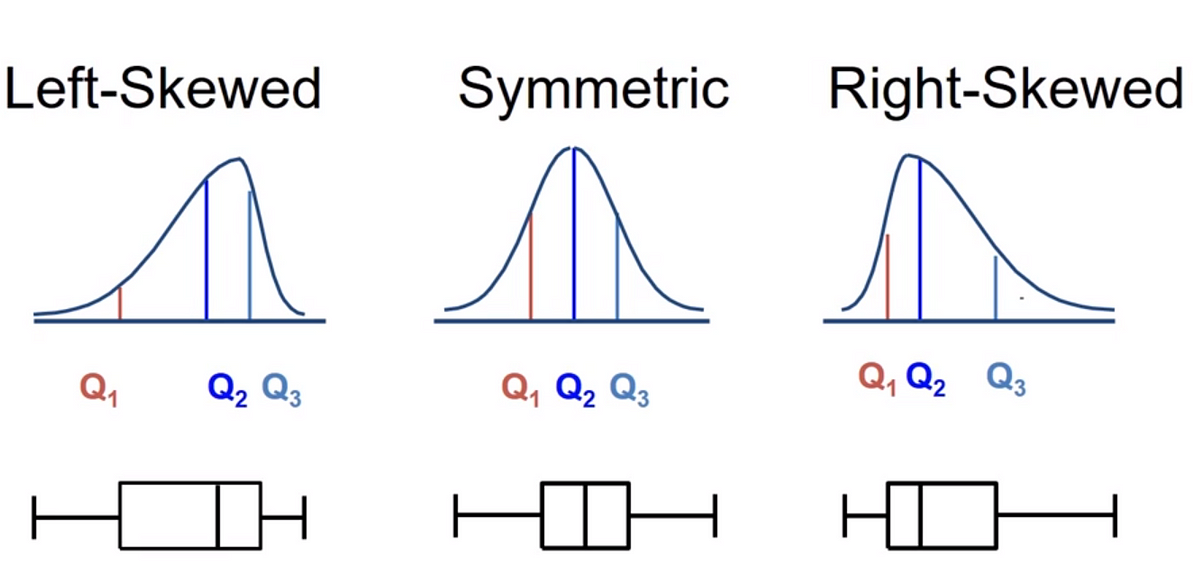
  • shape:
    • skewness:
      • right-skewed,
      • left-skewed,
      • symmetric
    • modality (how many peaks or modes a data distribution has): unimodal, bimodal, multimodal, uniform
  • center: mean (mean), median (median), mode (not always useful)
  • spread: range (range), standard deviation (sd), inter-quartile range (IQR)
  • unusual observations

Describing shapes of numerical distributions

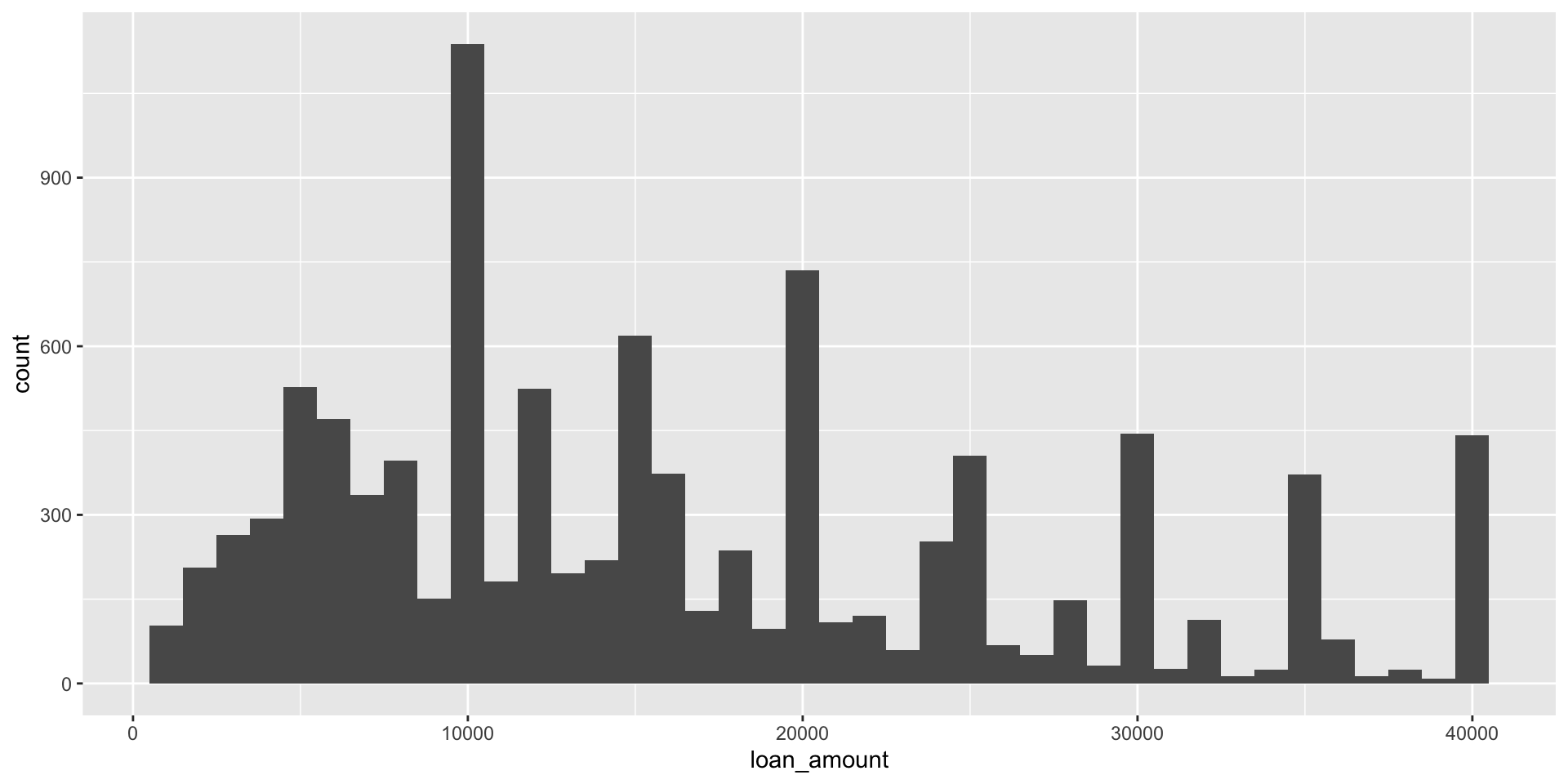
Histogram

Histogram

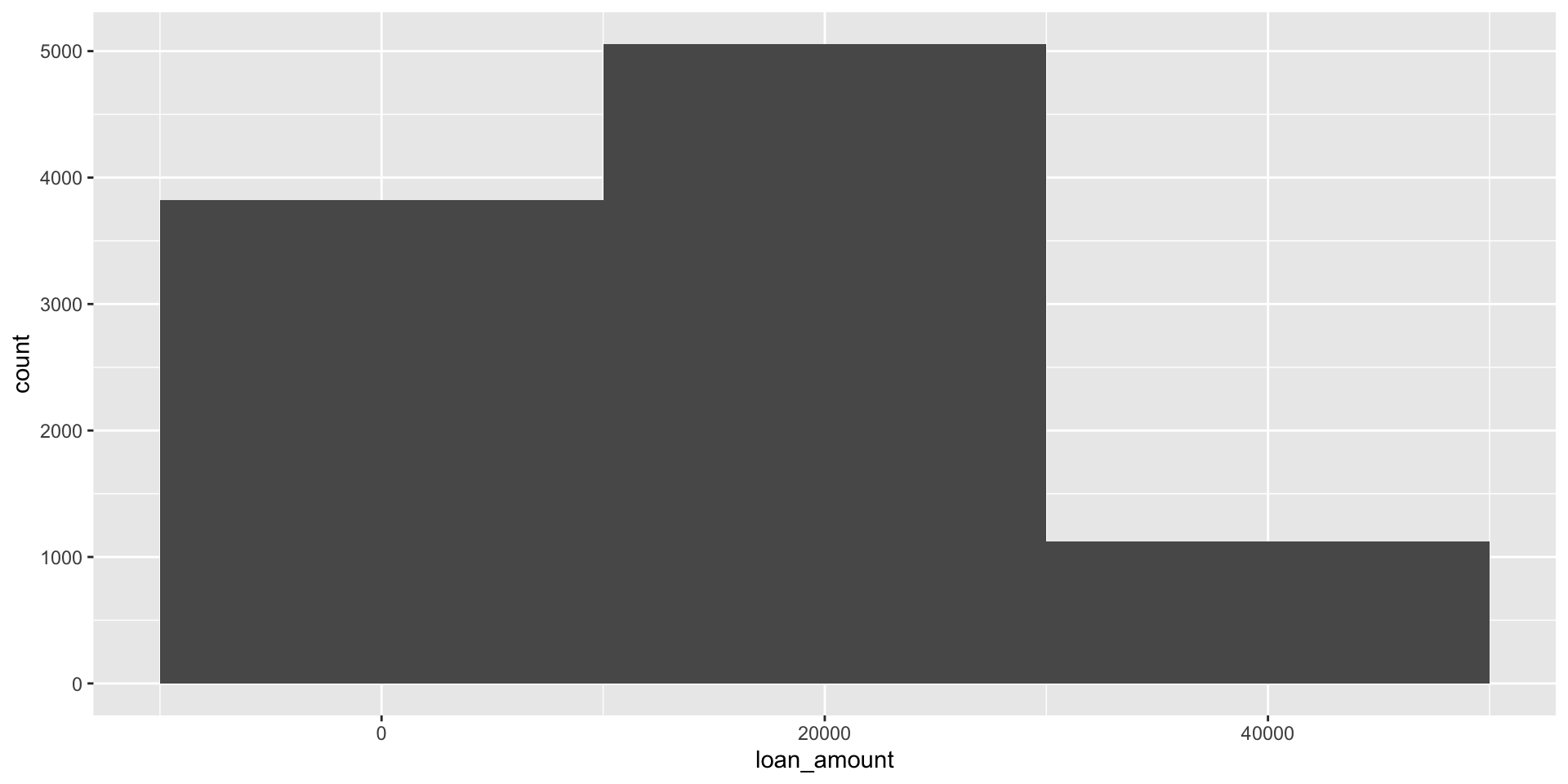
`stat_bin()` using `bins = 30`. Pick better value `binwidth`.
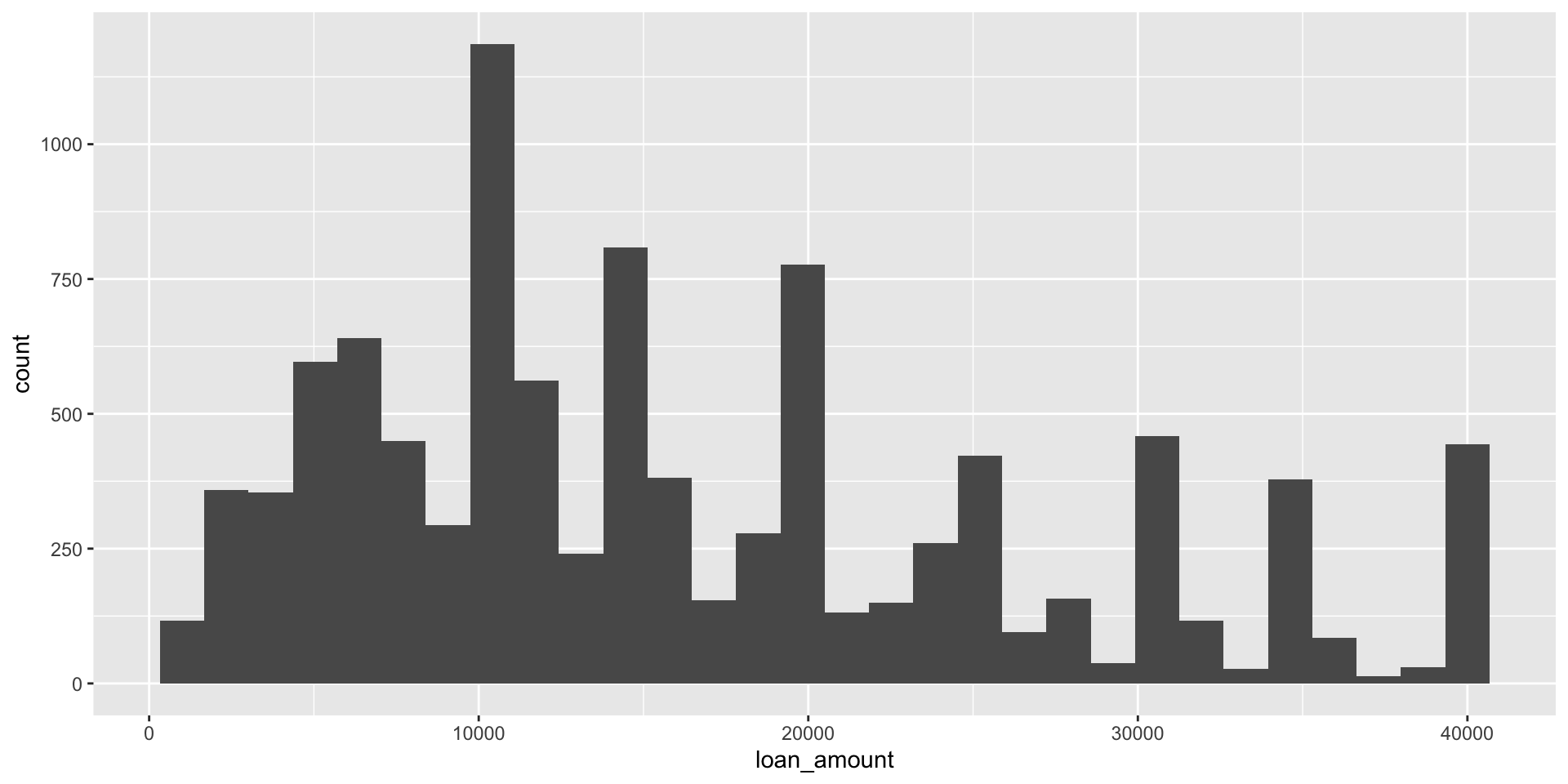
Histograms and binwidth
ggplot2 aesthetics

  • Aesthetic characteristics can be mapped to variables or set in the geom_*
    • color
    • shape
    • size
    • alpha (transparency)

ggplot2 aesthetics

  • Aesthetics as mapping
    • Determines size, color, etc. based on variables in the data
    • Goes inside aes( )
  • Aesthetics as setting
    • Determines size, color, etc. based on fixed values, e.g, don’t depend on the values of variables.
    • Goes inside geom( )

Customizing histograms

Add labels using labs()
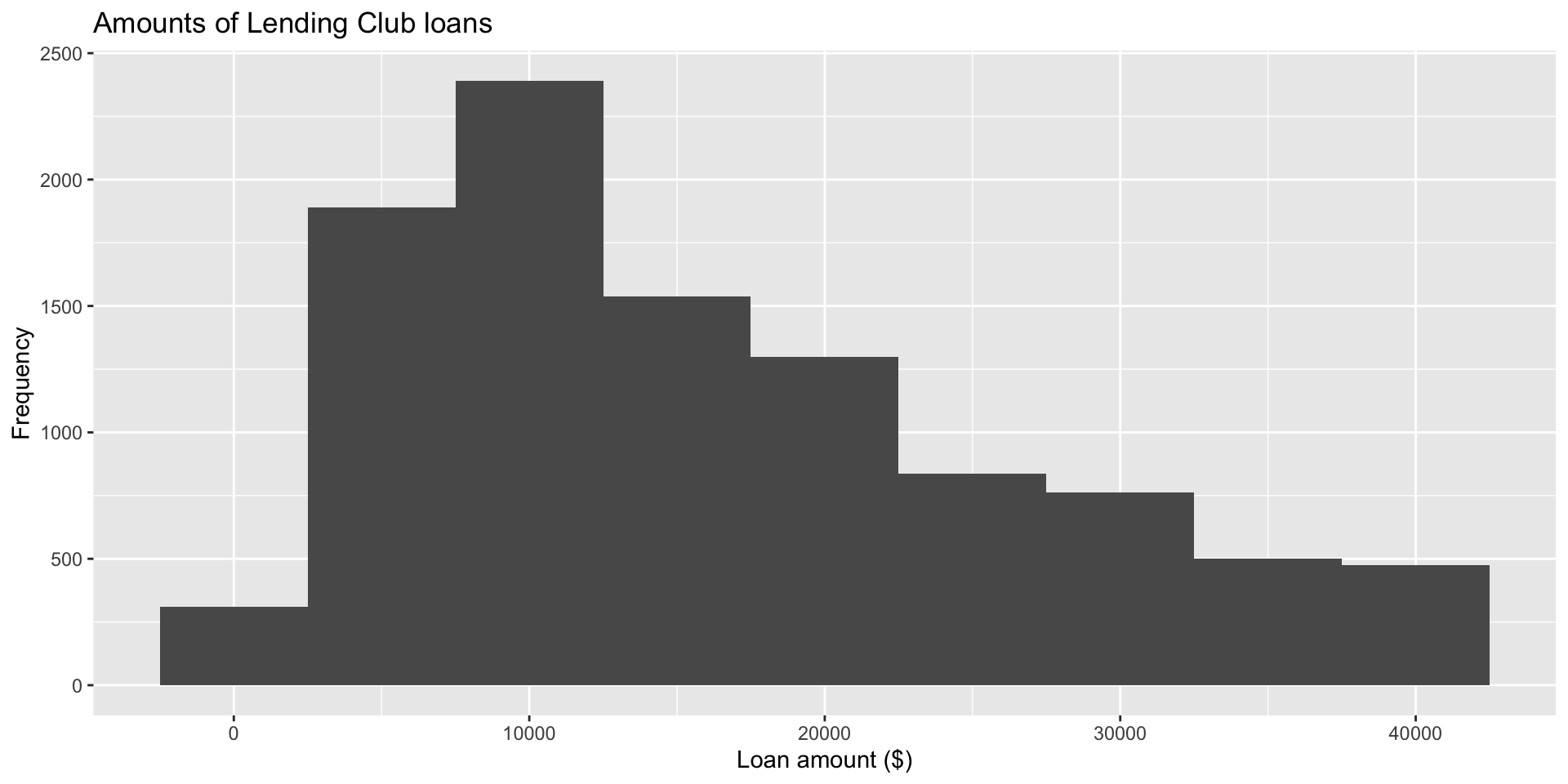
ggplot(loans, aes(x = loan_amount)) +
  geom_histogram(binwidth = 5000) +
  labs( 
    x = "Loan amount ($)", 
    y = "Frequency", 
    title = "Amounts of Lending Club loans" 
  ) 

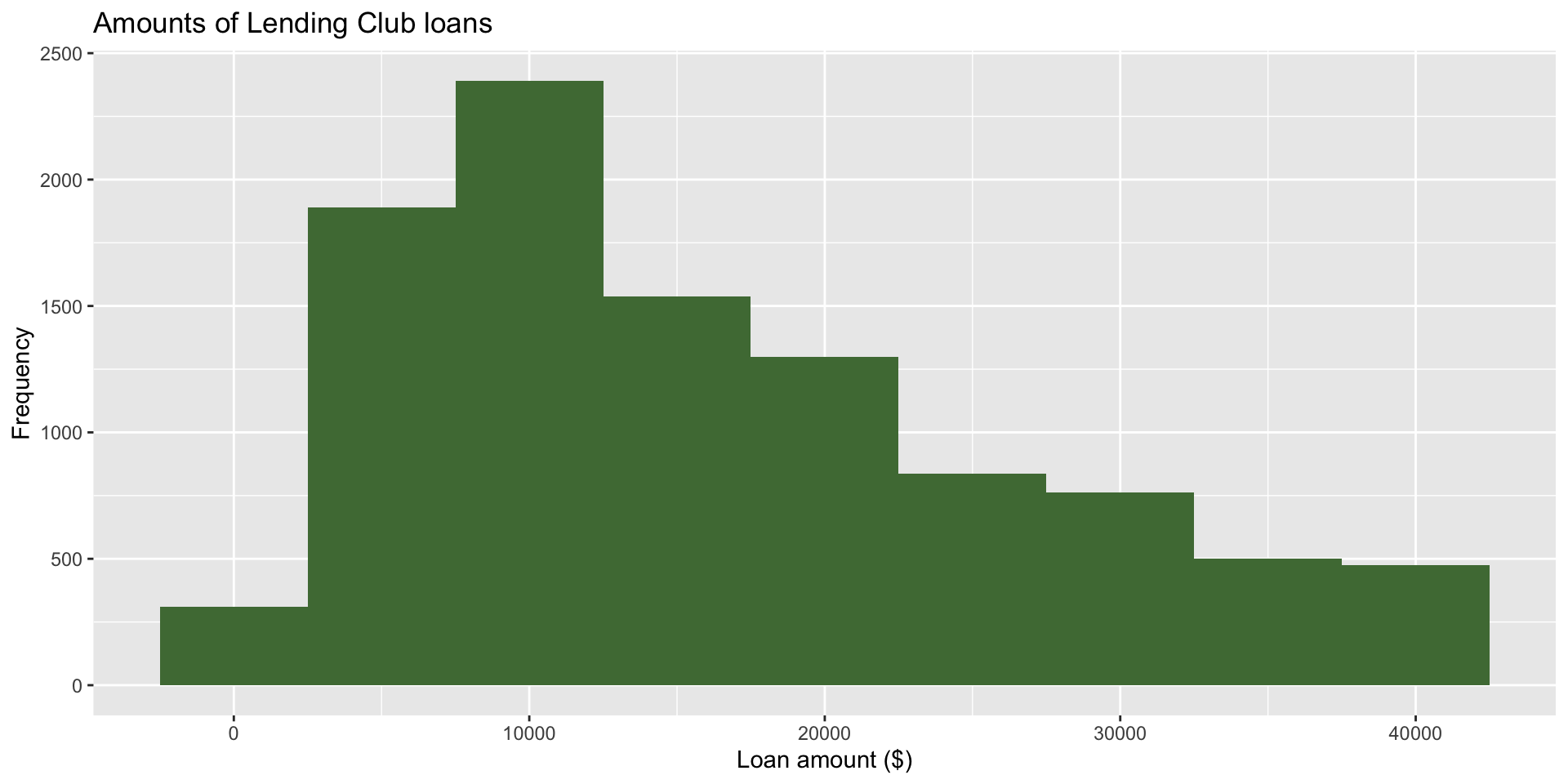
Fill in geom_*

ggplot(loans, aes(x = loan_amount)) +
  geom_histogram(binwidth = 5000,
                 fill = "#4F7942") +
  labs( 
    x = "Loan amount ($)", 
    y = "Frequency", 
    title = "Amounts of Lending Club loans" 
  ) 

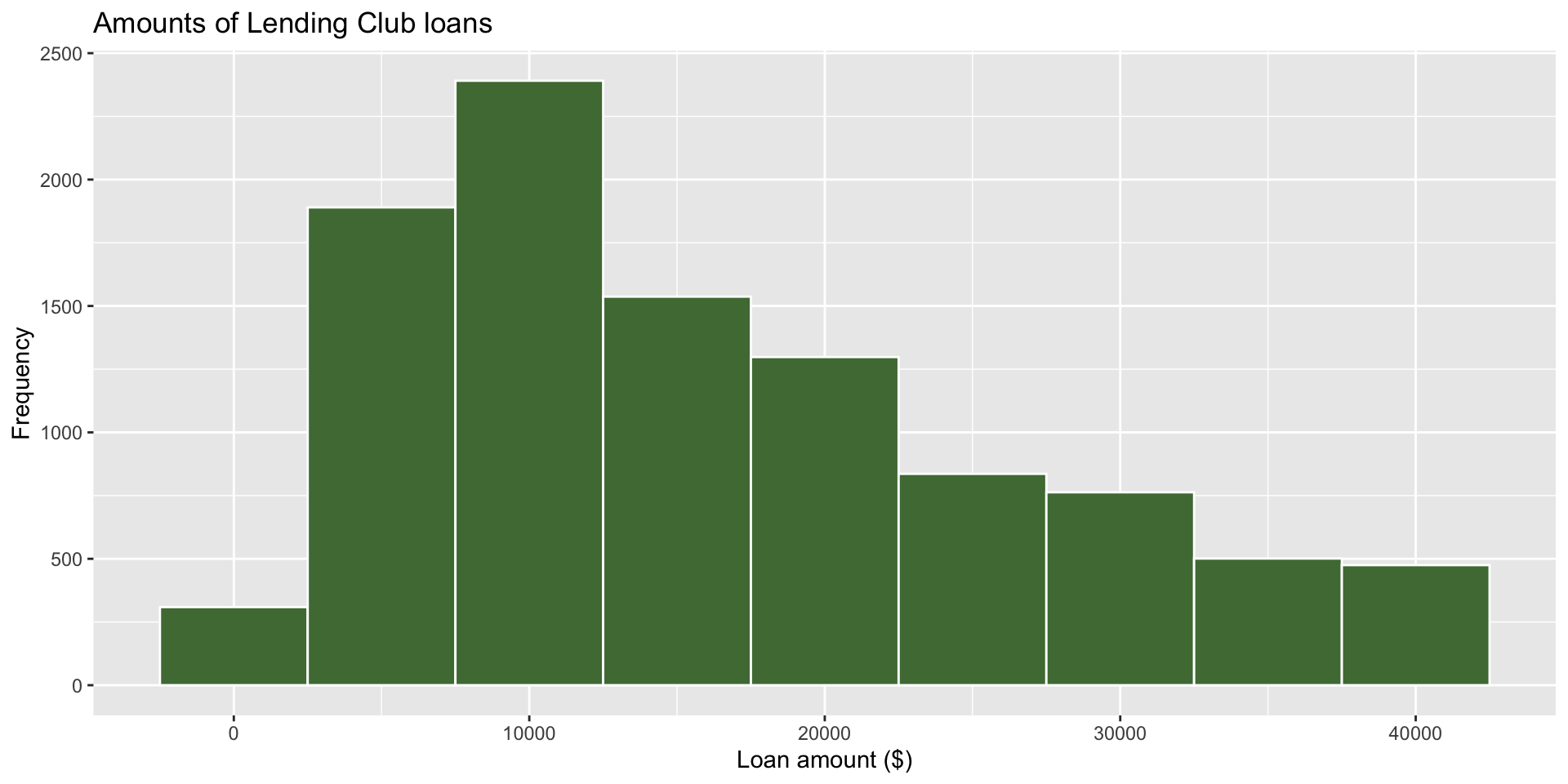
Color in geom_*

ggplot(loans, aes(x = loan_amount)) +
  geom_histogram(binwidth = 5000,
                 fill = "#4F7942",
                 color = "white") +
  labs( 
    x = "Loan amount ($)", 
    y = "Frequency", 
    title = "Amounts of Lending Club loans" 
  ) 

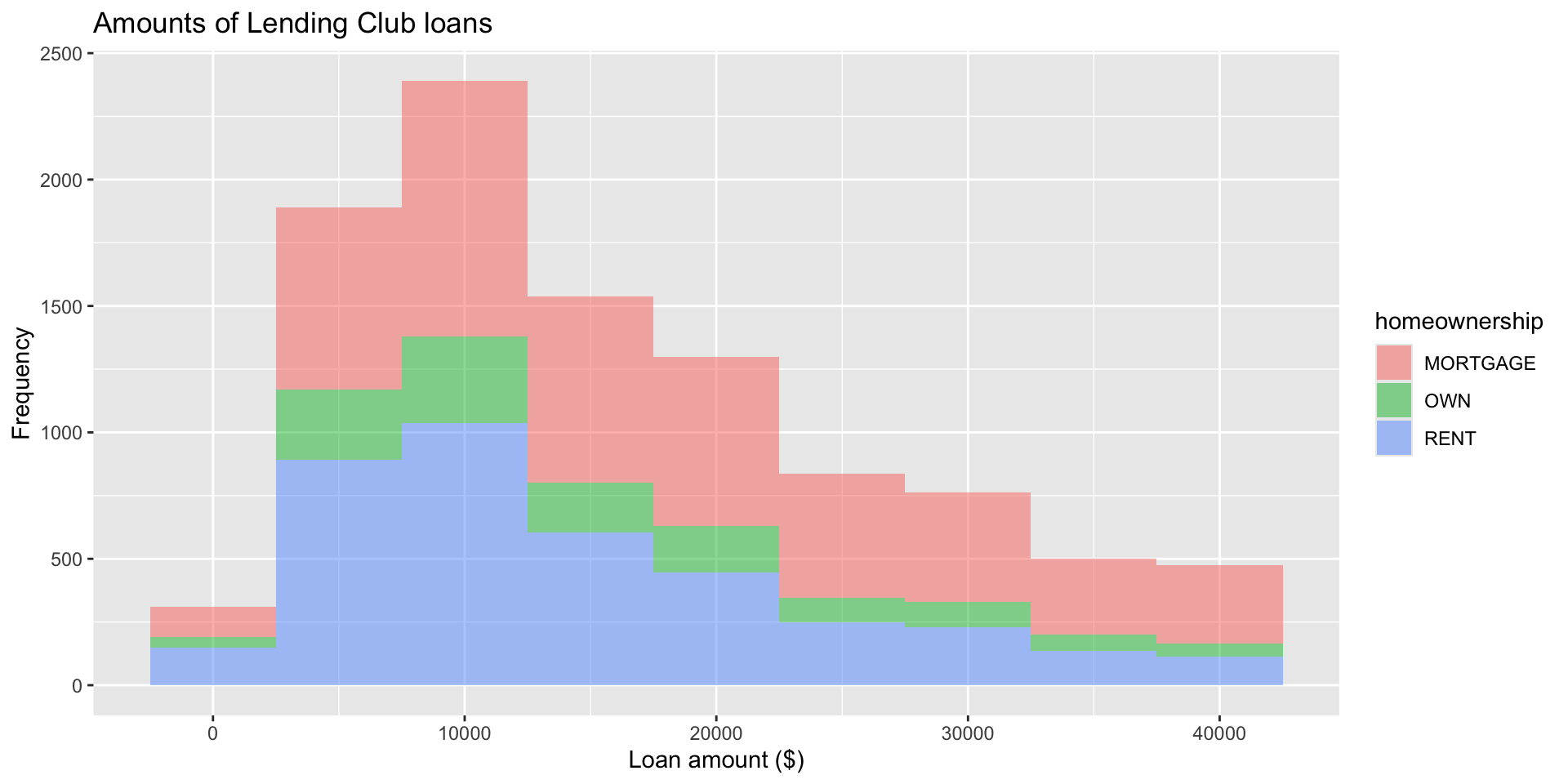
Fill by a categorical variable

ggplot(loans, aes(x = loan_amount, 
                  fill = homeownership)) + 
  geom_histogram(binwidth = 5000,
                 alpha = 0.5) + 
  labs(
    x = "Loan amount ($)",
    y = "Frequency",
    title = "Amounts of Lending Club loans"
  )

Faceting by a categorical variable

  • Small plots that display subsets of the data
  • Useful for exploring conditional relationship
  • Useful for exploring large datasets
  • Can get complex, fast

facet_wrap

facet_wrap(~ homeownership, nrow = 3)
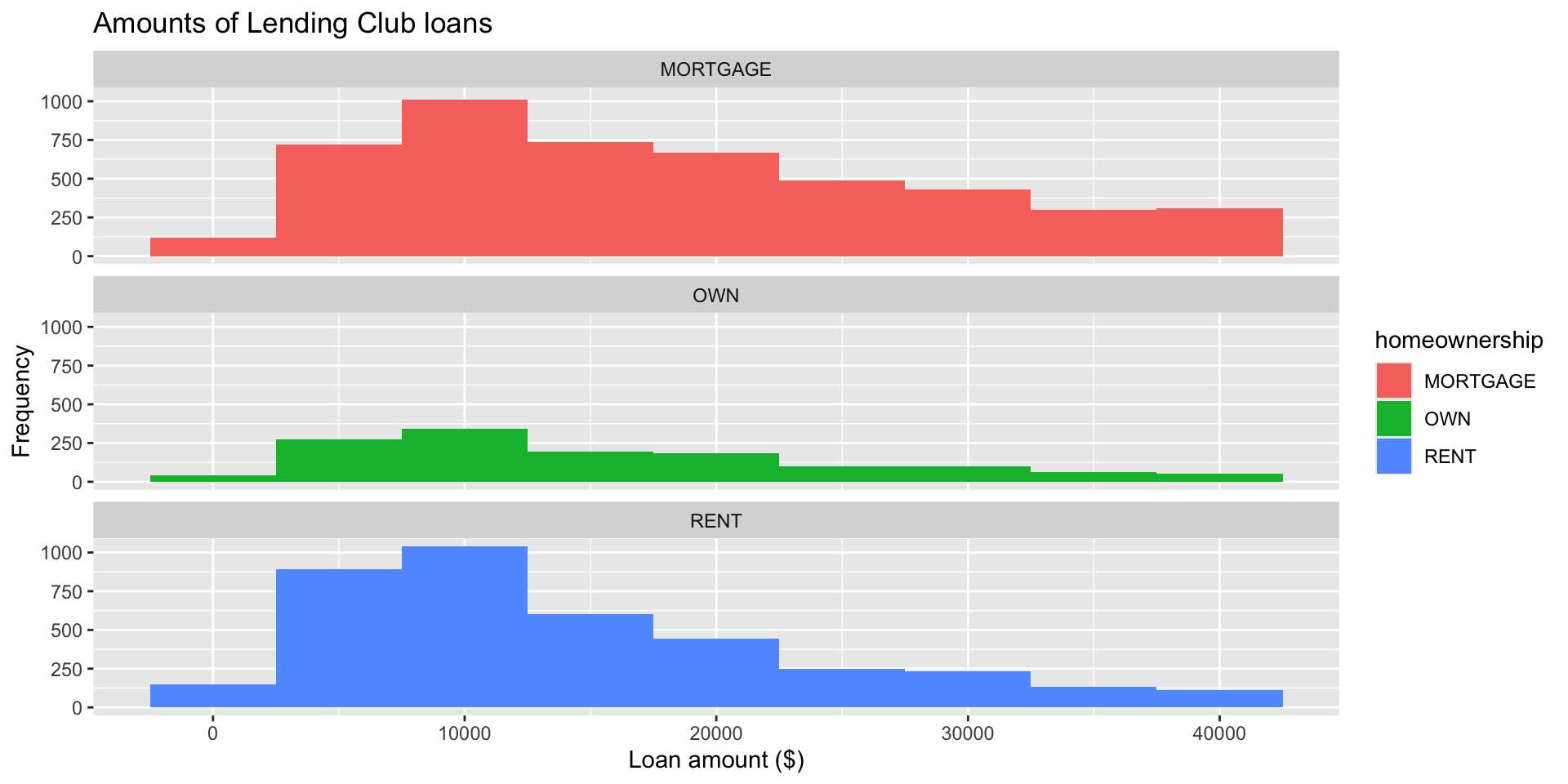
ggplot(loans, aes(x = loan_amount, 
                  fill = homeownership)) + 
  geom_histogram(binwidth = 5000) + 
  labs(
    x = "Loan amount ($)",
    y = "Frequency",
    title = "Amounts of Lending Club loans"
  ) +
  facet_wrap(~ homeownership, nrow = 3)

Facet with a categorical variable
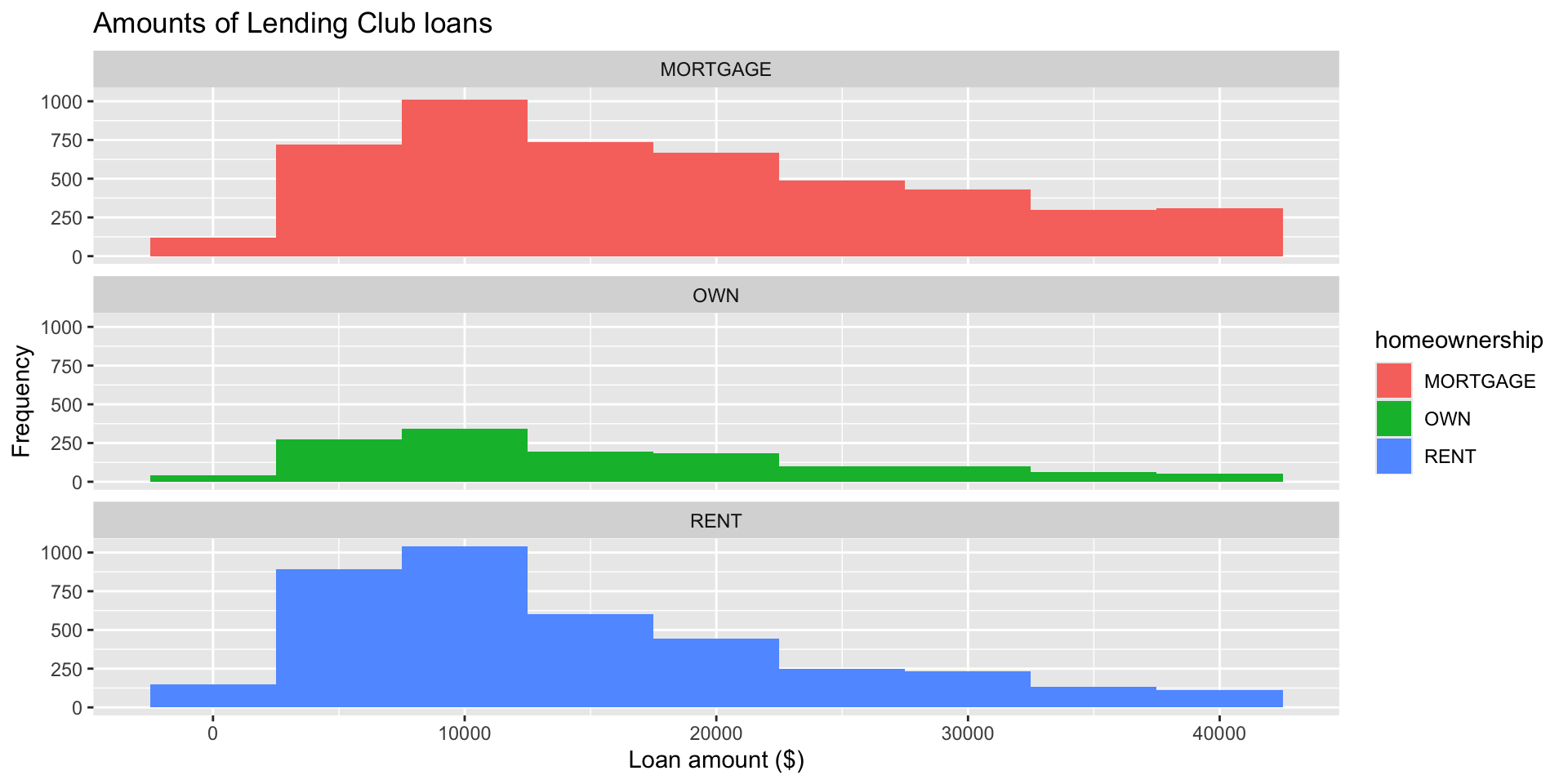
ggplot(loans, aes(x = loan_amount, fill = homeownership)) + 
  geom_histogram(binwidth = 5000) +
  labs(
    x = "Loan amount ($)",
    y = "Frequency",
    title = "Amounts of Lending Club loans"
  ) +
  facet_wrap(~ homeownership, nrow = 3)

Faceting with transparency in geom_*

geom_histogram(binwidth = 5000, alpha = 0.5)`
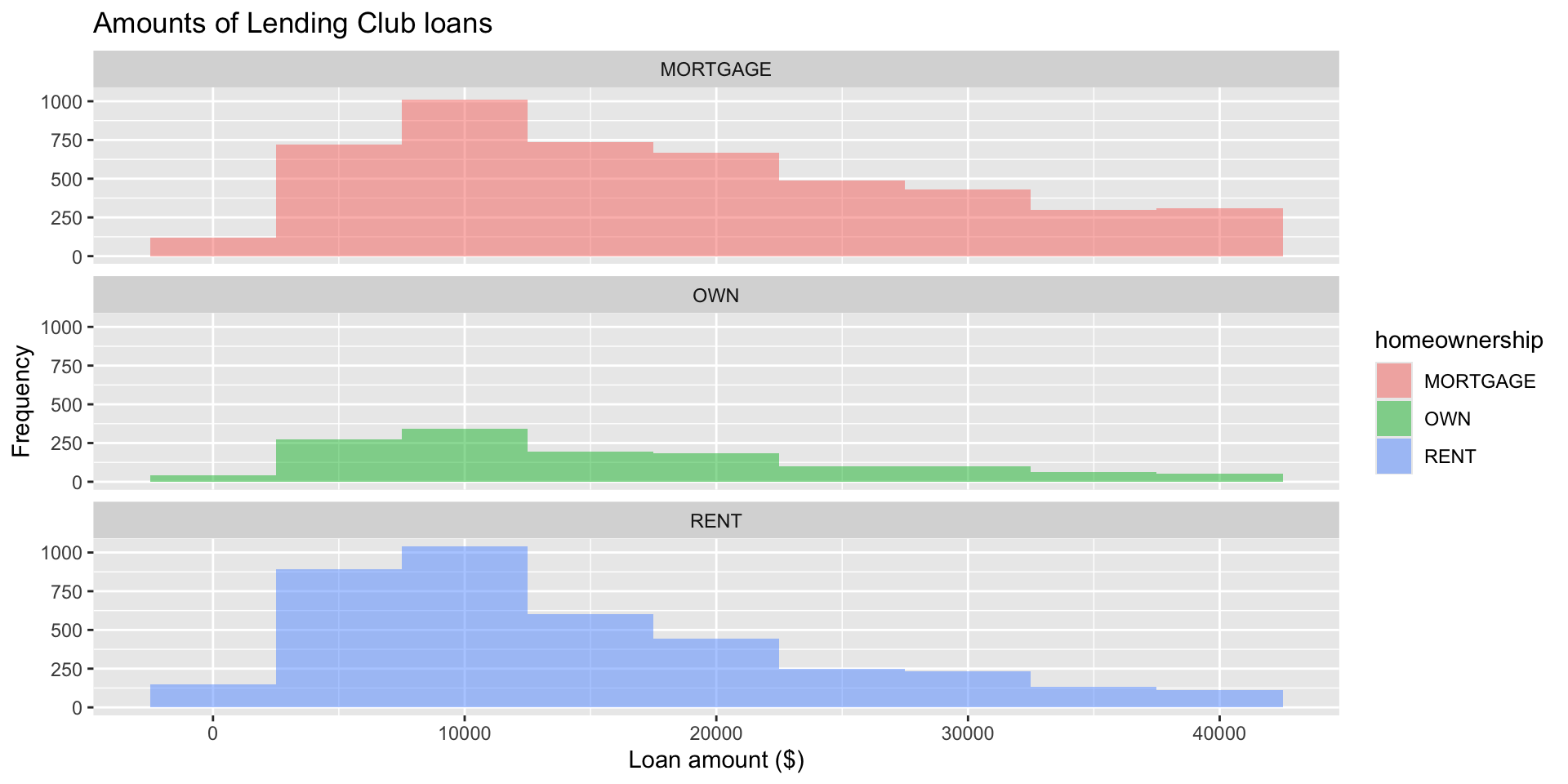
ggplot(loans, aes(x = loan_amount, 
                  fill = homeownership)) + 
  geom_histogram(binwidth = 5000,
                 alpha = 0.5) + 
  labs(
    x = "Loan amount ($)",
    y = "Frequency",
    title = "Amounts of Lending Club loans"
  ) +
  facet_wrap(~ homeownership, nrow = 3)

Density plot

Density plot

ggplot(loans, aes(x = loan_amount)) +
  geom_density()

Works better for continuous data

Density plots and adjusting bandwidth
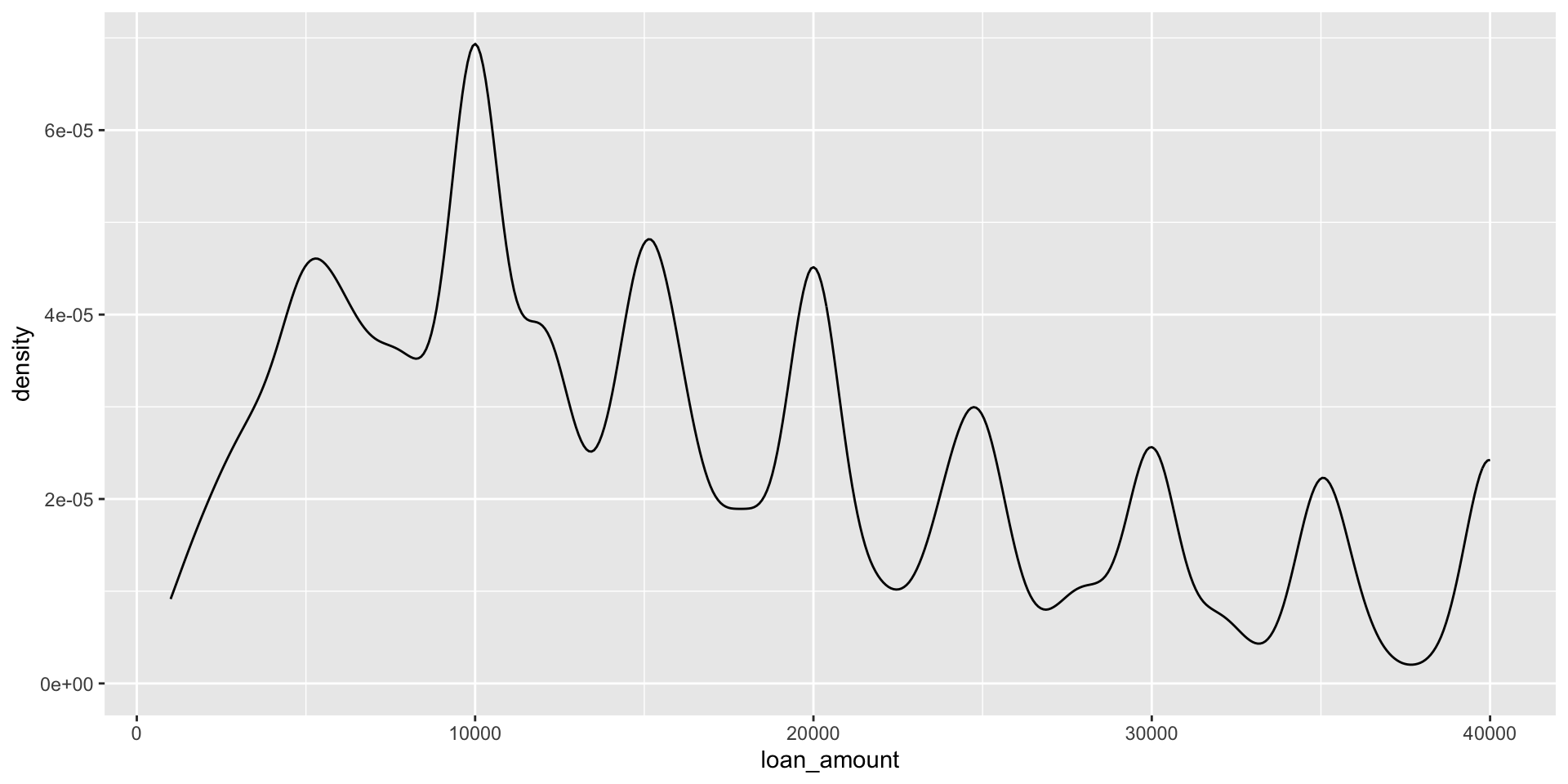
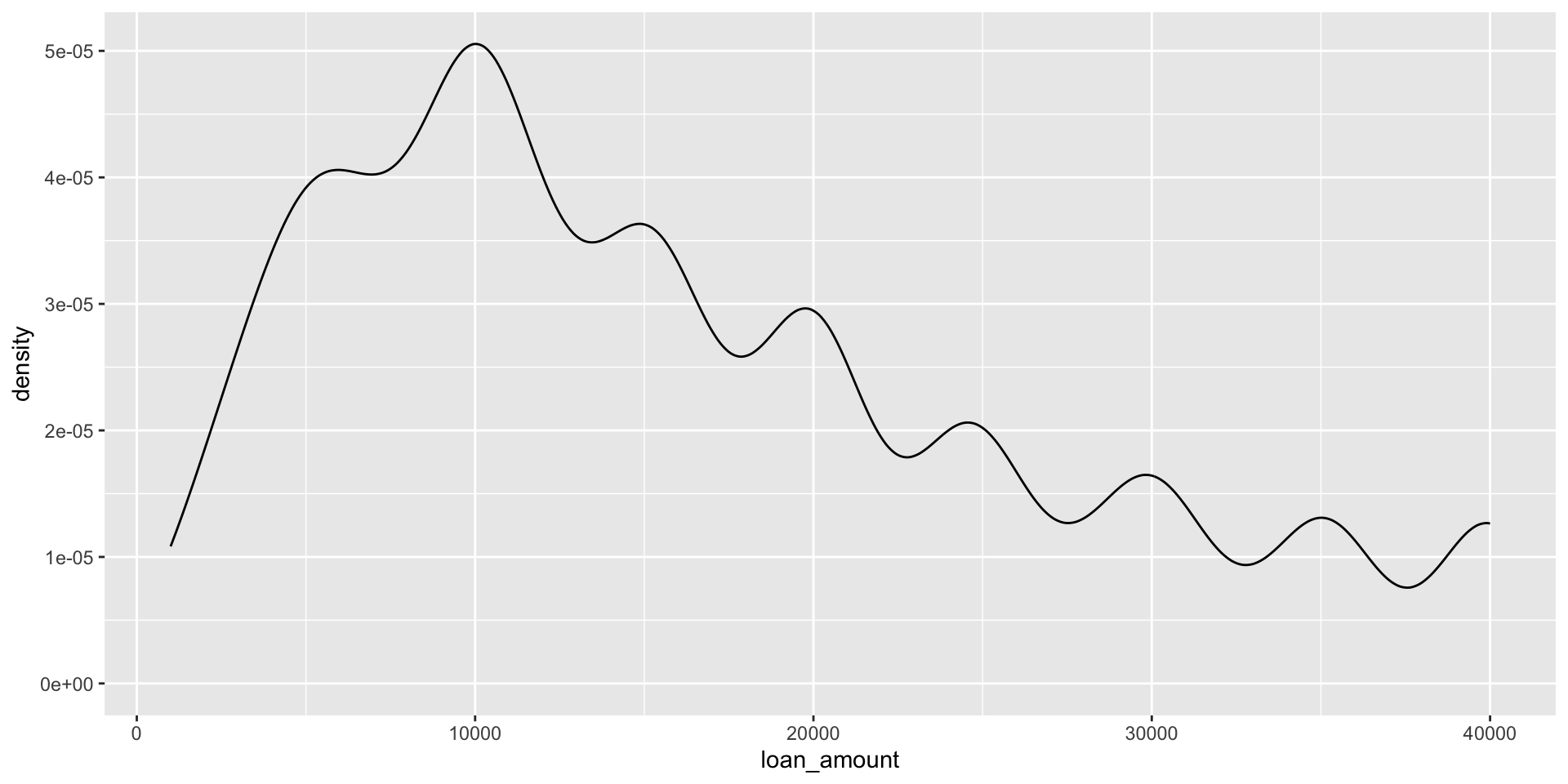
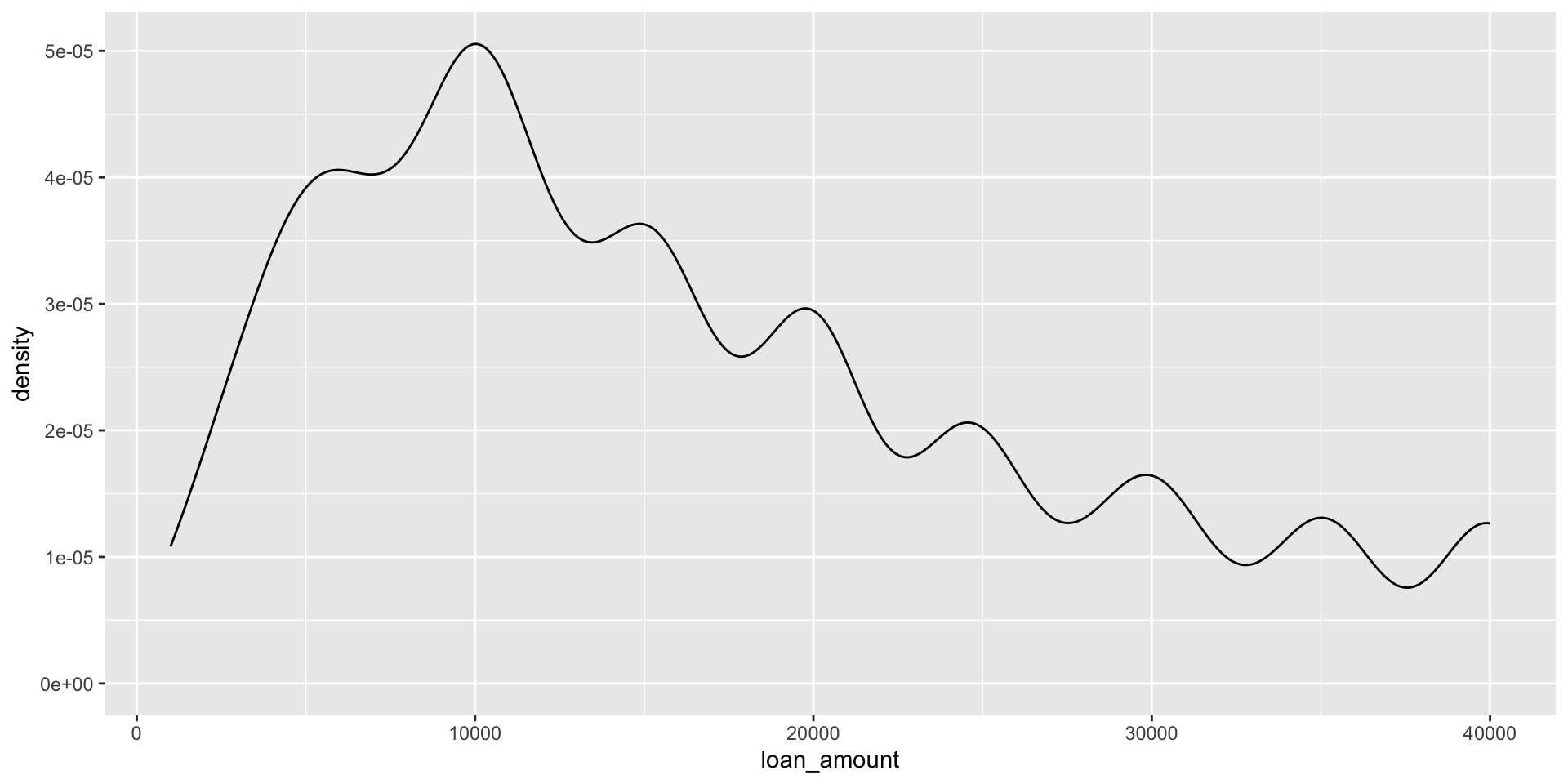
ggplot(loans, aes(x = loan_amount)) +
  geom_density(adjust = 0.5)

ggplot(loans, aes(x = loan_amount)) +
  geom_density(adjust = 1) # default bandwidth

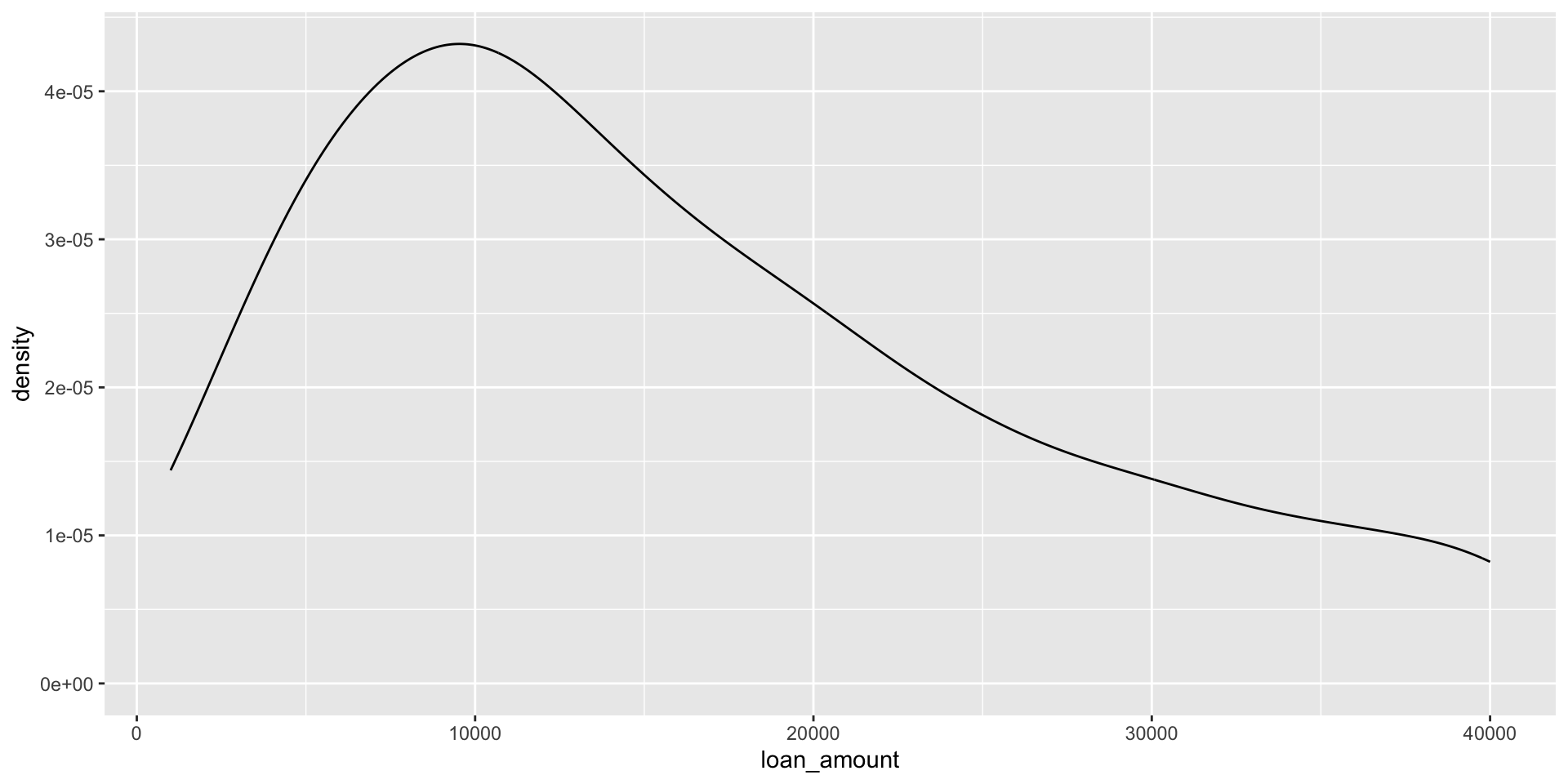
ggplot(loans, aes(x = loan_amount)) +
  geom_density(adjust = 2)

Customizing density plots

ggplot(loans, aes(x = loan_amount)) +
  geom_density(adjust = 2) +
  labs( 
    x = "Loan amount ($)", 
    y = "Density", 
    title = "Amounts of Lending Club loans" 
  ) 

Adding a categorical variable

ggplot(loans, aes(x = loan_amount, 
                  fill = homeownership)) + 
  geom_density(adjust = 2, 
               alpha = 0.5) + 
  labs(
    x = "Loan amount ($)",
    y = "Density",
    title = "Amounts of Lending Club loans", 
    fill = "Homeownership" 
  )

Box plot

Box plot

ggplot(loans, aes(x = interest_rate)) +
  geom_boxplot()

Box plot - flip orientation

ggplot(loans, aes(y = interest_rate)) +
  geom_boxplot()

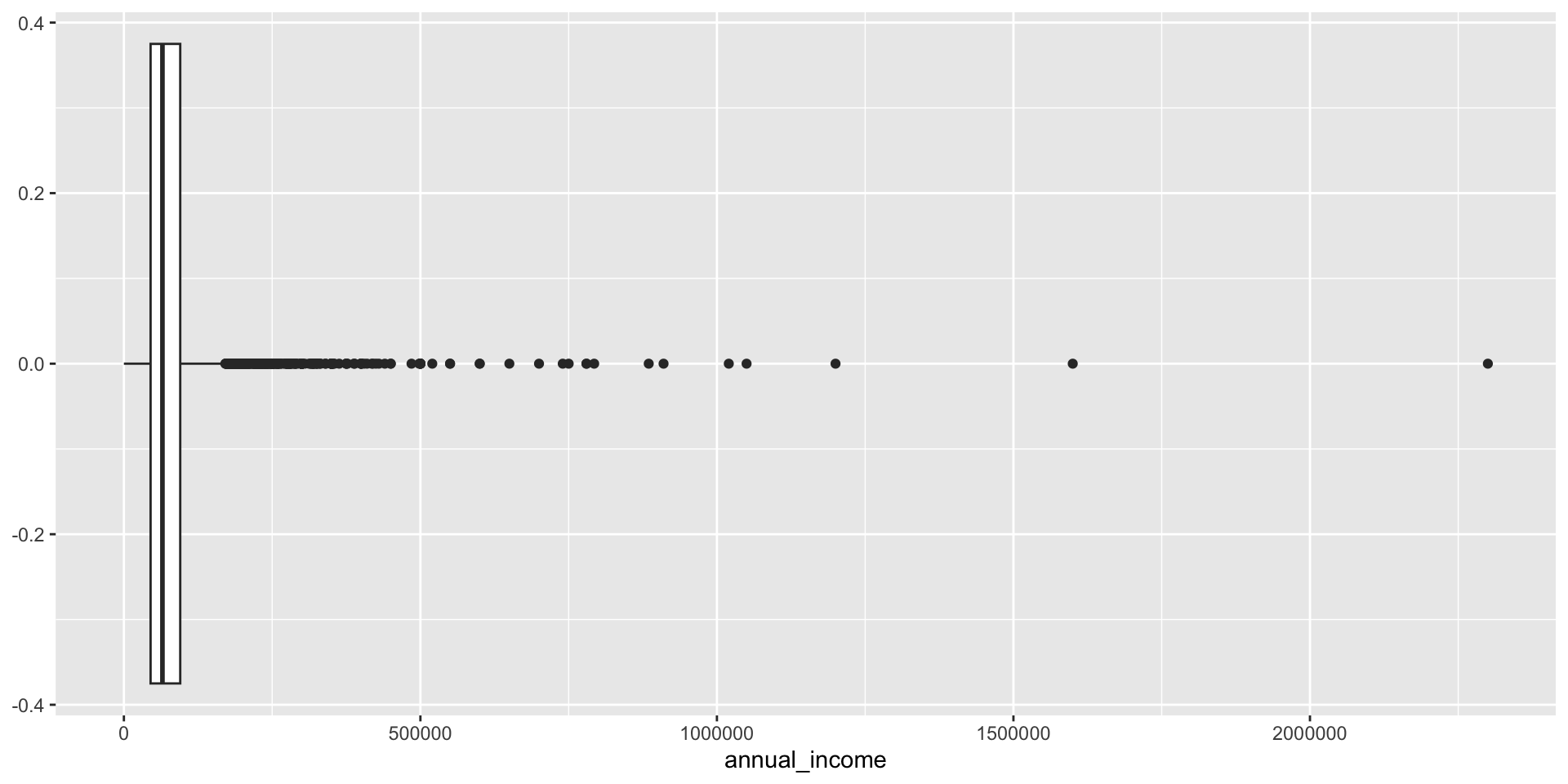
Box plot and outliers

ggplot(loans, aes(x = annual_income)) +
  geom_boxplot()

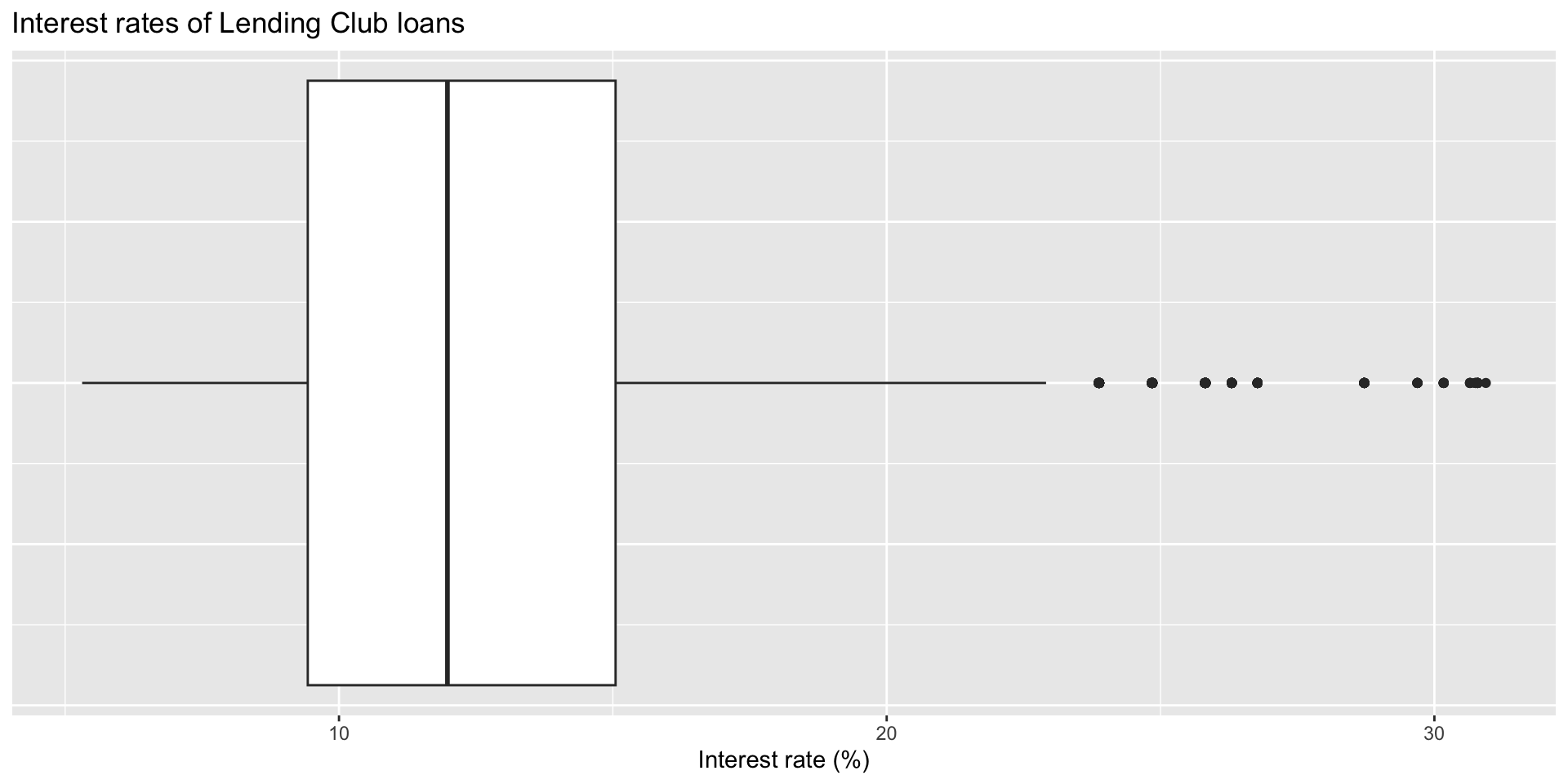
Customizing box plots

ggplot(loans, aes(x = interest_rate)) +
  geom_boxplot() +
  labs(
    x = "Interest rate (%)",
    y = NULL,
    title = "Interest rates of Lending Club loans"
  ) +
  theme( 
    axis.ticks.y = element_blank(), 
    axis.text.y = element_blank() 
  ) 

Side-by-side box plots

Interest rate by housing tenure (own, own with mortgage, rent)
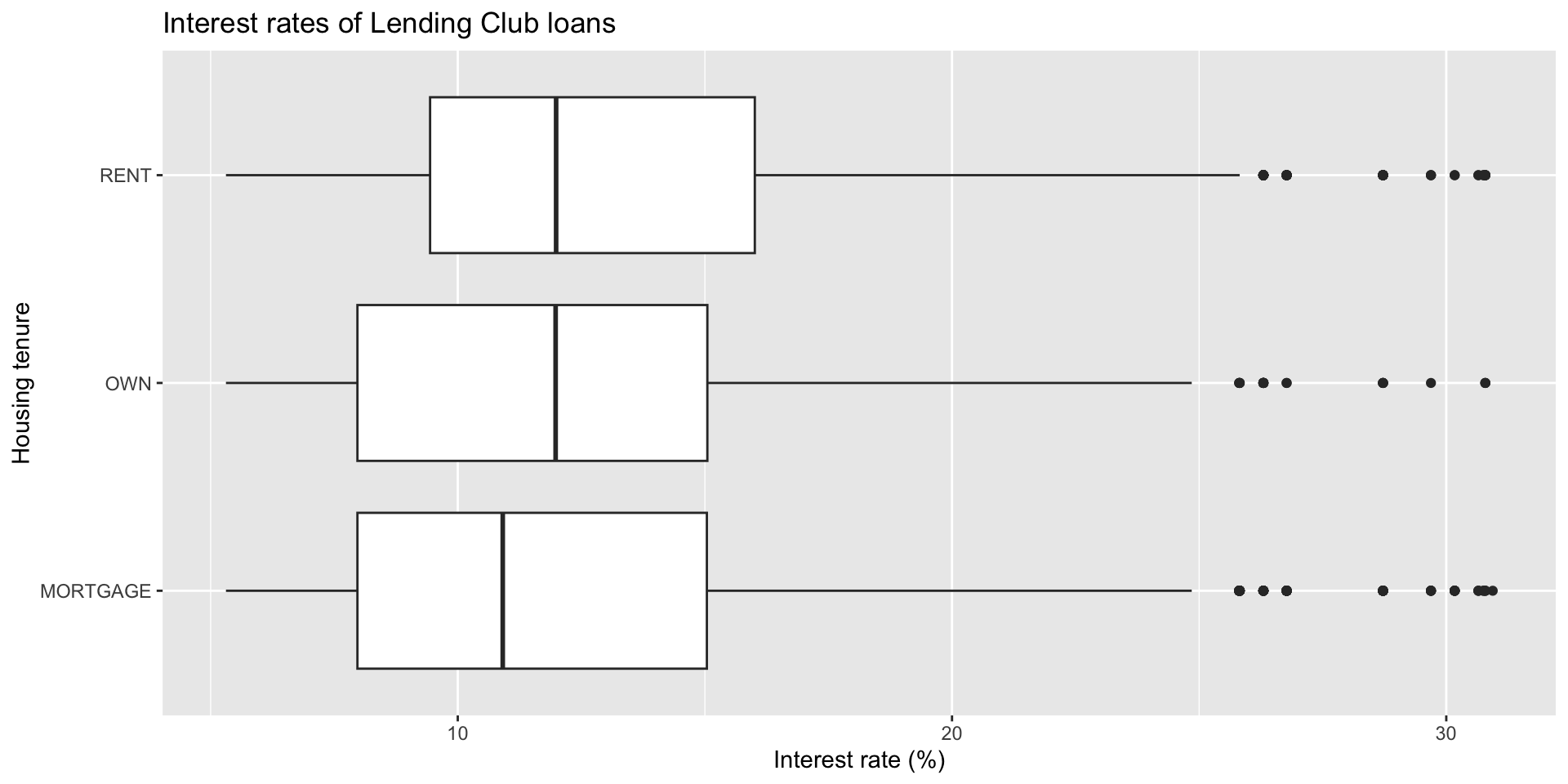
ggplot(loans, aes(x = interest_rate, 
                  y = homeownership)) +
  geom_boxplot() +
  labs(
    x = "Interest rate (%)",
    y = "Housing tenure",
    title = "Interest rates of Lending Club loans"
  ) 

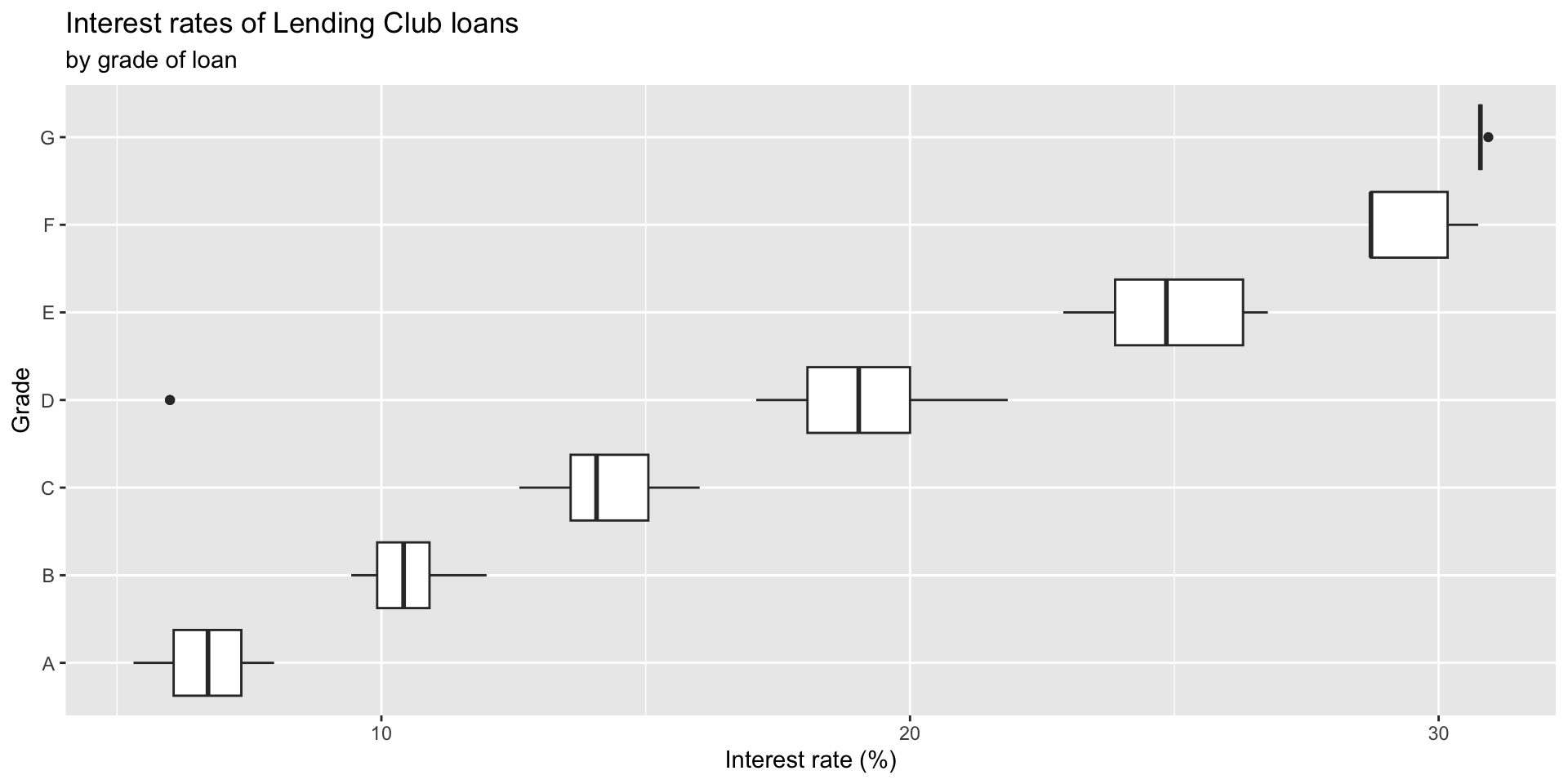
Adding a categorical variable

ggplot(loans, aes(x = interest_rate,
                  y = grade)) + 
  geom_boxplot() +
  labs(
    x = "Interest rate (%)",
    y = "Grade",
    title = "Interest rates of Lending Club loans",
    subtitle = "by grade of loan" 
  )

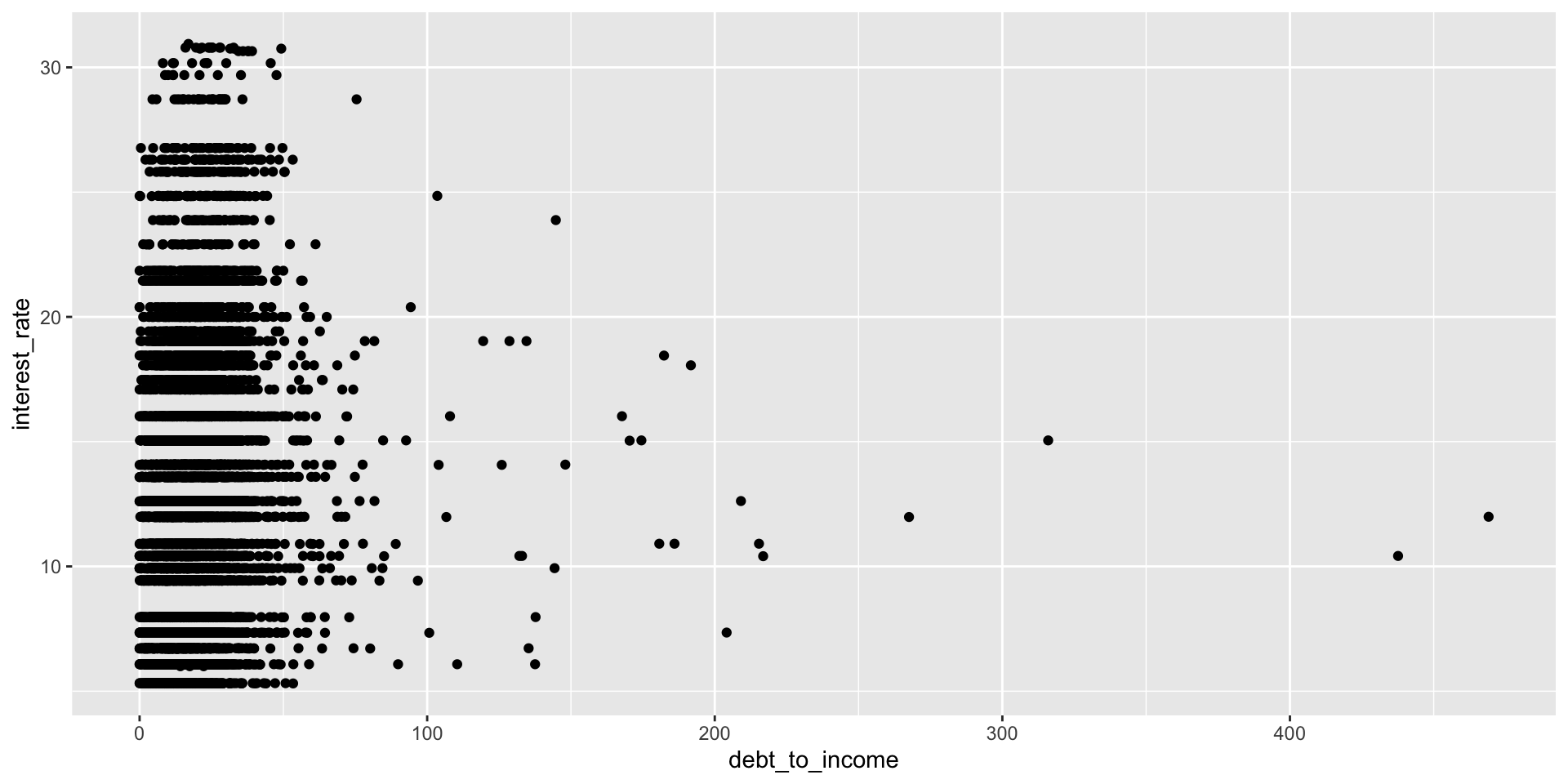
Relationships between numerical variables

Scatterplot

ggplot(loans, aes(x = debt_to_income, y = interest_rate)) +
  geom_point()